EducationSoftwareStrategy.com
StrategyCommunity

Knowledge Base

Product

Community

Knowledge Base

TopicsBrowse ArticlesDeveloper Zone

Product

Download SoftwareProduct DocumentationSecurity Hub

Education

Tutorial VideosSolution GalleryEducation courses

Community

GuidelinesGrandmastersEvents
x_social-icon_white.svglinkedin_social-icon_white.svg
Strategy logoCommunity

© Strategy Inc. All Rights Reserved.

LegalTerms of UsePrivacy Policy
  1. Home
  2. Topics

MicroStrategy Best Practices for Securing Snowflake Connections


Scott Rowley

Director, Application Security Engineering • MicroStrategy


The following article provides best practices for securing MicroStrategy to Snowflake connections.

Snowflake has posted details on how to secure connections to Snowflake. 

  • Detecting and Preventing Unauthorized User Access (snowflake.com) 

This includes two steps Strategy customers who use Snowflake should take: 

  1. Enforce Multi-Factor Authentication on all Snowflake accounts; 
  1. Set up Network Policy Rules to only allow authorized users or only allow traffic from trusted locations (VPN, Cloud workload NAT, etc.). 

Strategy Recommendation: Enforce Multi-Factor Authentication on all accounts 

Strategy Customers utilizing Snowflake can perform the following actions to ensure the Strategy configuration of Snowflake follows security best practices: 
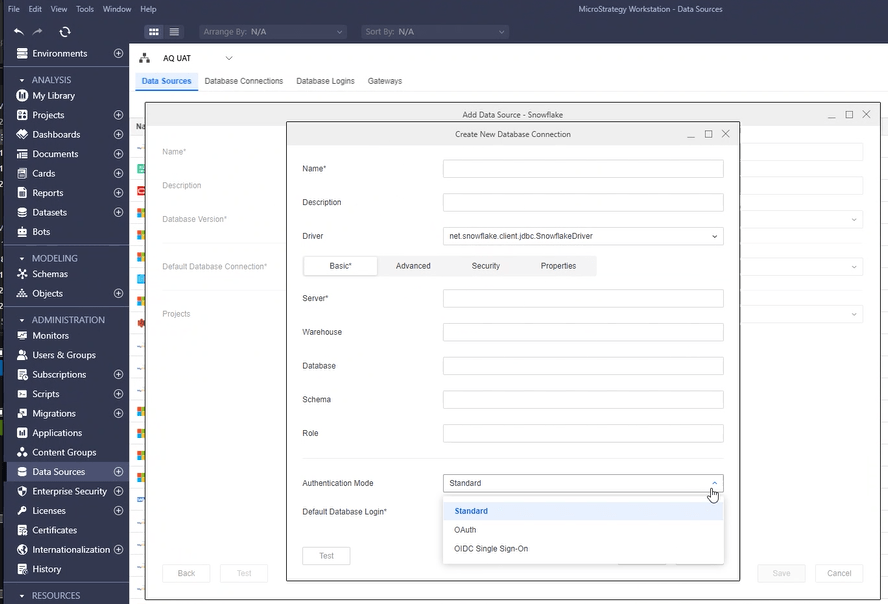
  1. When adding or editing a Snowflake connection, the Authentication Mode should be OIDC Single Sign-On or OAuth.  This enables the connection to utilize Multi-Factor Authentication enabled by the IDP.  Customers should check and confirm that Multi-Factor Authentication is enabled on their IDP for all accounts. 
  1. Strategy recommends using OIDC Single Sign-On as it provides a seamless user experience for authentication into the Strategy platform and Snowflake. 
ka0PW0000002LDFYA2_0EMPW0000077yrS.png


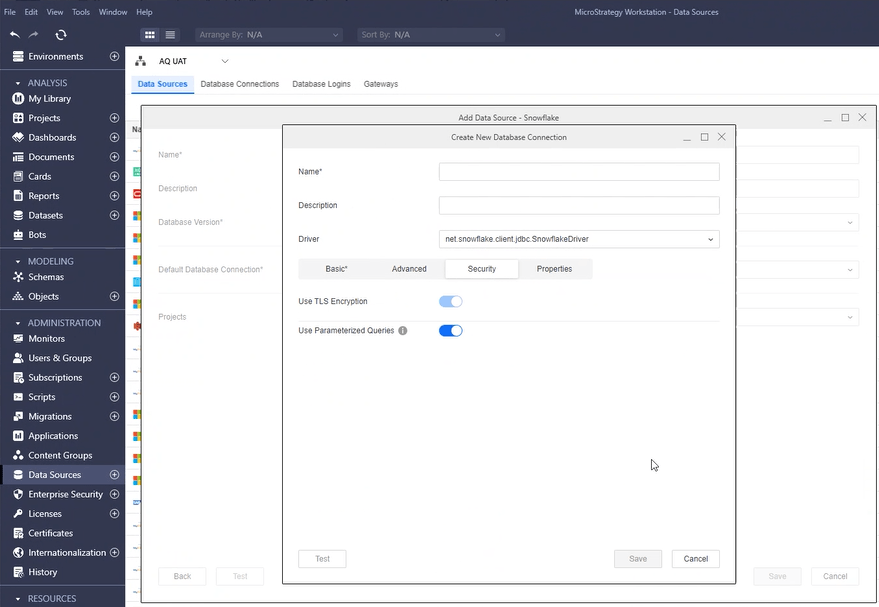
  1. Within the Snowflake connection, ensure the following settings are enabled.  These are enabled by default. 
  • Use TLS Encryption 
  • Use Parameterized Queries 
ka0PW0000002LDFYA2_0EMPW0000077yrT.png

 
In summary, Strategy recommends: 

  1. Utilizing OIDC Single Sign-on for Strategy and Snowflake authentication 
  1. Enabling Multi-Factor Authentication on the OIDC IDP so that Strategy connections are protected by MFA 
  1. Enabling Use TLS Encryption on Snowflake DSN Configuration 
  1. Enabling Use Parameterized Queries on Snowflake DSN Configuration 


Recommendation: Set up Network Policy Rules to only allow authorized users or only allow traffic from trusted locations (VPN, Cloud workload NAT, etc.) 

Strategy recommends source restrictions as a general best practice.  Users of Strategy Cloud can open a Strategy Technical Support Case for assistance in identifying source IP address ranges. 


Comment

0 comments

Details

Knowledge Article

Published:

June 4, 2024

Last Updated:

June 4, 2024