As of today, this bot can be demoed:
· Video: Youtube, search for "Strategy 2 minutes" on Google
· Video: full link is https://www.youtube.com/watch?v=Wj3VPQODCxY&t=5s&index=2&list=PL9QqqVTS5yON1urD42jEeN-dbGd0NHI9Q
· Live: Use Facebook Messenger and search a contact named "Strategy bot"
If you go live, here is a list of possible sentences you can type, using metrics, attributes, reports and dashboards
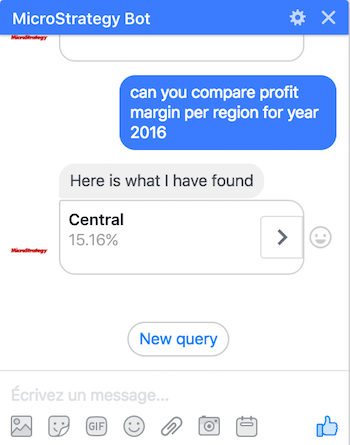
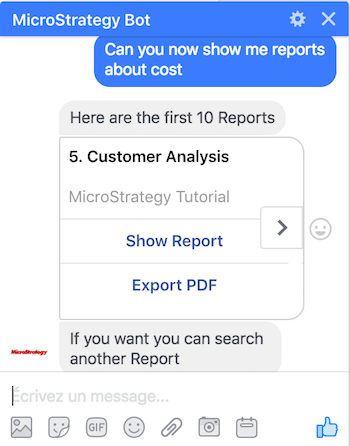
Explanations
Use Case 1: Get me information X (eg : max revenue for region south-west)
Sub-case 1.1: Find a metric per attribute using a math operation (maximum|max, minimum|min and average|avg are supported)
The generic pattern is: "Query prefix" <math operator> <metric> "per" <attribute>
· "Query prefix" can be any string
· "per" can also be replaced by other strings
· <math operator> = maximum|max|minimum|min|average|avg
· <metric> is a metric defined in the Cube
· <attribute> is an attribute defined in the Cube
· Example: get me max revenue per region
Sub-Case 1.2: Find a metric per attribute (without a math operation)
"Query prefix" <metric> "per" <attribute>
· retrieve the list of values of the metric for all the attribute elements
· Example: find revenue per region
Sub-Case 1.3: Find a metric and 1 attribute condition
"Query prefix" <metric> <attribute> <attribute element>
· <attribute element> is a value in the domain of the <attribute>
· Example: get revenue region south
Sub-Case 1.4: Find a metric and 2 attribute conditions
"Query prefix" <metric> <attribute1> <attribute1 element> <attribute2> <attribute2 element>
· Example: get revenue region south year 2016
· Example: get revenue region south 2016
· Note: the name of the second attribute can be avoided as the NLP is able to infere it
Use Case 2: Get me a report containing information X
"Query prefix" report|reports containing|contains|contain|about <metric>
· Retrieve the list of reports containing a specific metric in the definition
· Example: find report containing cost
. Example: can you show me reports about profit margin ?
Use Case 3: Get me a dashboard containing information X
"Query prefix" dashboard|dashboards containing|contains|contain|about <metric>
· Retrieve the list of dashboards containing a specific metric in the definition
· Example: find dashboards containing cost
. Example: can you show me dashboards about profit margin ?
