EducationSoftwareStrategy.com
StrategyCommunity

Knowledge Base

Product

Community

Knowledge Base

TopicsBrowse ArticlesDeveloper Zone

Product

Download SoftwareProduct DocumentationSecurity Hub

Education

Tutorial VideosSolution GalleryEducation courses

Community

GuidelinesGrandmastersEvents
x_social-icon_white.svglinkedin_social-icon_white.svg
Strategy logoCommunity

© Strategy Inc. All Rights Reserved.

LegalTerms of UsePrivacy Policy
  1. Home
  2. Topics

MicroStrategy Certifications Now Featured on Community Member Profiles


Emily Shorter

Vice President, Community • Strategy


To highlight your achievements, we uploaded your MicroStrategy certification information to your Community account. Learn where you can find the information, how you can celebrate your success on LinkedIn, and how we've mapped previous certifications to the new set of certifications.


<Operations on Parent Folder>Existing 1st Level Children Folders/ObjectsNewly created 1st Level Children Folders/ObjectsExisting all sub-Children Folders/ObjectsNewly created all sub-Children Folders/ObjectsAdd Demo[Object: Modify; Children: View](blank)Folder: Demo [Object: Modify; Children: View]
Objects: Demo [Object: View](blank)(blank)Add Demo[Object: Modify; Children: View]
+"Apply changes in permissions to all children objects"Folder: Demo [Object: Modify; Children: View]
Objects: Demo [Object: View]Folder: Demo [Object: Modify; Children: View]
Objects: Demo [Object: View](blank)Folder: Demo [Object: Modify; Children: View]
Objects: Demo [Object: View]Add Demo[Object: Modify; Children: View]
+"Apply changes in permissions to all children objects"
+"Overwrite children's access control list"Folder: Demo [Object: Modify; Children: View]
Objects: Demo [Object: View]Folder: Demo [Object: Modify; Children: View]
Objects: Demo [Object: View](blank)Folder: Demo [Object: Modify; Children: View]
Objects: Demo [Object: View]Add Demo[Object: Modify; Children: View]
+"Apply changes in permissions to all children objects"
+("Overwrite children's access control list")(Optional)
+"Recursively"Folder: Demo [Object: Modify; Children: View]
Objects: Demo [Object: View]Folder: Demo [Object: Modify; Children: View]
Objects: Demo [Object: View]<Operations on Parent Folder>Existing Children Folders/ObjectsNewly created Children Folders/ObjectsExisting sub-Children Folders/ObjectsNewly created sub-Children Folders/ObjectsRemove DemoFolder: Demo [Object: View; Children: View]
Objects: Demo [Object: View](blank)Folder: Demo [Object: View; Children: View]
Objects: Demo [Object: View]Folder: Demo [Object: View; Children: View]
Objects: Demo [Object: View]Remove Demo
+"Apply changes in permissions to all children objects"
+("Recursively")(Optional)Folder: Demo [Object: View; Children: View]
Objects: Demo [Object: View](blank)Folder: Demo [Object: View; Children: View]
Objects: Demo [Object: View]Folder: Demo [Object: View; Children: View]
Objects: Demo [Object: View]Remove Demo
+"Apply changes in permissions to all children objects"
+"Overwrite children's access control list"(blank)(blank)Folder: Demo [Object: View; Children: View]
Objects: Demo [Object: View](blank)Remove Demo
+"Apply changes in permissions to all children objects"
+"Overwrite children's access control list"
+“Recursively”(blank)(blank)(blank)(blank)
New certification badges now displayed on profile pages 
 

To highlight your achievements, we uploaded your Strategy certification information to your Community account.


Any certification you’ve successfully earned since January 1, 2019 is now reflected as a bold, colorful badge in your profile.


Have any greyed-out badges? Hover over the badge, click on “Learn About” and then sign up for a course to work towards earning that certification!


Celebrate your achievements on LinkedIn

Share your success with your network—the digital certification is easy to post directly to your LinkedIn profile. The new Strategy Certificates have been sent to students who passed the certification. To post your achievement to your LinkedIn profile:
 
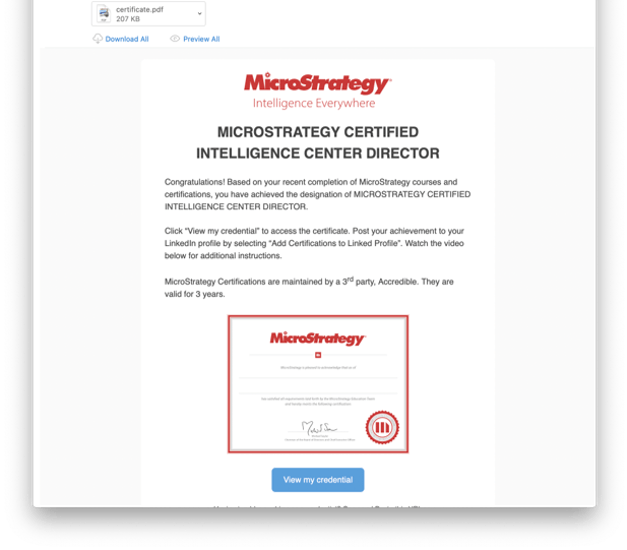
1.     Open the View your new badge from Strategy email and click View My Credential.
 

ka04W000000V1HxQAK_0EM2R0000019MNs.jpeg

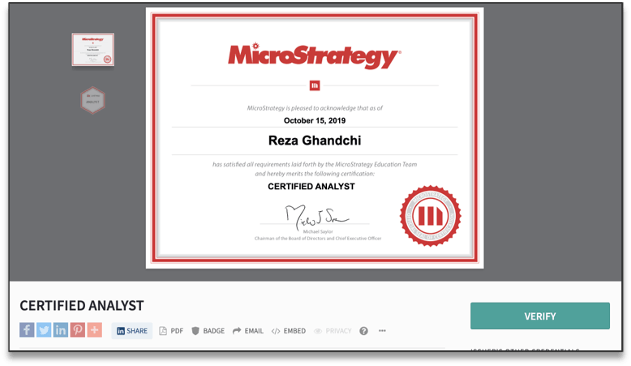
2.     Click the LinkedIn Share button at the bottom of the credential window. If you are not already logged in to your LinkedIn account, you will be prompted to do so.
 

ka04W000000V1HxQAK_0EM2R0000019MOg.jpeg

3.     You are taken to LinkedIn's site where you can choose to share as a post or as a private message.
 
4.     Write a message to accompany your certificate in your post or message and click Post/Send.


Do any certifications look unfamiliar?

Here’s how we mapped previous certifications to the new set of certifications:
 

Previous Certification

New Certification

Strategy Certified Master Developer (MCMD)

Services Architect (SVA) Certification

Strategy Certified Master Administrator (MCMAD)

Strategy Certified Architect (MCA)

Strategy Certified Specialist Administrator (MCSAD)

Strategy Certified Master Analyst (MCMA)

Strategy Certified Specialist Developer (MCSD)

Developer (DVL) Certification

Strategy Certified Specialist Analyst (MCSA)

Analyst (ANL) Certification

 
If you have any questions, reach out to education@microstrategy.com.


Comment

0 comments

Details

Blog Post

Published:

March 27, 2020

Last Updated:

September 8, 2020