EducationSoftwareStrategy.com
StrategyCommunity

Knowledge Base

Product

Community

Knowledge Base

TopicsBrowse ArticlesDeveloper Zone

Product

Download SoftwareProduct DocumentationSecurity Hub

Education

Tutorial VideosSolution GalleryEducation courses

Community

GuidelinesGrandmastersEvents
x_social-icon_white.svglinkedin_social-icon_white.svg
Strategy logoCommunity

© Strategy Inc. All Rights Reserved.

LegalTerms of UsePrivacy Policy
  1. Home
  2. Topics

KB482964: MicroStrategy Library throws “Application Error: Cannot create object because the name is in use. Please use a different name” when a user tries to login directly to the application.


Community Admin

• Strategy


After doing the setup and deploy of MicroStrategy Library on MicroStrategy 11.0 or 2019 from an upgrade, the error “Application Error: Cannot create object because the name is in use. Please use a different name” may be encountered when attempting to access MicroStrategy Library.

Starting with the release of Strategy ONE (March 2024), dossiers are also known as dashboards.
DESCRIPTION:
After doing the setup and deploy of Strategy Library on Strategy 11.0 or 2019 from an upgrade, the error “Application Error: Cannot create object because the name is in use. Please use a different name” may be encountered when attempting to access Strategy Library.
SYMPTOM:
After upgrading Strategy Library to 11.0 or 2019, the following scenarios might show the error mentioned above:
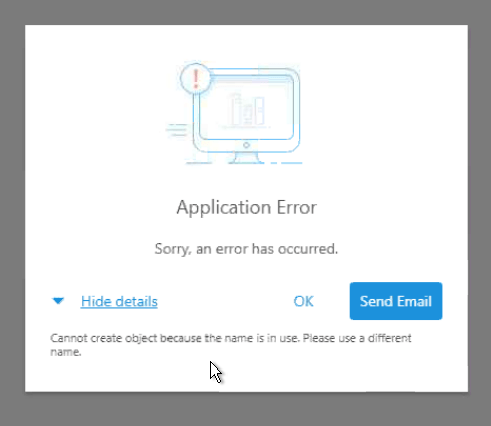
  1. A user tries login to Strategy Library directly.
  2. Accessing Strategy Library from the link on Strategy Web.
  3. Attempting to open a Dossier in Library from Launch link in Dossier.
ka0PW0000001JWZYA2_0EM44000000gb60.jpeg

Application Error: Cannot create object because the name is in use. Please use a different name
STEPS TO REPRODUCE:

  1. Upgrade Strategy Library 11.0 or 2019
  2. Login
    1. Navigate to Library URL
    2. Log into Strategy Library
    3. Receive Error Message
  3. Strategy Web
    1. Login into Strategy Web
    2. Navigate to Library from Link from Project homepage
    3. Receive Error Message
  4. Launch Link
    1. Execute Dossier in Strategy Web
    2. Click on Launch link and the Dossier renders in Library
    3. Attempt to Add to Library or Click on Library home
    4. Receive Error Message

CAUSE:
There is a duplication of the user’s profile after upgrading the Metadata. Shown below is an example of what might be seen in the Enterprise Manager project:

ka0PW0000001JWZYA2_0EM44000000gb6A.jpeg

ACTION:
Currently the issue is being reviewed by Strategy for a potential fix/patch on an upcoming Strategy release.
 
WORKAROUND:
Go to the Profiles in one project in Developer and rename the duplicated profile that is name-clashed and non-associated to something else. In the case above, this should be the 'Administrator (Administrator)' profile.
 
KB482964


Comment

0 comments

Details

Knowledge Article

Published:

March 15, 2019

Last Updated:

March 21, 2024