EducationSoftwareStrategy.com
StrategyCommunity

Knowledge Base

Product

Community

Knowledge Base

TopicsBrowse ArticlesDeveloper Zone

Product

Download SoftwareProduct DocumentationSecurity Hub

Education

Tutorial VideosSolution GalleryEducation courses

Community

GuidelinesGrandmastersEvents
x_social-icon_white.svglinkedin_social-icon_white.svg
Strategy logoCommunity

© Strategy Inc. All Rights Reserved.

LegalTerms of UsePrivacy Policy
  1. Home
  2. Topics

KB484156: Strategy on Azure technical update - authentication using service principal


Phaneendra Kumar Namala

Product Owner, Principal • MicroStrategy


This article addresses the update Microsoft Azure is making on the authentication method from access token to service principal. This article also provides instructions on providing the Strategy Cloud Platform access to service principal.

StrategyOnAzure will be updating the authentication method from access token to service principal.
According to Microsoft, "an Azure service principal is an identity created for use with applications, hosted services, and automated tools to access Azure resources. This access is restricted by the roles assigned to the service principal, giving you control over which resources can be accessed and at which level. For security reasons, it's always recommended to use service principals with automated tools rather than allowing them to log in with a user identity."
This update will let users control the access provided to Strategy Cloud Platform. Users can either provide access to service principal at the subscription level or resource group level. For new deployments, by default, the access level will be set to resource group level, where a user can either provide an existing resource group name or create a new one during the subscription configuration. With resource group level configuration, all the resources of new environments will be deployed in the given resource group.
For subscription level access, service principal will be given access to the entire subscription and a new resource group with the name, “env-XXXX,” will be created for each deployment. For existing environments, Strategy Cloud Console requires access to service principal at the subscription level to communicate with the environments to perform actions like start, reboot, and terminate from Strategy Cloud Platform.
 

How to provide access to service principal

  • Navigate to Subscriptions.
ka0PW0000005i6rYAA_0EM2R0000019OAg.jpeg
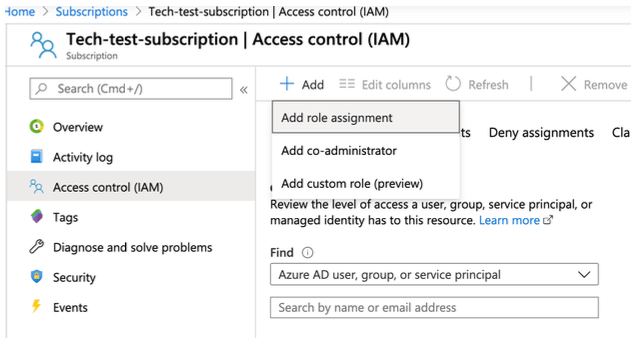
  • Click on your subscription and navigate to Access control (IAM).
ka0PW0000005i6rYAA_0EM2R0000019OAl.jpeg
  • Click on Add > Add role assignment.
ka0PW0000005i6rYAA_0EM2R0000019OAq.jpeg
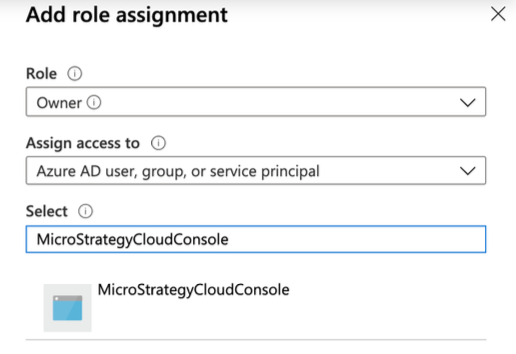
  • From the role drop-down, choose Owner.
  • From the Assign access to drop-down, choose Azure AD user, group, or service principal.
  • In the Select field, enter StrategyCloudConsole.
ka0PW0000005i6rYAA_0EM2R0000019OAv.jpeg
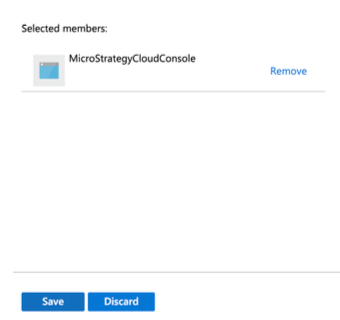
  • Select the StrategyCloudConsole service principal and click Save.
ka0PW0000005i6rYAA_0EM2R0000019OB0.jpeg

Comment

0 comments

Details

Knowledge Article

Published:

March 30, 2020

Last Updated:

May 15, 2025