EducationSoftwareStrategy.com
StrategyCommunity

Knowledge Base

Product

Community

Knowledge Base

TopicsBrowse ArticlesDeveloper Zone

Product

Download SoftwareProduct DocumentationSecurity Hub

Education

Tutorial VideosSolution GalleryEducation courses

Community

GuidelinesGrandmastersEvents
x_social-icon_white.svglinkedin_social-icon_white.svg
Strategy logoCommunity

© Strategy Inc. All Rights Reserved.

LegalTerms of UsePrivacy Policy
  1. Home
  2. Topics

KB484169: MicroStrategy Web fails to initialize when SAML is configured after upgrading to MicroStrategy 2020, resulting in a 404 error


Neelima Yelisetty

Quality Architect • MicroStrategy


This article explains why SAML fails to be initialized in MicroStrategy Web 2020 after upgrading from MicroStrategy 2019. This article also provides a solution to avoid the 404 error that results when Web fails to start up.

Description


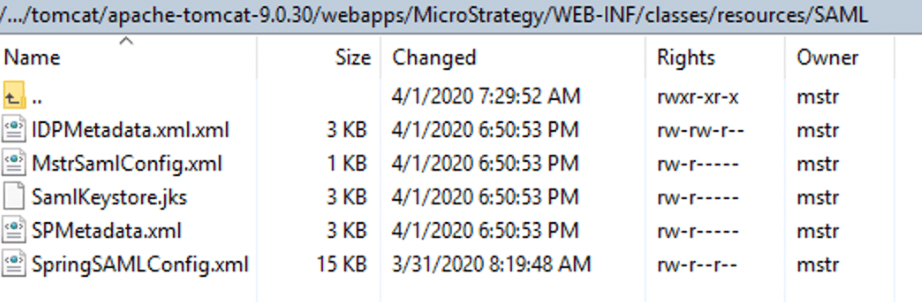
SAML configuration files can be found in

 Strategy/WEB-INF/classes/resources/SAML
. If you are using Tomcat, these files can be found in the following directory:
Webapps/MicroStrategy/WEB-INF/classes/resources/SAML
.

ka02R000000g7AlQAI_0EM2R0000019SNF.jpeg

Why is this happening?

MstrSamlConfig.xml
,
SamlKeystore.jks
,
SPMetadata.xml 
are generated by the SAML configuration page.
IDPMetadata.xml 
comes from the SAML Identity Provider.
SpringSAMLConfig.xml
is a pre-existing file that is specific to the Strategy Web version.
Customers upgrading from Strategy 2019 to Strategy 2020 may reuse all the files except for
SpringSAMLConfig.xml
, provided nothing has changed in their SAML setup.
However, if the old
SpringSAMLConfig.xml 
from Strategy 2019 is mistakenly reused, it will cause Strategy 2020 to fail to start up. 

Solution

You should use the

SpringSAMLConfig.xml 
file that comes out-of-the-box with the Strategy 2020 installation.


Comment

0 comments

Details

Knowledge Article

Published:

April 3, 2020

Last Updated:

April 3, 2020