EducationSoftwareStrategy.com
StrategyCommunity

Knowledge Base

Product

Community

Knowledge Base

TopicsBrowse ArticlesDeveloper Zone

Product

Download SoftwareProduct DocumentationSecurity Hub

Education

Tutorial VideosSolution GalleryEducation courses

Community

GuidelinesGrandmastersEvents
x_social-icon_white.svglinkedin_social-icon_white.svg
Strategy logoCommunity

© Strategy Inc. All Rights Reserved.

LegalTerms of UsePrivacy Policy
  1. Home
  2. Topics

MicroStrategy and Datastrong Host "STEM for Her" Race at Upcoming MicroStrategy World™ User Conference


Stefan Zepeda

Salesforce Solutions Architect • Strategy


MicroStrategy® Incorporated (Nasdaq: MSTR), a leading worldwide provider of enterprise software platforms, today announced that it will sponsor and host a 5K run in association with Datastrong, a BI and data warehousing solutions provider, on Wednesday, April 19, 2017, at MicroStrategy's annual user conference, MicroStrategy World 2017. All proceeds from the event will benefit STEM for Her, a non-profit foundation that supports young women and girls in the Washington, D.C. region who are interested in pursuing careers in science, technology, engineering and math fields of study.

Symptom


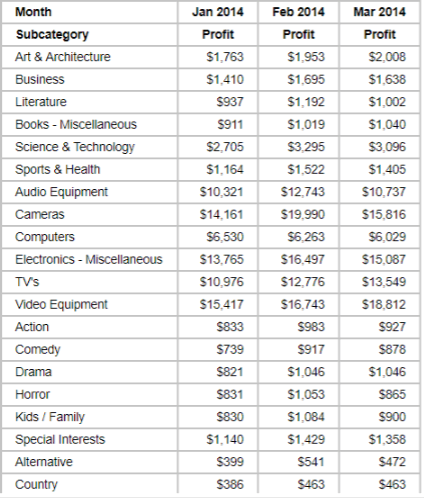
Dynamic sorting is useful when you sort your report based on a metric like monthly profit. For instance, let's say you have a report with a Subcategory attribute in your rows, as well as a Month attribute and Profit metric in your columns. 
ka02R000000keQnQAI_0EM2R000000hKED.jpeg

Ideally you'd sort this report  by the latest month's profits so that, in this case, March 2014 would automatically be your sort criteria.  
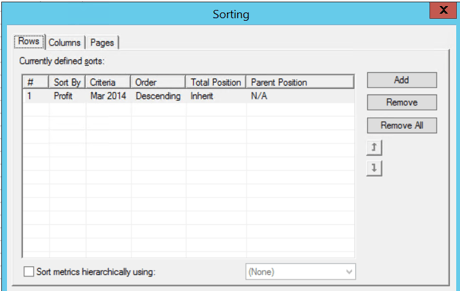
However because the data volume would grow when April 2014 was added, you'd have to manually change your sort criteria to Apr 2014. Without this step your data would still be sorted by Profit for Mar 2014.
ka02R000000keQnQAI_0EM2R000000hKGO.jpeg

This issue occurs because the dynamical criteria could not be specified in Strategy. When any detailed element is chosen and saved, the criteria is fixed.

Solution


Strategy allows users to select Subtotal as sort criteria. With this, you can create a metric whose Subtotal is equal to Profit for the latest month and use that metric to sort the grid dynamically. Follow along with our Tutorial Project to learn how to select Subtotal as sort criteria (this sample Tutorial DWH is hosted on an Oracle Database). 
Note
  1. If a filter/prompt has been used to choose the time range, be sure to add this filter/prompt to both reports created in step 2 and the final step.
  2. Avoid testing with Access data. Setting a Metric to outer join will not work this way. 
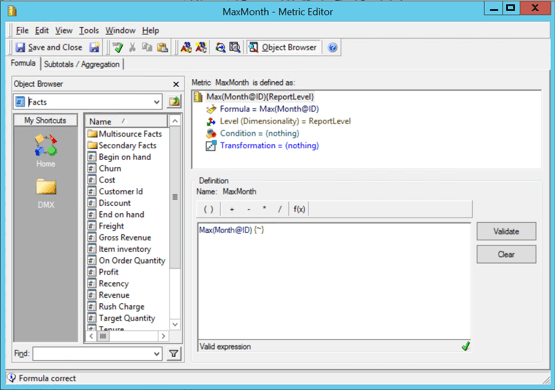
  • Create a metric named MaxMonth with the forumla Max(Month@ID).
ka02R000000keQnQAI_0EM2R000000hKH2.jpeg
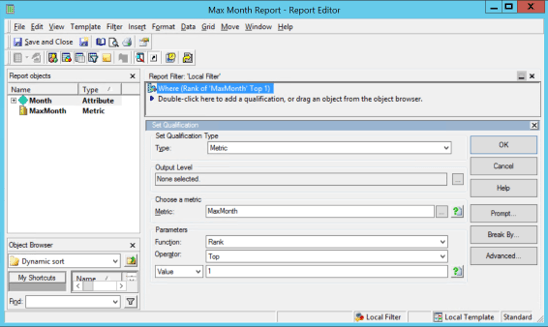
  • Create a report named "Max Month Report". Include a Month attribute and the MaxMonth metric from step 1. This report will always fetch the latest month. 
ka02R000000keQnQAI_0EM2R000000hKH7.jpeg
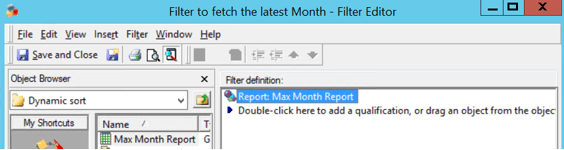
  • Create a filter called Filter to Fetch the Latest Month and drag Max Month Report to the filter definition field.
ka02R000000keQnQAI_0EM2R000000hKHg.jpeg
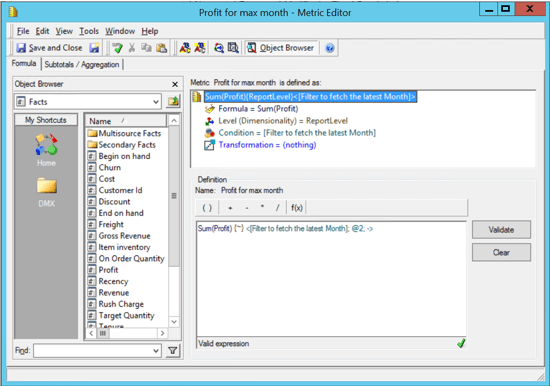
  • Create a metric and name it Profit for Max Month, which is the Sum(Profit_Fact) with Filter to Fetch the Latest Month as a filter condition. 
ka02R000000keQnQAI_0EM2R000000hKHq.jpeg
  • Create a report for dynamic sort with Subcategory and Month as your attributes, as well as Profit and Profit for Max Month as your metrics.
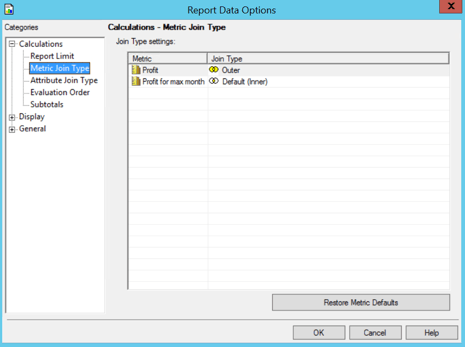
  • Set Profit to Outer join in Report Data Options.
ka02R000000keQnQAI_0EM2R000000hKI0.jpeg
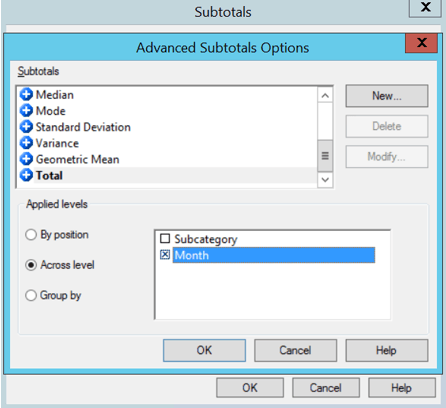
  • Enable Subtotal as Total at the Month level.
ka02R000000keQnQAI_0EM2R000000hKIK.jpeg
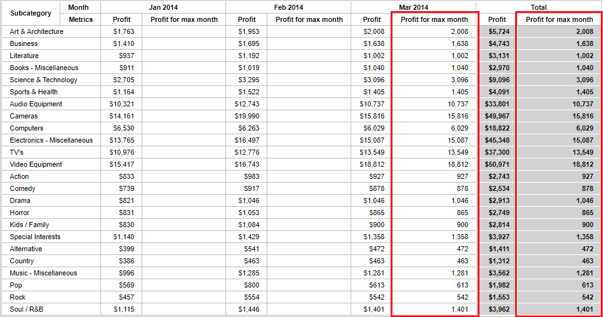
  • Your report will display Total under Profit for max month which is equal to profits for the latest month:

ka02R000000keQnQAI_0EM2R000000hKIP.jpeg
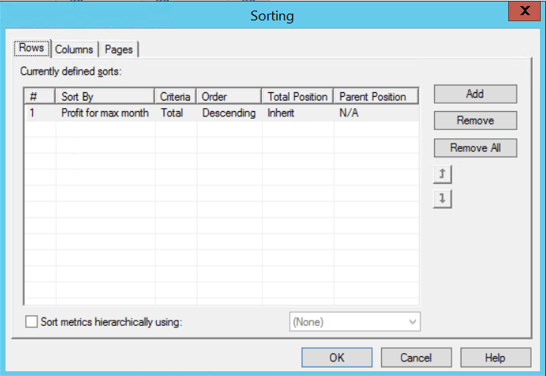
  • Sort the grid with the Profit for max month metric and set the Criteria to Total.
ka02R000000keQnQAI_0EM2R000000hKIZ.jpeg
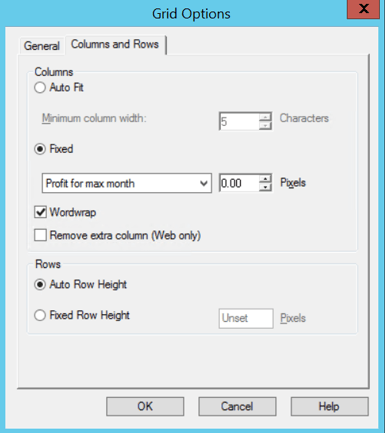
  • Hide the Profit for max month metric by setting its width to 0 in the Grid Options menu. 
ka02R000000keQnQAI_0EM2R000000hKJ3.jpeg


Now when new data is added, it will automatically be sorted by the latest Month.


Comment

0 comments

Details

Knowledge Article

Published:

April 18, 2017

Last Updated:

April 18, 2017