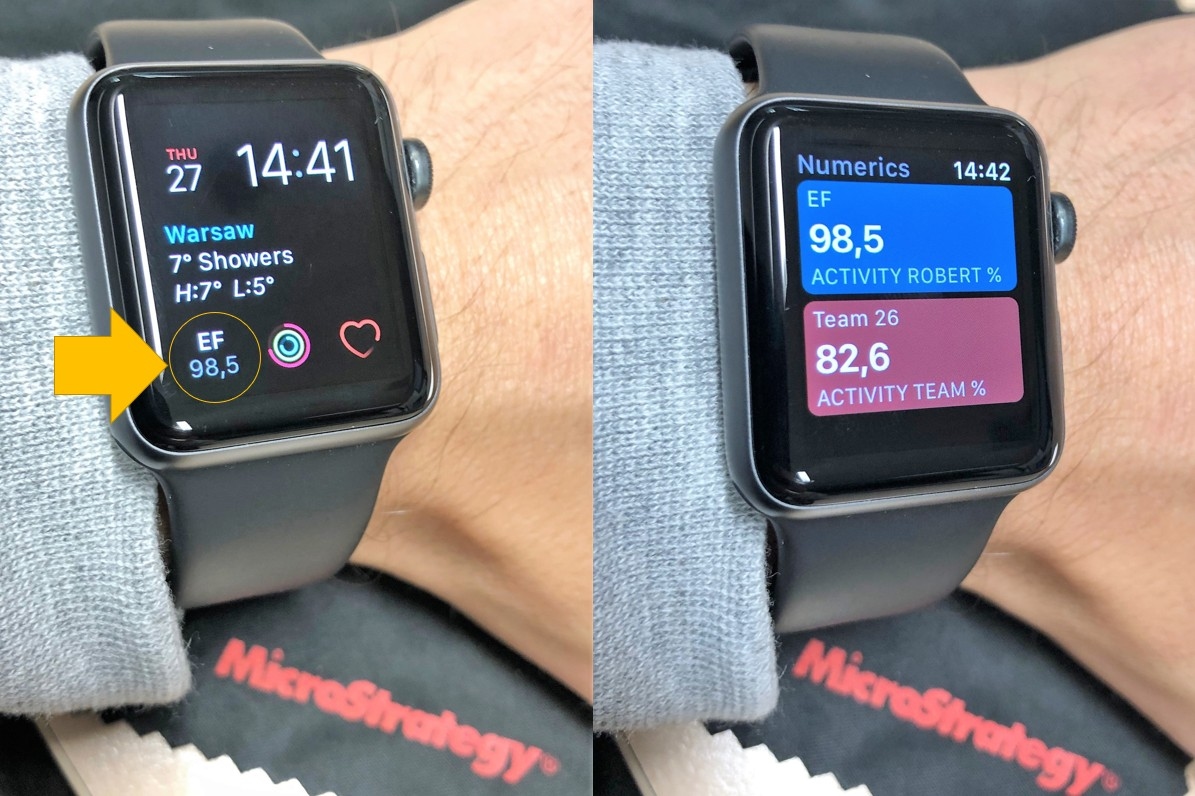
There is no official Strategy client for Apple Watch, however REST APIs allow such an integration. I've found an app called Numerics that could display data on a watch face as a complication. On the main watch face I can now see my data. After tapping on it more data tiles can be opened.
SETUP
- I've created two Strategy reports in My Reports folder. Both of them contain just one row of data.
- On a separate machine I've created a Python script that runs according to schedule. This Python script generates two CSV files and saves them to a public folder on Tomcat. I am using mstrio and the code is very short and simple (see below).
- on iPhone I use 'Numerics' app to set up the connection and format the widget. I am providing URL address to CSV files. There are other data options within this app like JSON file (URL as well) or Google Spreadsheet. Important thing is that this app has particular requirements about file structure, Python code is very handy here (flexibility in formatting).
Apple Watch app checks the CSV files every 10 minutes (I believe) for updated data.
### PYTHON CODE ###
from mstrio import Strategy
conn = Strategy.Connection(base_url="https://your.server/MicroStrategyLibrary/api",
                               username="QQQQQQQQQQQ", password="XXXXXXXXXXXXX",
                               project_name="YYYYYYYY", login_mode=ZZ)
conn.connect()
report_dataframe = conn.get_report(report_id='2081C97211E909BFB9810080EFE54C63')
report_dataframe[['Activity Robert %']].to_csv('activity.csv', index=False)
report_dataframe = conn.get_report(report_id='51C78AE411E909D8710B0080E6A59CFB')
report_dataframe[['Activity Team %']].to_csv('team.csv', index=False)