EducationSoftwareStrategy.com
StrategyCommunity

Knowledge Base

Product

Community

Knowledge Base

TopicsBrowse ArticlesDeveloper Zone

Product

Download SoftwareProduct DocumentationSecurity Hub

Education

Tutorial VideosSolution GalleryEducation courses

Community

GuidelinesGrandmastersEvents
x_social-icon_white.svglinkedin_social-icon_white.svg
Strategy logoCommunity

© Strategy Inc. All Rights Reserved.

LegalTerms of UsePrivacy Policy
  1. Home
  2. Topics

Migrate the Teradata 17.x DSNs back to 16.20


Haiping Jiang

Quality Engineer, Senior • MicroStrategy


This article describes a way to migrate the Teradata 17.x DSNs back to 16.20.

SYMPTOM: 

After upgrading Strategy products from 2020 update 2 to 2021 or higher, the Teradata 17.x ODBC driver was installed while the Teradata 16.20 ODBC driver was uninstalled. The DSNs created by using Teradata 16.20 ODBC driver were upgraded to Teradata 17.x ODBC driver.

CAUSE:

We have shipped Teradata ODBC Driver 16.20 since Strategy 2020 Update 2. In order to get in catch with the newest Teradata Database 17.x release and provide better support for Teradata, we upgraded Teradata ODBC Driver from version 16.20 to 17.x with our Strategy 2021 or higher version.  
 
The DSNs created by using Teradata 16.20 ODBC driver will be upgraded to Teradata 17.x automatically.

ACTION: 

There's a way to migrate the DSNs back to use Teradata 16.20 ODBC driver if the user still wants to use Teradata 16.20 ODBC driver:
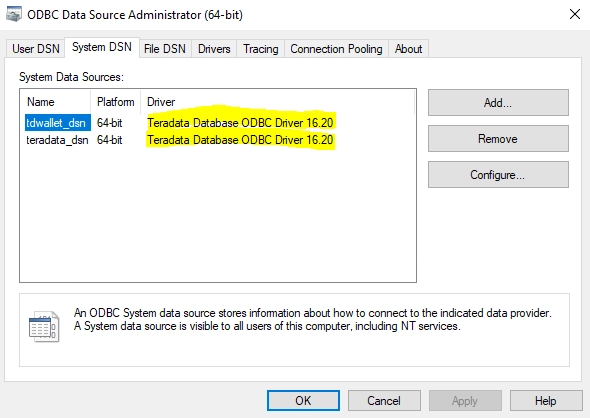
 

  1. Download Teradata 16.20 ODBC driver from Teradata ODBC Driver For Windows | Teradata Downloads  (created a free account if you don't have one) and install the 16.20 ODBC driver.
  2. After installing the Teradata 16.20 ODBC driver, the user should also follow the below steps to migrate the 17.x DSNs back to 16.20.
  3. Open Command Prompt (Run as administrator)
    Go to C:\Program Files (x86)\Teradata\Client\16.20\ODBC Driver for Teradata\
  4. Use the corresponding command to migrate the DSNs back to use Teradata 16.20 ODBC driver:
  • Migrate 32-bit DSNs:  cscript tdodbcdsn.vbs 32bit
  • Migrate 64-bit DSNs:   cscript tdodbcdsn.vbs 64bit  
ka04W000001Iu9rQAC_0EM4W000004Xs6O.jpeg

Comment

0 comments

Details

Knowledge Article

Published:

February 3, 2022

Last Updated:

February 3, 2022