EducationSoftwareStrategy.com
StrategyCommunity

Knowledge Base

Product

Community

Knowledge Base

TopicsBrowse ArticlesDeveloper Zone

Product

Download SoftwareProduct DocumentationSecurity Hub

Education

Tutorial VideosSolution GalleryEducation courses

Community

GuidelinesGrandmastersEvents
x_social-icon_white.svglinkedin_social-icon_white.svg
Strategy logoCommunity

© Strategy Inc. All Rights Reserved.

LegalTerms of UsePrivacy Policy
  1. Home
  2. Topics

KB485140: Missing JAVA_HOME path prevents Kafka and ZooKeeper from starting in MicroStrategy 2021 Update 2


Archana Munukuntla

Quality Architect • MicroStrategy


This article explains why Kafka and ZooKeeper cannot be starting after upgrading from MicroStrategy 2021 to 2021 Update 2. This article also provides a workaround to start the services.

Description 


After upgrading from Strategy 2021 to Strategy 2021 Update 2, Kafka and ZooKeeper cannot be started. 

Steps to reproduce

  1. Install Strategy 2021. 
  2. Upgrade to Strategy 2021 Update 2.
    After the installation, Kafka and ZooKeeper are stopped.
  3. Attempt to start the services. The following message is returned:
    
    [mstr@env-258226laiouse1 initd_scripts]$ ./kafka-zookeeper start
    Kafka service is stopped
    Zookeeper service is stopped

    The following entries can be found in the Kafka logs. 
    
    [mstr@env-258226laiouse1 logs]$ cat kafkaServer.out
    nohup: failed to run command 'java': No such file or directory
    [mstr@env-258226laiouse1 logs]$

Why is this happening? 

In Strategy 2021 Update 1, the

JAVA_HOME
path in
kafka-run-class.sh
is missing. This prevents Apache Kafka and ZooKeeper from starting.

Workaround

  • Navigate to the following path:
    <install_path>/MessagingServices/Kafka/kafka_2.13-2.7.0/bin
  • Open the
    kafka-run-class.sh
    file.
    
    [mstr@tec-l-1008315 bin]$ vi kafka-run-class.sh 

  • Add the following entry in the file with the install path in it.
    
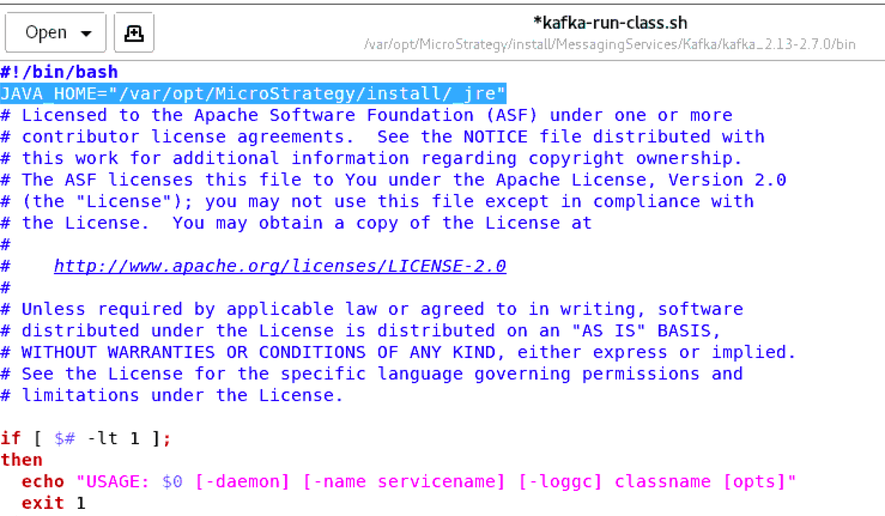
    JAVA_HOME="<install_path>/_jre"

  • Save the file.
    The file should look like the following screenshot:
ka04W000001IrBHQA0_0EM4W0000038196.jpeg
  • Navigate to the following path:
    <install_path>/initd_scripts/
  • Start Kafka.
    
    [mstr@tec-l-1008315 ~]$ cd /var/opt/Strategy/install/initd_scripts/
    [mstr@tec-l-1008315 initd_scripts]$ ./kafka-zookeeper start
    Kafka service running with PID = 15701
    Zookeeper service running with PID = 94746
    [mstr@tec-l-1008315 initd_scripts]$ 

    Kafka should be up and running without any issues.

Comment

0 comments

Details

Knowledge Article

Published:

August 25, 2021

Last Updated:

August 25, 2021