EducationSoftwareStrategy.com
StrategyCommunity

Knowledge Base

Product

Community

Knowledge Base

TopicsBrowse ArticlesDeveloper Zone

Product

Download SoftwareProduct DocumentationSecurity Hub

Education

Tutorial VideosSolution GalleryEducation courses

Community

GuidelinesGrandmastersEvents
x_social-icon_white.svglinkedin_social-icon_white.svg
Strategy logoCommunity

© Strategy Inc. All Rights Reserved.

LegalTerms of UsePrivacy Policy
  1. Home
  2. Topics

Missing ‘Previous Value’ label translation option in KPI visualization in MicroStrategy 2019 Update 3 and later


Stefano Antonellis

Principal Product Specialist • Strategy


In MicroStrategy 2019 Update 3 and later, the ‘Previous Value’ label of KPI dossier visualization does not show any option to be translated, either in Web or Developer.

Starting with the release of Strategy ONE (March 2024), dossiers are also known as dashboards.

STEPS TO REPRODUCE:

1. In Strategy Web, create a dossier which contains one date-related attribute and a metric.
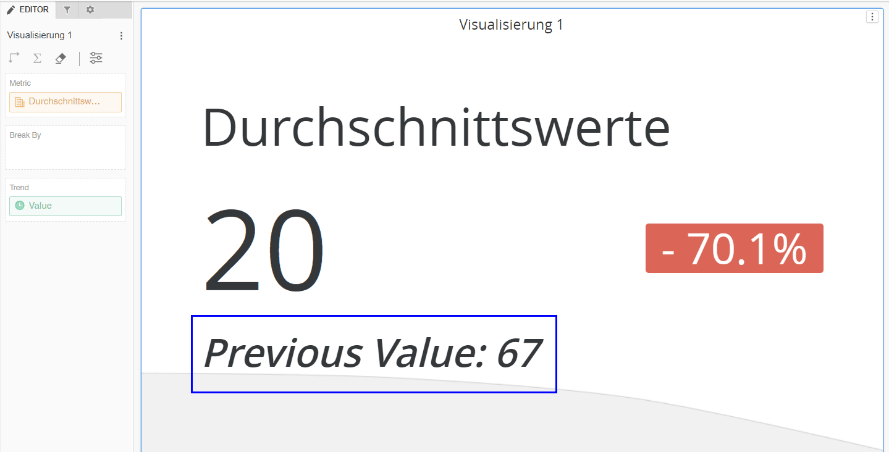
2. Create a visualization using the in-built KPI visualization on the dossier with the objects mentioned above, as shown below:
ka0PW0000001JgsYAE_0EM4W000004XIZl.png

Observe that on formatting, "Previous Value" label appears.
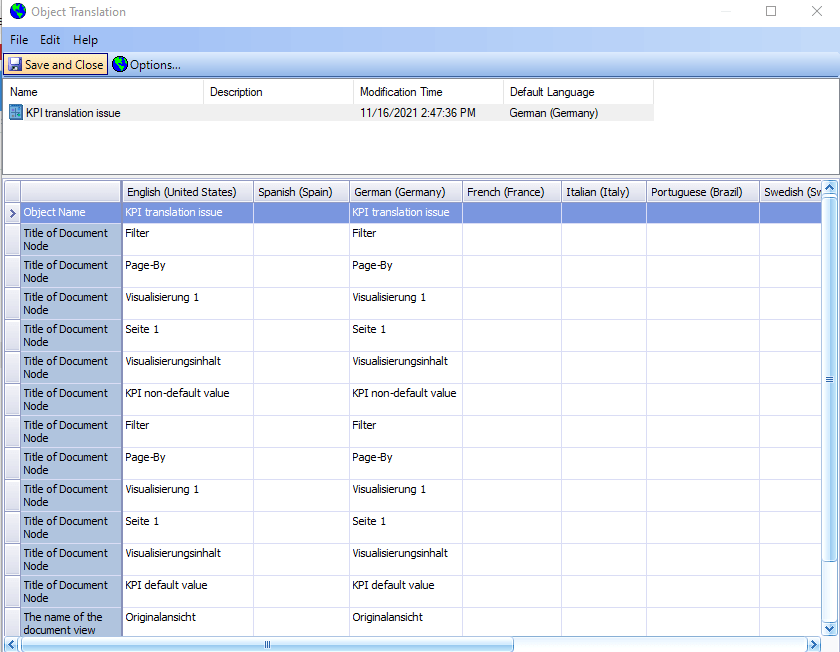
3. In Developer, find the Dossier, right mouse click on it, and select "Translations"; note that the ‘Previous Value’ label is not present, as shown below:
ka0PW0000001JgsYAE_0EM4W000004XIZm.png


ACTION:

 
An enhancement request has been opened with the Technology team and has been addressed to Strategy 2021 Update4; upgrade to this version, to take advantage of the fix.


Comment

0 comments

Details

Knowledge Article

Published:

January 11, 2022

Last Updated:

March 21, 2024