EducationSoftwareStrategy.com
StrategyCommunity

Knowledge Base

Product

Community

Knowledge Base

TopicsBrowse ArticlesDeveloper Zone

Product

Download SoftwareProduct DocumentationSecurity Hub

Education

Tutorial VideosSolution GalleryEducation courses

Community

GuidelinesGrandmastersEvents
x_social-icon_white.svglinkedin_social-icon_white.svg
Strategy logoCommunity

© Strategy Inc. All Rights Reserved.

LegalTerms of UsePrivacy Policy
  1. Home
  2. Topics

KB484848: Missing or permissive X-Frame-Options HTTP response header reported when doing a security scan for MicroStrategy Web


Yanqing Liu

Cloud Support Expert I • MicroStrategy


This article provides steps for adding X-Frame-Options to the HTTP response header on MicroStrategy Web JSP and ASP.

Description


When performing a security scan for Strategy Web, it reports that "

X-Frame-Options
" is missing in the HTTP response header. 

Solution 


You can add

X-Frame-Options
to the HTTP response header for Strategy Web. 

On Strategy Web JSP

  • Open the
    web.xml
    file under
    <Your Strategy Web application>/WEB-INF
    . 
  • Search for the keyword "
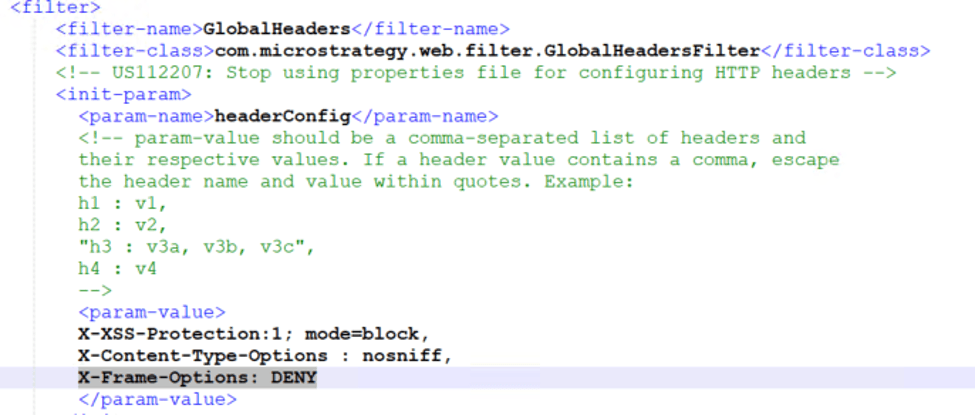
    GlobalHeaders
    " and then add the header "
    X-Frame-Options
    " to the
    <param-value>
    tag. For example: 
ka04W000000XQ6UQAW_0EM4W000001KeAM.jpeg
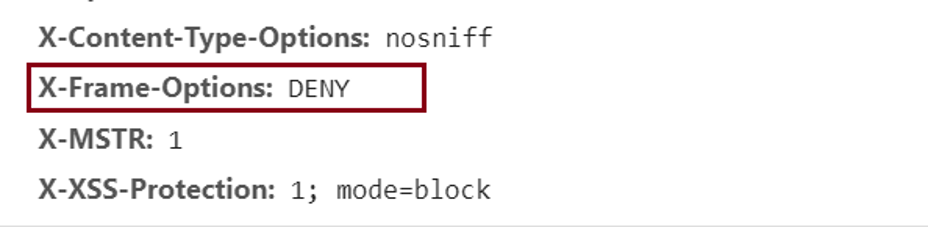
  • Restart the web application server and
    X-Frame-Options
    can be found in the HTTP response header when using Strategy Web.
ka04W000000XQ6UQAW_0EM4W000001KeAl.jpeg

On Strategy Web ASP

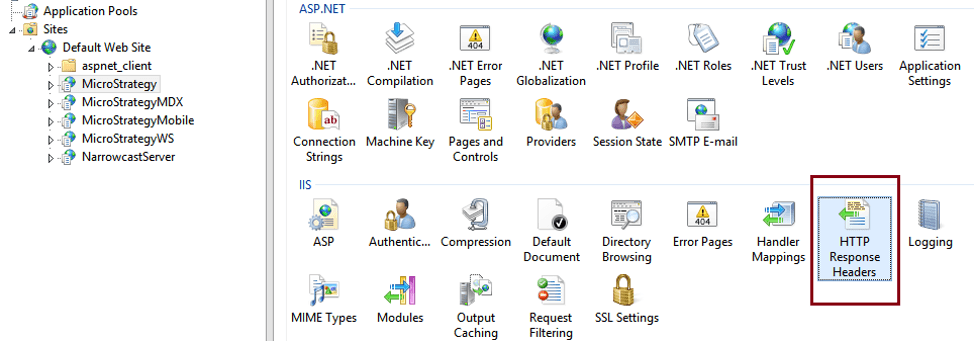
  • Find the Strategy Web application in IIS.
  • Go to HTTP Response Headers.
ka04W000000XQ6UQAW_0EM4W000001KeB0.jpeg
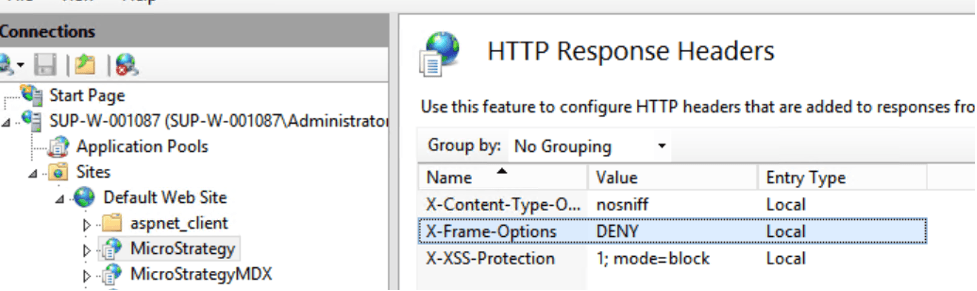
  • Add X-Frame-Options to the HTTP Response Headers.
ka04W000000XQ6UQAW_0EM4W000001KeB5.jpeg
  • Restart IIS after making the change.

You can also refer to this Microsoft documentation to add the customer header.


Comment

0 comments

Details

Knowledge Article

Published:

January 26, 2021

Last Updated:

January 26, 2021