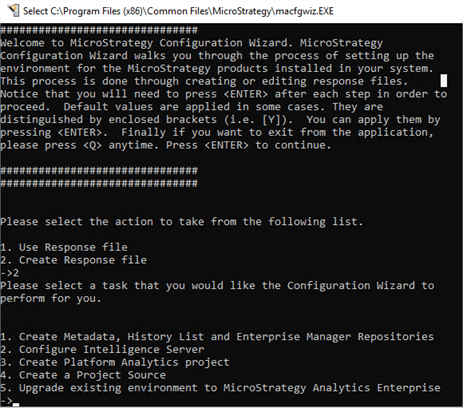
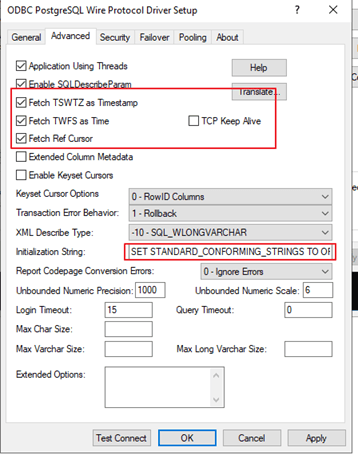
You can use different modes to install and configure a Platform Analytics project, such as GUI mode, silent mode, and console mode. When using console mode to create a Platform Analytics project against a PostgreSQL metadata, you may encounter an error message.
You will receive an error message when using command line mode.


Check the Configuration Wizard log file (MACfg.xml) for more information. The log file can often be found in the Strategy\Log folder.
<log4j:message><![CDATA[Error occured while creating Platform Analytics project.: MsiSessionManager::IsUserLoggedIn(): user session is invalid when trying to add new commands in.]]></log4j:message>
<log4j:throwable><![CDATA[com.Strategy.tools.macfgwiz.backbone.base.ConfigurationException: Error occured while creating Platform Analytics project.: MsiSessionManager::IsUserLoggedIn(): user session is invalid when trying to add new commands in.
at com.Strategy.tools.macfgwiz.backbone.pa.impl.PaProjectConfigOpImpl.projectExists(PaProjectConfigOpImpl.java:309)
at com.Strategy.tools.macfgwiz.backbone.pa.impl.PaProjectConfigOpImpl.run(PaProjectConfigOpImpl.java:134)
at com.Strategy.tools.macfgwiz.ui.interactive.steps.SummaryTextStep.submitOperations(SummaryTextStep.java:216)
at com.Strategy.tools.macfgwiz.ui.interactive.steps.SummaryTextStep.displaying(SummaryTextStep.java:67)
at com.Strategy.tools.macfgwiz.ui.interactive.text.TextWizard.displayStep(TextWizard.java:21)
at com.Strategy.tools.macfgwiz.ui.interactive.base.AbstractWizard.currentStepChanged(AbstractWizard.java:83)
at com.Strategy.tools.macfgwiz.ui.interactive.base.DefaultWizardModel.fireCurrentStepChanged(DefaultWizardModel.java:114)
at com.Strategy.tools.macfgwiz.ui.interactive.base.DefaultWizardModel.goTo(DefaultWizardModel.java:106)
at com.Strategy.tools.macfgwiz.ui.interactive.base.DefaultWizardModel.goNext(DefaultWizardModel.java:77)
at com.Strategy.tools.macfgwiz.ui.interactive.steps.PlatformAnalyticsRepositoryTextStep.displaying(PlatformAnalyticsRepositoryTextStep.java:53)
Check the Configuration Wizard log file (MACfg.xml) for more information. The log file can often be found in the Strategy\Log folder.
<log4j:message><![CDATA[Error occured while creating Platform Analytics project.: MsiSessionManager::IsUserLoggedIn(): user session is invalid when trying to add new commands in.]]></log4j:message>
<log4j:throwable><![CDATA[com.Strategy.tools.macfgwiz.backbone.base.ConfigurationException: Error occured while creating Platform Analytics project.: MsiSessionManager::IsUserLoggedIn(): user session is invalid when trying to add new commands in.
at com.Strategy.tools.macfgwiz.backbone.pa.impl.PaProjectConfigOpImpl.projectExists(PaProjectConfigOpImpl.java:309)
at com.Strategy.tools.macfgwiz.backbone.pa.impl.PaProjectConfigOpImpl.run(PaProjectConfigOpImpl.java:134)
at com.Strategy.tools.macfgwiz.ui.interactive.steps.SummaryTextStep.submitOperations(SummaryTextStep.java:216)
at com.Strategy.tools.macfgwiz.ui.interactive.steps.SummaryTextStep.displaying(SummaryTextStep.java:67)
at com.Strategy.tools.macfgwiz.ui.interactive.text.TextWizard.displayStep(TextWizard.java:21)
at com.Strategy.tools.macfgwiz.ui.interactive.base.AbstractWizard.currentStepChanged(AbstractWizard.java:83)
at com.Strategy.tools.macfgwiz.ui.interactive.base.DefaultWizardModel.fireCurrentStepChanged(DefaultWizardModel.java:114)
at com.Strategy.tools.macfgwiz.ui.interactive.base.DefaultWizardModel.goTo(DefaultWizardModel.java:106)
at com.Strategy.tools.macfgwiz.ui.interactive.base.DefaultWizardModel.goNext(DefaultWizardModel.java:77)
at com.Strategy.tools.macfgwiz.ui.interactive.steps.PlatformAnalyticsRepositoryTextStep.displaying(PlatformAnalyticsRepositoryTextStep.java:53)
