Platform Analytics makes use of fact tables for displaying data contained in the Platform Analytics Repository. Also, for the PostgreSQL warehouse, we create historical tables for some fact tables whose data amount may be very large. An example of this is the access_transactions and the fact_sql_stats tables. The historical table's name starts with the prefix "historical_".
By default, Platform Analytics keeps all the fact tables in its Repository for a period of 180 days. After this number of days is surpassed, all the data contained in the fact tables will pass to the historical fact tables.
This is a default setting provided by Strategy to guarantee an adequate performance of Platform Analytics. In this way we avoid the saturation of the fact tables, and it makes it easier and faster to retrieve the data.
It is possible to modify the number of days that the data will be kept in the fact tables before moving to historical fact tables. For this, we need to:
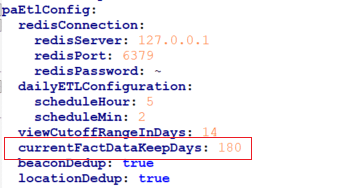
Please note that if old data (older than currentFactDataKeepDays) went to historical PA tables, then this will not return to current tables on its own. It will be needed to follow a process to move Platform Analytics historical tables to current tables. Please contact Strategy Support Team for more details.
NOTE: Be aware that increasing too much this value, keeping the data in fact tables for a longer period, may lead to a performance repercussion or a bigger amount of memory will be needed depending on the amount of data managed and contained in the tables.
