In Strategy Secure Enterprise 11.0, dynamic growth algorithm for buffer size is introduced to improve the performance of buffer, and it is enabled by default.
This change improves the performance for memory intensive use scenario also potentially increases the memory footprint for Intelligence Server.
With the buffer size dynamic growth algorithm enabled, the number of blocks allocated per request is increased exponentially (1.5 times), subject to a limit (256MB). Once the limit is hit, the exponentially growth will be disabled.
For example:
Start with 40 blocks * 4KB, 160KB, next allocations would be
240KB, 360KB, 540KB, 810KB, 1.19MB, 1.78MB, 2.67MB, 4.00MB, 6.01MB, 9.01MB, 13.52MB, 20.27MB, 30.41MB, 45.61MB, 68.42MB, 102.63MB, 153.94MB, 346.38MB(limit kicks in), 346.38MB, 346.38MB, 346.38MB, 346.38MB, 346.38MB, 346.38MB, 346.38MB, 346.38MB
To disable above algorithm:
Unix:
Use the environment variable “MSTR_BUFFER_DISABLE_DYNAMIC_GROW”. Use below command to disable buffer dynamic growth on Linux:
export MSTR_BUFFER_DISABLE_DYNAMIC_GROW=1
Windows:
Add an environment variable to disable buffer dynamic growth on Windows as shown below:
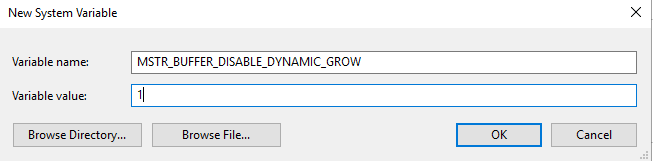
To confirm DYNAMIC_GROW is disabled:
When DYNAMIC_GROW is disabled, if start Intelligence Server in console mode, the console prints 'Dynamic grow disabled'.
To enable DYNAMIC_GROW again after disable it:
Use below command on Linux:
export MSTR_BUFFER_DISABLE_DYNAMIC_GROW=0
NOTE: In Strategy 11.0, Strategy 2019 and Strategy 2019 Update 1, for metric-heavy cubes(more than 25 metrics), it is recommended to set environment variable MSTR_BUFFER_DISABLE_DYNAMIC_GROW =1 to avoid too much memory usage.
There is no memory concern in 2019 Update 2 and above.
Article Reference Number: KB441581
