EducationSoftwareStrategy.com
StrategyCommunity

Knowledge Base

Product

Community

Knowledge Base

TopicsBrowse ArticlesDeveloper Zone

Product

Download SoftwareProduct DocumentationSecurity Hub

Education

Tutorial VideosSolution GalleryEducation courses

Community

GuidelinesGrandmastersEvents
x_social-icon_white.svglinkedin_social-icon_white.svg
Strategy logoCommunity

© Strategy Inc. All Rights Reserved.

LegalTerms of UsePrivacy Policy
  1. Home
  2. Topics

KB485319: New Library authoring options do not display for desktop machines with touch screens


Liang Chen

Software Engineer, Principal • Microstrategy, Inc.


This article reviews a known issue when using the Library Authoring functionality in MicroStrategy Library. This issue is related to both editing of existing dossiers and creation of net new dossiers.

Starting with the release of Strategy ONE (March 2024), dossiers are also known as dashboards.

Description


In Strategy 2021 Update 4, Strategy Library introduced dossier authoring functionalities all within one interface. You can now create new dossiers or edit existing ones.
There a multiple entry points for the dossier creation and editing feature:

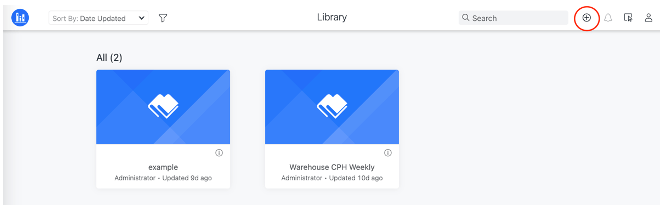
  • The New Dossier 
ka0PW0000001Jh1YAE_0EM4W000004XNhD.jpeg
  •  button in the top right of the Library Home page toolbar:
ka0PW0000001Jh1YAE_0EM4W000004XNqy.jpeg
  • The edit icon is also found in the information window of a dossier from Library Home. 
  • The Edit 
ka0PW0000001Jh1YAE_0EM4W000004XNhS.jpeg
  •  button in the dossier's top right toolbar when viewing in Library:
ka0PW0000001Jh1YAE_0EM4W000004XNr3.jpeg

This feature is currently available for desktop browsers only.
This feature is not yet enabled for mobile browsers.

Problem


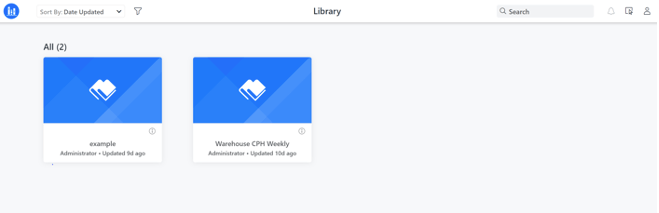
If you are working on a desktop machine with a touch screen, for example, Windows Surface, these dossier authoring buttons are not displayed.
If you view the image below, you can see that the dossier creation button is missing in the top toolbar of Library Home.
ka0PW0000001Jh1YAE_0EM4W000004XNr8.jpeg

Why is this happening?


This feature was built for desktop mode browsers only. For desktop machines with touch screens, for example, Windows Surface, the clients are considered as tablets and therefore, edit buttons are not shown.

Workaround: What can you do in the time being?


For touch screen machines, please disable touch screen. For example, with the Windows Surface, please refer to this Microsoft documentation.
After disabling touch screen settings, please make sure to restart the web browser to pick up the latest configuration.

Solution


This issue has been addressed in Strategy 2021 Update 5. Consider updating to take advantage of the fix.


Comment

0 comments

Details

Knowledge Article

Published:

January 13, 2022

Last Updated:

March 21, 2024