In Strategy Secure Enterprise 11.0, new behavior is introduced for smartheap memory tuning. Environment variable "MSTR_MEM_CACHE_AUTO_CONFIG” is used to control the smartheap memory tuning rules.
MSTR_MEM_CACHE_AUTO_CONFIG:
The environment variable “MSTR_MEM_CACHE_AUTO_CONFIG” is turned on by default in Strategy Secure Enterprise 11.0 when the machine has more than 64 cpu cores and has more than 64 GB physical memory, otherwise the environment variable is turned off by default. With the performance gain of this change.
Smartheap Memory Tuning Rule(Enable/Disable) and Detail Tuning rules:
terminate instancename <cache folder path> is not a directory, or not readable or not writeable.0x80041903No cache data available for this report.0x80041E03ReportCacheManager failed to load the cache file0x80041E0BThe cache directory for one of the projects could not be created. The location specified could be inaccessible or the path specified could be incorrect.0x80041E0CReportCacheManager failed to get the current directory0x80041E0DReportCacheManager failed to create cache file0x80041E10ReportCacheManager failed to save cache to file0x80041E18adding result to the cachepool failed0x800438F2Cache Administration operation failed.0x800039CAMsiUserInBox: Failed to persist the results of this message. Please check that the cache configuration is proper and that the history list directory as specified in the server definition exists on the Intelligence Server machine.1/1/2009M(1/1/2009)1/2/2009M(1/1/2009) + M(1/2/2009)1/3/2009M(1/1/2009) + M(1/2/2009) + M(1/3/2009)MSTR_ MEM_ CACHE_ AUTO_ CONFIGSmartheap Memory Tuning Rule (Enable / Disable)Detail Tuning rules0Enables light memory tuning and disables dynamic memory tuning. The memory usage will be consistent with 10.10 and previous versions. | terminate instancename <cache folder path> is not a directory, or not readable or not writeable.0x80041903No cache data available for this report.0x80041E03ReportCacheManager failed to load the cache file0x80041E0BThe cache directory for one of the projects could not be created. The location specified could be inaccessible or the path specified could be incorrect.0x80041E0CReportCacheManager failed to get the current directory0x80041E0DReportCacheManager failed to create cache file0x80041E10ReportCacheManager failed to save cache to file0x80041E18adding result to the cachepool failed0x800438F2Cache Administration operation failed.0x800039CAMsiUserInBox: Failed to persist the results of this message. Please check that the cache configuration is proper and that the history list directory as specified in the server definition exists on the Intelligence Server machine.1/1/2009M(1/1/2009)1/2/2009M(1/1/2009) + M(1/2/2009)1/3/2009M(1/1/2009) + M(1/2/2009) + M(1/3/2009)MSTR_ MEM_ CACHE_ AUTO_ CONFIGSmartheap Memory Tuning Rule (Enable / Disable)Detail Tuning rules0Enables light memory tuning and disables dynamic memory tuning. The memory usage will be consistent with 10.10 and previous versions. | MSTR_MEM_CACHE_MAX_FREE_PAGES_KB = 4096 MSTR_MEM_CACHE_MAX_TOTAL_SIZE = 1GB MSTR_MEM_CACHE_MAX_BLOCKS_PER_BAND = 256 MSTR_MEM_INCREMENT_SIZE_KB = 1MB MSTR_MEM_CACHE_MAX_BLOCK_SIZE = 8 MB |
MSTR_MEM_CACHE_MAX_BLOCK_SIZE = 8 MB | Enables high-level, aggressive memory tuning. | MSTR_MEM_CACHE_MAX_FREE_PAGES_KB = 1/10 of total physical RAM MSTR_MEM_CACHE_MAX_TOTAL_SIZE = 1/4 of total physical RAM MSTR_MEM_CACHE_MAX_BLOCKS_PER_BAND = 81920 MSTR_MEM_INCREMENT_SIZE_KB = 1/1000 of total physical RAM MSTR_MEM_CACHE_MAX_BLOCK_SIZE = 1GB, If total RAM is >= 256GB , else 512MB |
512MB | 512MB | MSTR_MEM_CACHE_MAX_FREE_PAGES_KB = 1/10 of total physical RAM MSTR_MEM_CACHE_MAX_TOTAL_SIZE = 1/4 of total physical RAM MSTR_MEM_CACHE_MAX_BLOCKS_PER_BAND = 81920 MSTR_MEM_INCREMENT_SIZE_KB = 1/1000 of total physical RAM MSTR_MEM_CACHE_MAX_BLOCK_SIZE = 32 MB |
How to enable or disable the behavior:
The memory tuning settings listed above can be enabled or disabled by setting the environment variable "MSTR_MEM_CACHE_AUTO_CONFIG" to 1 or 0. Below is an example about disabling and enabling environment variable on Linux and Windows.
Linux:
The auto memory tuning can be disabled by adding the following line to the Tunable.sh file which is located by default in the env folder of the home folder of the Strategy installation <home folder of MSTR installation>/env/Tunable.sh>;:
export MSTR_MEM_CACHE_AUTO_CONFIG=0
Windows:
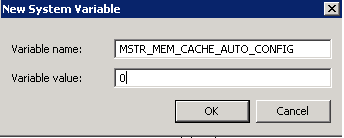
The auto memory tuning can be disabled by creating an environment variable named "MSTR_MEM_CACHE_AUTO_CONFIG" and a variable value of "0" as screenshot below:
Refer to Technical Document below for more information of MSTR_MEM_CACHE_AUTO_CONFIG on 10.x :
New environment variable MSTR_MEM_CACHE_AUTO_CONFIG in MicroStrategy Secure Enterprise 10.x
Article Reference Number: KB441579
