Starting with the release of Strategy ONE (March 2024), dossiers are also known as dashboards.
The Strategy PDF Exporter service is responsible for exporting Visual Insight and Dossier content to PDF in versions 10.6 and higher. Beginning in Strategy version 10.11, the options for the PDF Exporter service can be configured using the Service Manager GUI.
To access the PDF Exporter configuration options, open Strategy Service Manager on the Intelligence Server machine (or machines if in a cluster) and select Strategy PDF Exporter in the Service drop-down:
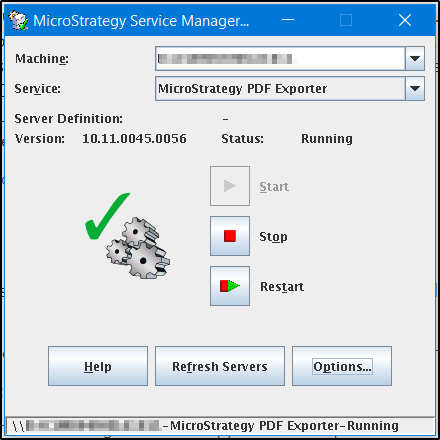
From this screen, the PDF Exporter service can be started, stopped, or restarted.
To configure the service options, click the Options... button and select the Export Engine Service Options tab:
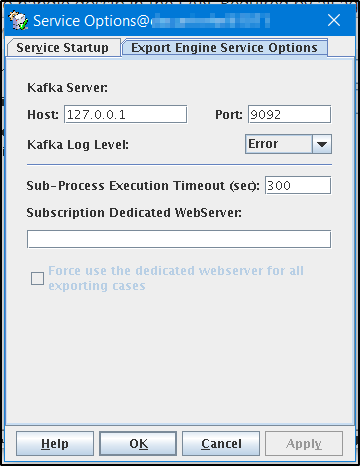
The options available are as follows:
Kafka Server Host and Port:
Configures the Strategy Messaging Services (Kafka) server to send the log output to. (logging.kafka.server and logging.kafka.port parameters in application.properties)
Kafka Log Level:
Configures the level of log output between Error, Warn, Debug, Info, or Trace. (logging.level.kafka parameter in application.properties)
Sub-Process Execution Timeout (sec):
Configures the timeout period for the export process. (exporter.phantomjs.executionTimeout in application.properties)
Subscription Dedicated WebServer:
Allows configuration of a specific Strategy Web URL to use when exporting for a Distribution Services subscription. Resources such as embedded images Map plugins, and custom widgets will need to be available on Strategy Web for exports to work successfully, so a Web URL must be provided to use when running subscriptions as there will not be a Web URL passed from a user session. (exporter.web.url in application.properties)
If the Force use... box is checked, then the specified Strategy Web URL will be used even for interactive exports. (exporter.web.url.forced in application.properties)
The Strategy internal reference number for this Knowledge Base article is KB440455. KB440455
