Kerberos delegation happens when a service needs to pass on the Kerberos user's credentials to access another service. For example, when using integrated authentication in Strategy Web, the web server needs to delegate the end user's credentials to the Intelligence Server so that the user can log in seamlessly.
In Strategy versions prior to 10.11, it was required to use unconstrained delegation when configuring the service accounts (Trust this user for delegation to any service in Active Directory). Beginning in 10.11, Strategy can also use constrained delegation (Trust this user for delegation to specified services only in Active Directory) for improved security.
Compared to unconstrained delegation, where the intermediate service gets the end user's Ticket Granting Ticket (TGT) and thus can impersonate the user to access any other service without limits, Kerberos Constrained Delegation (KCD) never requires possession of the end user's TGT, and puts a constraint on which other services it is allowed to delegate the user to access. Thus, even if the front-end service is compromised it doesn't possess any end user's Kerberos credentials, and the services it can access through Kerberos authentication are limited.
To take advantage of KCD in Strategy, it needs to be enabled for the Kerberos service accounts (used by the Web server, Intelligence Server, etc.) on the Microsoft Active Directory (AD) by navigating to the properties of the relevant service accounts, selecting the "Delegation" tab, and selecting the Trust this user for delegation to specified services only option.
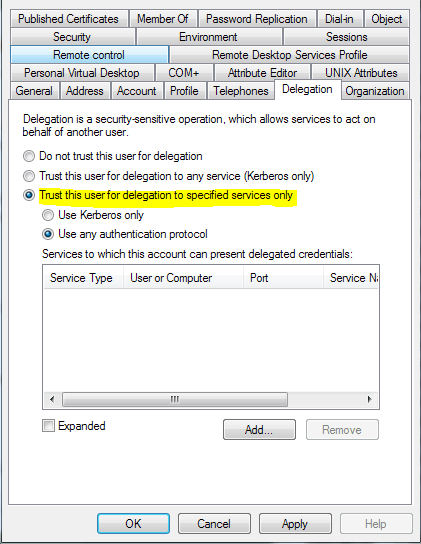
The sub-options "Use Kerberos only" and "Use any authentication protocol" are situational and will be explained below.
After enabling constrained delegation, the services allowed to delegate to must be added. When adding services, the interface will first ask which service account the destination service resides on, and then display a list of services registered to that account to choose from. Repeat the process until all needed services have been added, and then save the configuration.
Intelligence Server:
The Intelligence Server will need to delegate Kerberos credentials when using warehouse pass-through with Kerberos to pass end user credentials to databases. The database service(s) will need to be added to the delegation list, as well as the Intelligence Server service itself. Additionally, the Use any authentication protocol option must be enabled.
When using warehouse pass-through through the MDX provider, the MDX provider service will need to be added to the Intelligence Server's delegation list, and the database service(s) will need to be added to the MDX provider service's delegation list.
Web, Mobile, Library:
These front end servers will need to delegate Kerberos credentials when connecting to the Intelligence Server. Add the Intelligence Server to the delegation list for each. When using ASP versions hosted on IIS, the Use any authentication protocol option must be enabled.
Note:
The "Do not require Kerberos preauthentication" account option must be disabled for all of the Strategy service accounts. Depending on the Kerberos implementation, it may also need to be disabled for the end user accounts as well.
The Strategy internal reference number for this Knowledge Base article is KB440503. KB440503
