EducationSoftwareStrategy.com
StrategyCommunity

Knowledge Base

Product

Community

Knowledge Base

TopicsBrowse ArticlesDeveloper Zone

Product

Download SoftwareProduct DocumentationSecurity Hub

Education

Tutorial VideosSolution GalleryEducation courses

Community

GuidelinesGrandmastersEvents
x_social-icon_white.svglinkedin_social-icon_white.svg
Strategy logoCommunity

© Strategy Inc. All Rights Reserved.

LegalTerms of UsePrivacy Policy
  1. Home
  2. Topics

KB438626: New setting in MicroStrategy Secure Enterprise 10.9: Enable Fencing


Justin Parks

Principal Product Specialist • MicroStrategy


The following knowledge base article describes a new setting introduced in MicroStrategy Secure Enterprise 10.9, Enable Fencing. This setting is exposed through the Web Administrator interface.

Overview:
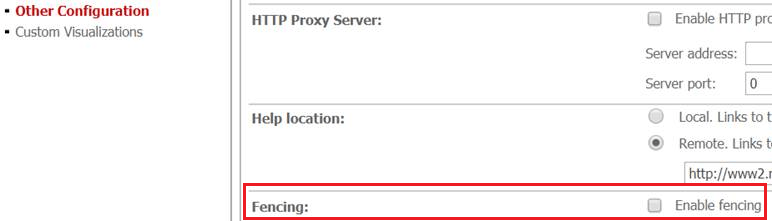
Starting in Strategy Secure Enterprise 10.9, a new feature has been added to Web Administration >  Other Configurations called "Enable Fencing", as shown below:
 

ka044000000kS5dAAE_0EM44000000PylO.png

 
This setting is unchecked by default, which disables User fencing. The Work fences feature was introduced in Strategy Secure Enterprise10.4: more details about 'User Fencing' can be found in the following Knowledge Base article:
KB318757: New feature in MicroStrategy Secure Enterprise Platform 10.4: Work Fences KB438626


Comment

0 comments

Details

Knowledge Article

Published:

September 15, 2017

Last Updated:

February 22, 2019