EducationSoftwareStrategy.com
StrategyCommunity

Knowledge Base

Product

Community

Knowledge Base

TopicsBrowse ArticlesDeveloper Zone

Product

Download SoftwareProduct DocumentationSecurity Hub

Education

Tutorial VideosSolution GalleryEducation courses

Community

GuidelinesGrandmastersEvents
x_social-icon_white.svglinkedin_social-icon_white.svg
Strategy logoCommunity

© Strategy Inc. All Rights Reserved.

LegalTerms of UsePrivacy Policy
  1. Home
  2. Topics

KB484098: No data returned for multi-level metric defined on attributes


Liheng Ding

Software Engineer, Senior • MicroStrategy


This article addresses the missing data caused by the multi-level metric defined on attributes. This article also provides a solution to avoid the loss of data.

Starting with the release of Strategy ONE (March 2024), dossiers are also known as dashboards.

SYMPTOM:

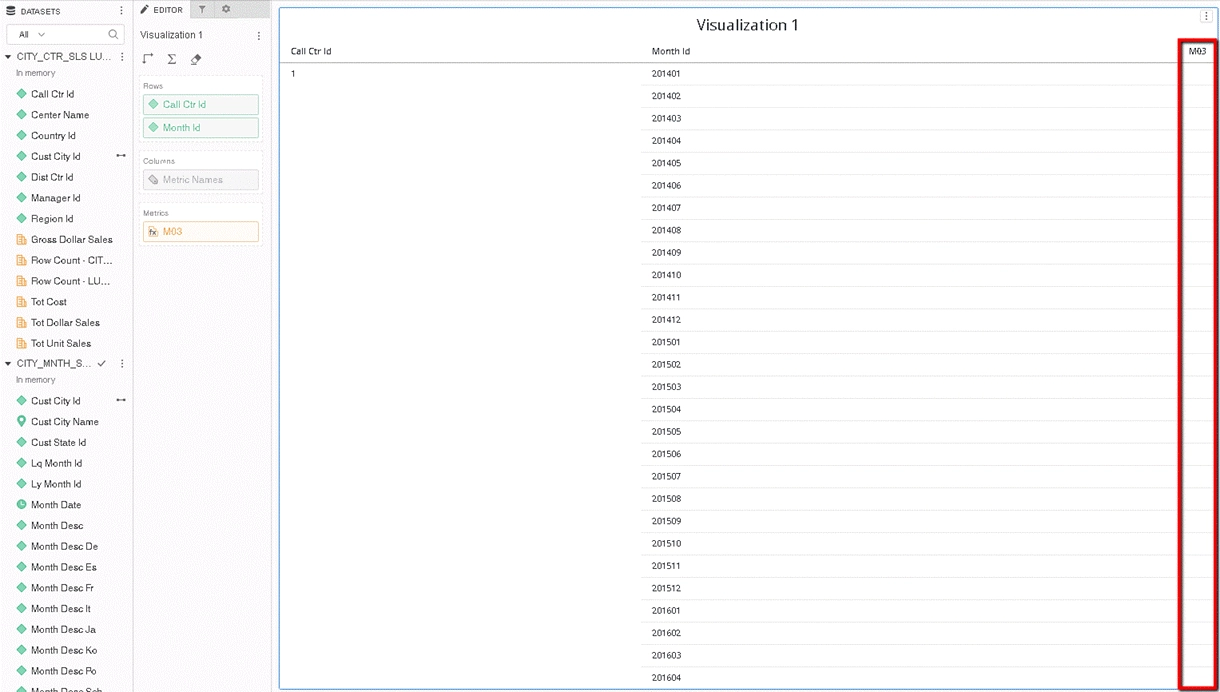
There is no data returned for the derived metric when
1. It is based on other derived metrics
2. It is also defined on the attribute which doesn't exist in the grid or the embedded metric.

STEPS TO REPRODUCE

This following example uses the Strategy Tutorial Warehouse that is shipped with Strategy products with Data Engine Version set to 2019. The issue can also be reproduced in Data Engine Version 10.4
  • In Strategy Web, create a new dossier.
  • In the Datasets panel, click New Data > Databases > Select Tables. Click Next.
  • Add CITY_CTR_SLS, LU_CALL_CTR to create dataset1 and import as “In-Memory.”
  • Add CITY_MNTH_SLS, LU_CUST_CITY and LU_MONTH to create dataset2 and import as “In-Memory.”
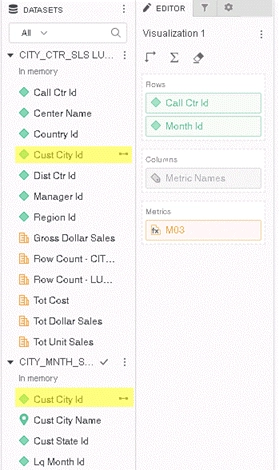
  • Link the attribute Cust City Id between the two datasets.
ka0PW0000001JbkYAE_0EM2R000000o5Q5.jpeg
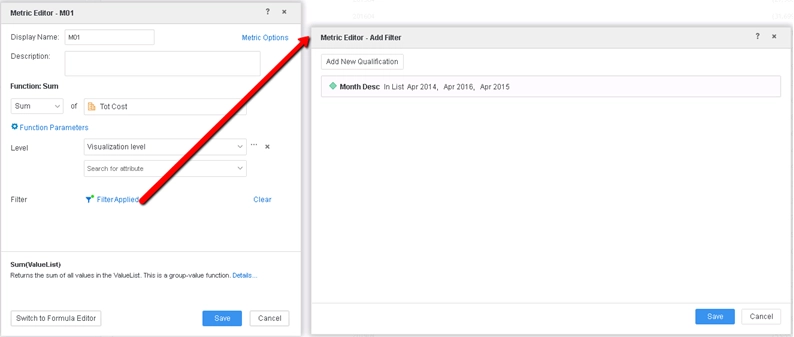
  • Create a derived metric M01 in dataset2 to calculate the Sum of Tot Cost and add a filter on Month Desc.
ka0PW0000001JbkYAE_0EM2R000000o5QA.jpeg
  • Create a derived metric M02 in dataset2 with the formula: M01*-1.
  • Create a derived metric M03 in dataset2 with the formula: Sum((M02+[Year Id])){~+}.
  • Drag Call Ctr Id from dataset1, and Month Id and M03 from dataset2 onto the grid. No data is returned for the multi-level metric M03.
ka0PW0000001JbkYAE_0EM2R000000o5QK.jpeg


CAUSE

This is a known defect in Strategy 2019. The new features expose a problem with the server engine when dealing with multi-level metrics.

ACTION

This issue has been fixed in Strategy 2020 Update 1/Strategy 2019 Update 5 and above. To pick up the fix, enable the project level setting, "Data Engine Version," to 2019 or above. This property can only be enabled through Workstation. For more details on enabling the setting, refer to Change Data Engine Version.
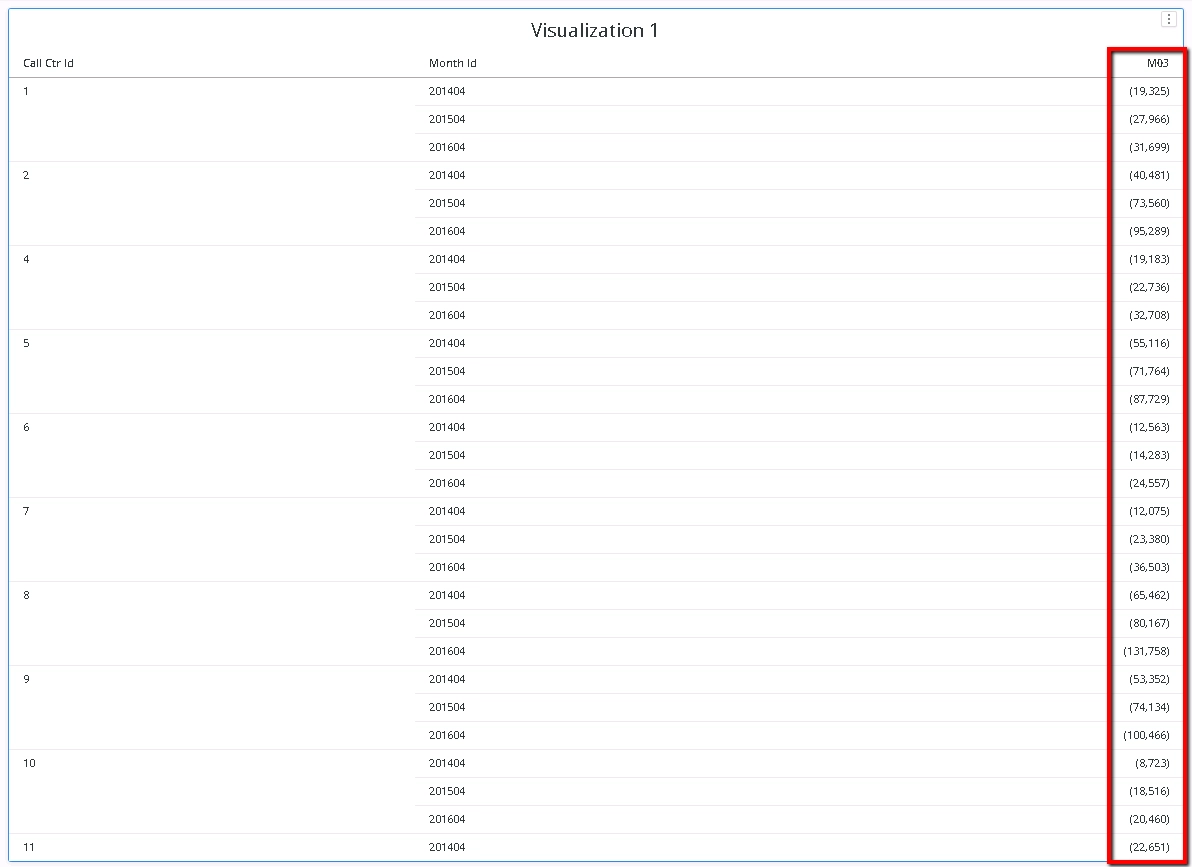
After fix, the derived metric in the example above should return data.
ka0PW0000001JbkYAE_0EM2R000000o8Id.jpeg

REGRESSION

Regression starting from Strategy 10.7 caused by optimization done in DE81883 and DE43399.
Strategy internal reference number for this technical note is KB484089 and DE149083.


Comment

0 comments

Details

Knowledge Article

Published:

March 4, 2020

Last Updated:

March 21, 2024