Starting with the release of Strategy ONE (March 2024), dossiers are also known as dashboards.
This article describes a situation where ‘Show in folder’ option is not available in Workstation –> ‘My Library’ blade for Windows users.
When users right-click on any Dossier located in ‘My Library’ blade in Workstation, the option to ‘Show in folder’ is not visible.
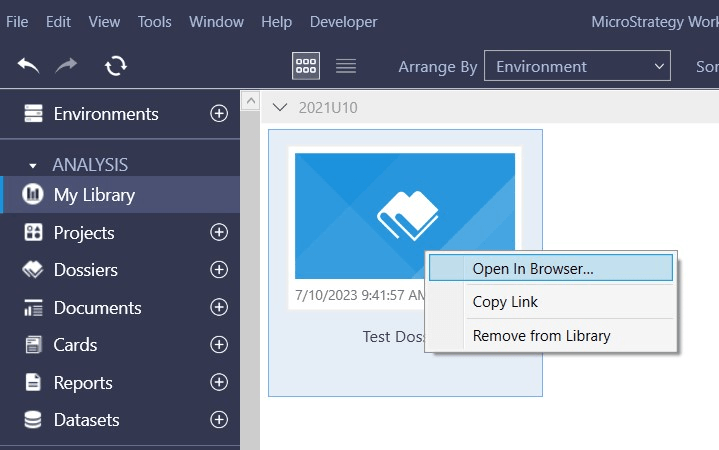
The same option is visible in any other blades, like ‘Dossiers’ or ‘Documents’.
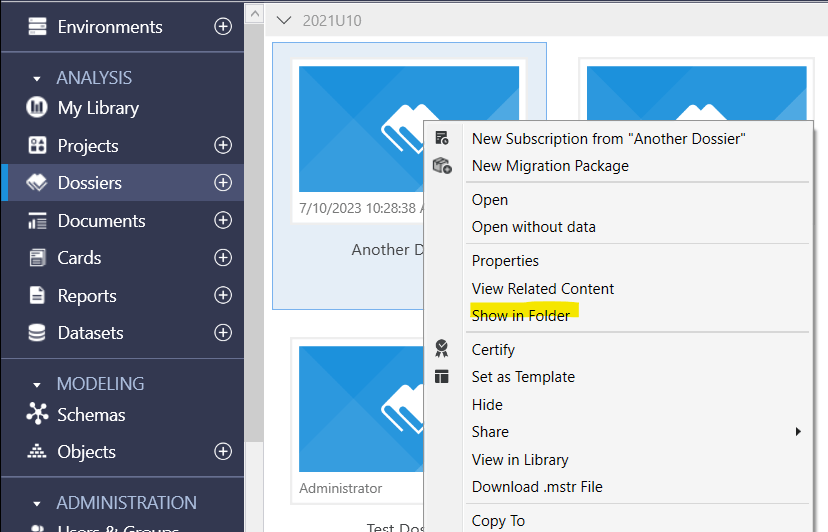
The problem also doesn’t apply to Workstation on MacOS – only Windows version is affected.
This was a product limitation and inconsistency between Windows and MacOS versions of Workstation. While MacOS users could choose “Show in folder” option directly from My Library section, this was not available for Windows users.
This inconsistency has been fixed in July 2023 release of Workstation (23.07 version). To take advantage of the fix, please upgrade to this or a newer (if already available) version.
