EducationSoftwareStrategy.com
StrategyCommunity

Knowledge Base

Product

Community

Knowledge Base

TopicsBrowse ArticlesDeveloper Zone

Product

Download SoftwareProduct DocumentationSecurity Hub

Education

Tutorial VideosSolution GalleryEducation courses

Community

GuidelinesGrandmastersEvents
x_social-icon_white.svglinkedin_social-icon_white.svg
Strategy logoCommunity

© Strategy Inc. All Rights Reserved.

LegalTerms of UsePrivacy Policy
  1. Home
  2. Topics

KB483022: "No projects available for this mobile server" error shows when configure new projects in mobile configuration in MicroStrategy Mobile


Mengran (Molly) Wang

Senior Cloud Support Engineer III • MicroStrategy


User might observe error "No projects available for this Mobile Server." when configure new mobile configuration. After making sure user has sufficient privilege for viewing the projects in mobile and projects are available under iserver, check the mobile server name defined.

SYMPTOM:
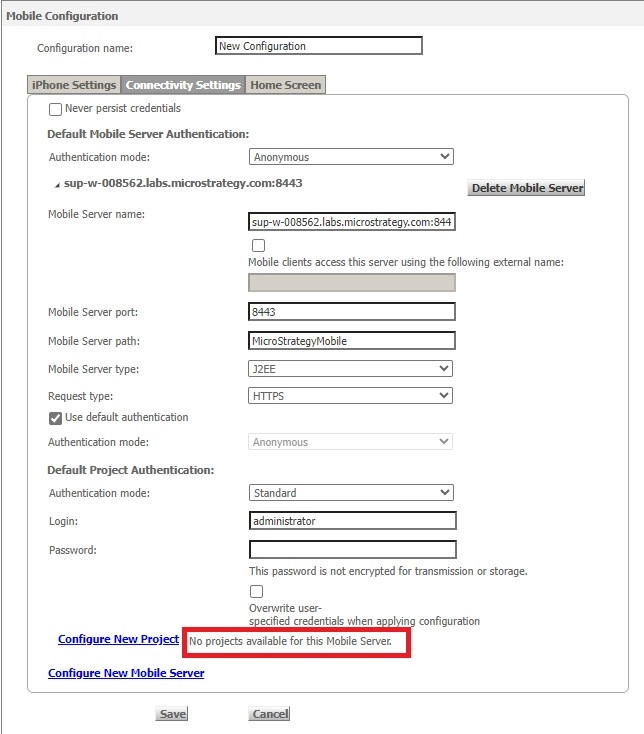
User might observe below error when configuring a new Mobile configuration:
ka0PW0000000rvZYAQ_0EMPW0000044oaD.jpeg

No projects available for this Mobile Server.
However:
1. Intelligence Server is connected and running.
2. There are projects displaying in Web with same user.
2. User has sufficient privileges in mobile viewing the projects.
CAUSE:
Notice that in the Mobile server name field, user input port number 8443 as well, showing as <webservername>:8443 instead of just <webservername>. That is causing mobile server name not to be recognized.
ACTION:
Make sure host and port number information is correct. In this example, removing the port number in mobile server name resolved the error.


Comment

0 comments

Details

Knowledge Article

Published:

March 27, 2019

Last Updated:

February 26, 2024