EducationSoftwareStrategy.com
StrategyCommunity

Knowledge Base

Product

Community

Knowledge Base

TopicsBrowse ArticlesDeveloper Zone

Product

Download SoftwareProduct DocumentationSecurity Hub

Education

Tutorial VideosSolution GalleryEducation courses

Community

GuidelinesGrandmastersEvents
x_social-icon_white.svglinkedin_social-icon_white.svg
Strategy logoCommunity

© Strategy Inc. All Rights Reserved.

LegalTerms of UsePrivacy Policy
  1. Home
  2. Topics

KB485606: Not able to migrate objects between MSTR 2021 different Updates version


Shuang Qi

Senior Cloud Support Engineer II • Strategy


This article describes a problem the user may encounter when migrating a package with Object Manager between different versions.

Symptom

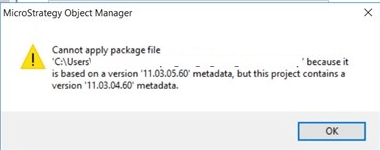
When migrating the object package between M2021 different Update version with Object Manager, user may see error after proceeding “Cannot apply package file ‘xxxxxx’ because it is based on a version ‘xxxxxx’ metadata, but this project contains a version ‘xxxxxxx’ metadata.”A sample screenshot as below :

ka0PW0000000uDVYAY_0EMPW0000046oJC.jpeg


Cause

Technically Object Manager supports package migration in same MSTR version between different updates, this error will appear if the package is created with different version of Object Manager tool.

Action

Please make sure version of Object Manger tool is same as the object package. Use same version of Object Manager to create the package then migrate to target environment.


Comment

0 comments

Details

Knowledge Article

Published:

July 29, 2022

Last Updated:

February 26, 2024