EducationSoftwareStrategy.com
StrategyCommunity

Knowledge Base

Product

Community

Knowledge Base

TopicsBrowse ArticlesDeveloper Zone

Product

Download SoftwareProduct DocumentationSecurity Hub

Education

Tutorial VideosSolution GalleryEducation courses

Community

GuidelinesGrandmastersEvents
x_social-icon_white.svglinkedin_social-icon_white.svg
Strategy logoCommunity

© Strategy Inc. All Rights Reserved.

LegalTerms of UsePrivacy Policy
  1. Home
  2. Topics

KB482873: Notification “The dossier will attempt to display more than 250 columns” occurs when manipulating Dossier and trying to drop an attribute in columns even if the final column number is lower than 250 in MicroStrategy 10.4 or above


Min Zheng

Senior Manager, Cloud Support • MicroStrategy


This article describes a situation where the columns number is far less than 250 but user gets the notification that it exceeds 250 columns.

Starting with the release of Strategy ONE (March 2024), dossiers are also known as dashboards.
SYMPTOM:
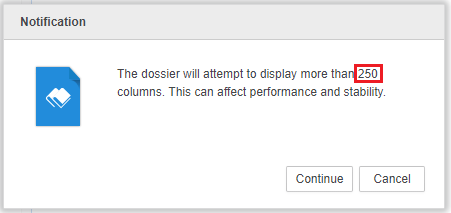
Notification “The dossier will attempt to display more than 250 columns. This can affect performance and stability.” Occurs when manipulating Dossier and trying to drop an attribute in columns even if the final column number is lower than 250 in Strategy 10.4 or above.
Follow below steps to reproduce the issue in Tutorial project:
1. Create a report with attribute Quarter, Month and metric Cost.
2. Create a dossier and put Month in Columns and Cost in Metrics.
    Note that there are 36 columns.
3. Drag and drop Quarter to Columns. Below Notification message will occur:
ka0PW0000001JWGYA2_0EM44000000gN3b.jpeg


The dossier will attempt to display more than 250 columns. This can affect performance and stability.
Click on Continue. Actually, after this manipulation, there are still 36 columns in total, which is far less than 250 columns as Quarter is parent of Month.
 
CAUSE:
This is a known behavior in Strategy 10.4 or above.
When trying to drag and drop an attribute A to Columns, calculation will be done at back end:
Situation1:
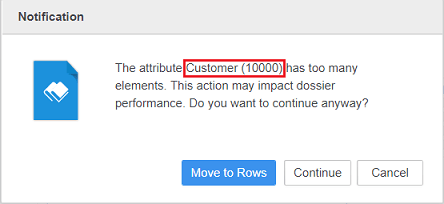
If elements of A is above 250, a notification including name of A and elements number would appear.
For example, Customer attribute has 10000 elements. Below notification will appear when adding Customer to Column:

ka0PW0000001JWGYA2_0EM44000000gN3g.jpeg


The attribute Customer(10000) has too many elements. This action may impact dossier performance.

Situation2:
if elements of A is less than 250 but number(Element of A)*number(Current columns in grid) is above 250, the notification in steps to reproduce would appear.
However for Situation 2, it is possible that the final column number will not exceed 250, typically when the newly added attribute is parent of existing attribute in column.
For example, 
In steps to reproduce, Month has 36 elements. Quarter has 9 elements.
Although the final column number with both Quarter and Month in columm would be 36, the notification will be popped up as 36*9=324, which is over 250.
An enhancement request US152385 has been logged in Strategy to improve the criteria to pop up the notification. It is still under evaluation and is not scoped in any future release yet. 
Currently users could ignore this notification as it is no harm.
  KB482873


Comment

0 comments

Details

Knowledge Article

Published:

February 15, 2019

Last Updated:

March 21, 2024