After a metadata upgrade or warehouse upgrade, you may see previously running reports fail to execute due to ODBC errors like the following.
Error: QueryEngine encountered error: Execute Query failed. Error type: Odbc error. Odbc operation attempted: SQLExecDirect. [42S02:942: on SQLHANDLE] [Strategy][ODBC Oracle Wire Protocol driver][Oracle]ORA-00942: table or view does not exist. Error in Process method of Component: QueryEngineServer.
/*This query runs fine*/ select a11.space_id space_id, a11.space_desc space_desc from lu_space a11
/*This query will fail*/ select a11.space_id space_id, a11.space_desc space_desc from “lu_space” a11
/*This query will fail*/ select "a11"."space_id" "space_id", "a11"."space_desc" "space_desc" from "lu_space" a11
The cause of this issue is that some versions of data warehouses, for example, Oracle, treat case-sensitivity differently between the table name or column name (as known as identifiers) when quoted and unquoted.
When identifiers are quoted, the database interprets literally and case-sensitively. For example, if the warehouse has a table named Table1 with a column named COLNAME, a query select “COLNAME” from Table1 can run against this warehouse. If the query is select “colname” from Table1, it will fail since colname is not equal to COLNAME, case-sensitively. With the added quotations, the report fails after upgrading.
However, if the query is select colname from Table1, it can run successfully. Without the quotations, the warehouse treats the identifiers case-insensitively, in which case colname equals COLNAME. It is the reason why before upgrading, the report was able to successfully run.
This issue occurs in scenarios when table or column names in the SQL are surrounded by quotation marks (double quotes “”, square brackets [], and back-ticks `` ). However, the underlying cause is that the table or column names stored in the metadata are inconsistent with the table or column names in the data warehouse.
There could be many reasons that lead to such inconsistency. One of the possibilities is previous warehouse migration between vendors, for example, from MySQL to Oracle. The table and column names stored in the metadata reflect the older warehouse schema, for example, using lower case for table and column names, while the table and column names in the new warehouse are in upper case.
If the inconsistency only exists in column names, the administrator user can fix it by updating the table structure within the warehouse catalog. This action will sync up the metadata with the current warehouse and ensure the column names are in the correct case. However, if the tables are now inconsistent, please (1)contact your database administrator to ensure the case of the current warehouse table name matches that of the existing, or (2)redefine the schema objects based on latest data warehouse.
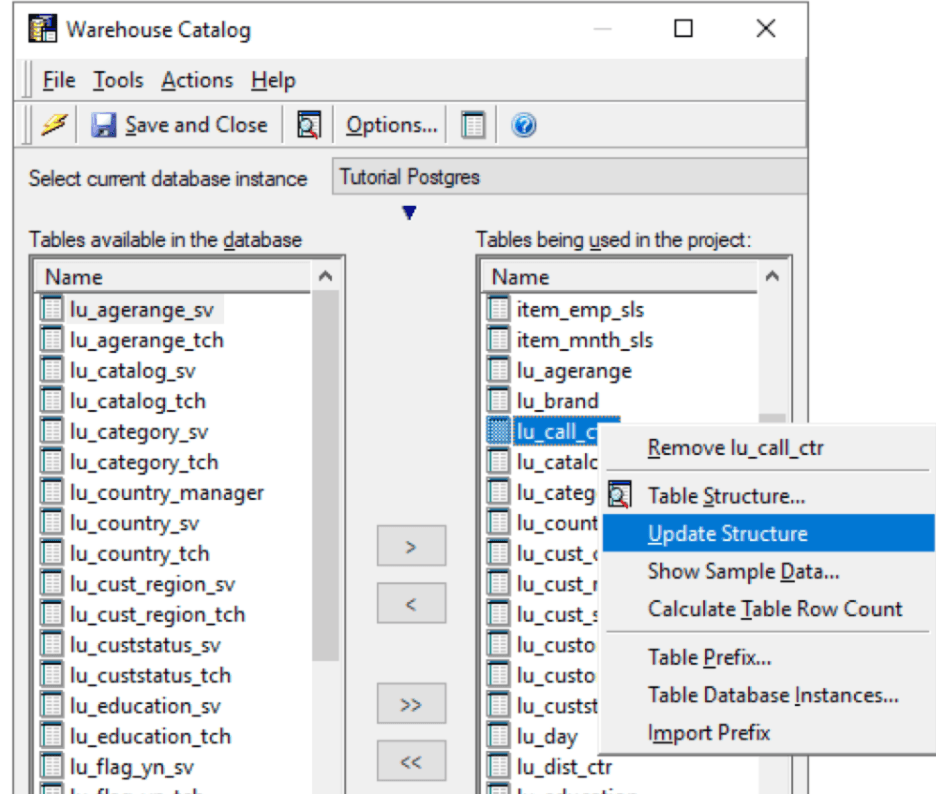
Sometimes, above "Update Structure" will result in error such as this:
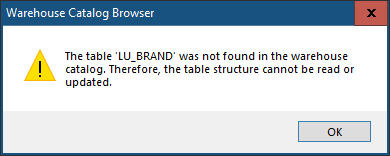
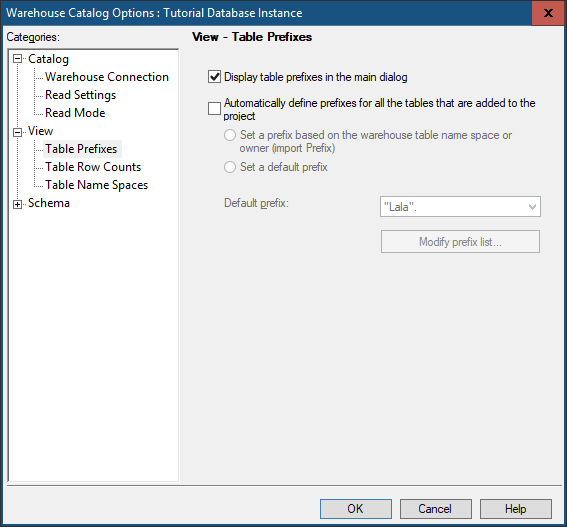
This is most likely due to namespace difference during warehouse migration. When current warehouse table has a different namespace after switching the connection information of the Database Instance, warehouse catalog will not be able to find the table with the old namespace in the new database. When this happens, we need to first expose the namespace for new database. This can be achieved by clicking on warehouse catalog menu "Tools"-->"Options"-->"Views" and check the box of "Display table prefixes in the main dialog":
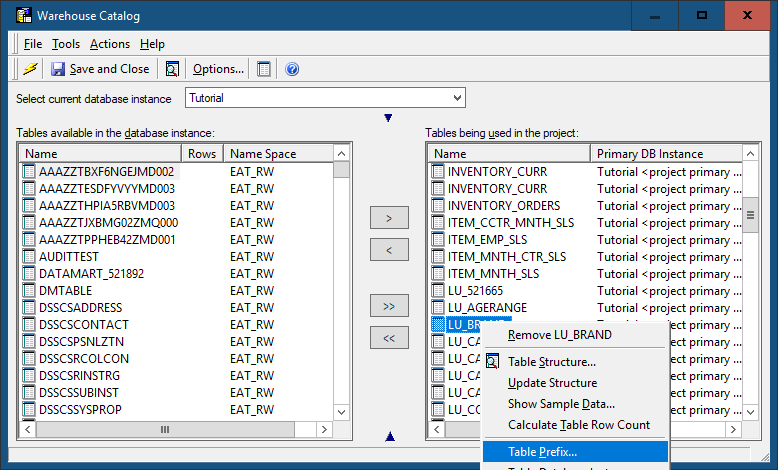
This will show the namespace for the current database, such as "EAT_RW":
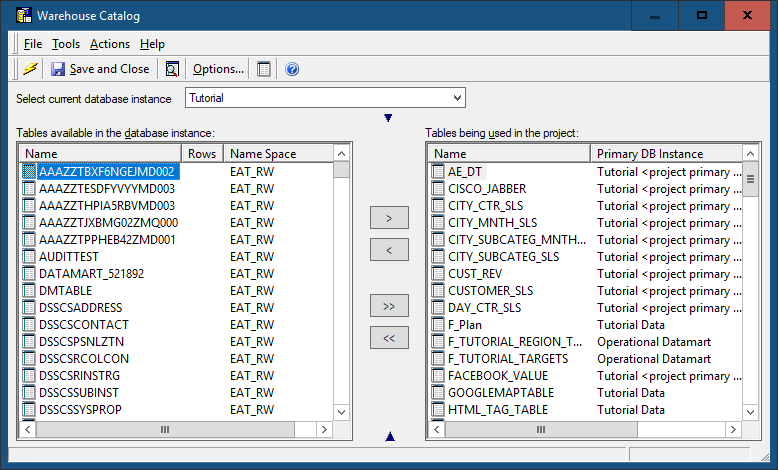
Now we can right mouse click on the table and choose "table prefix" to set the correct table fix. We can either choose an existing table prefix or create a new one such as "EAT_RW." Please note the dot is necessary as part of table prefix.
After this is done, we should be able to update table structure successfully.
