EducationSoftwareStrategy.com
StrategyCommunity

Knowledge Base

Product

Community

Knowledge Base

TopicsBrowse ArticlesDeveloper Zone

Product

Download SoftwareProduct DocumentationSecurity Hub

Education

Tutorial VideosSolution GalleryEducation courses

Community

GuidelinesGrandmastersEvents
x_social-icon_white.svglinkedin_social-icon_white.svg
Strategy logoCommunity

© Strategy Inc. All Rights Reserved.

LegalTerms of UsePrivacy Policy
  1. Home
  2. Topics

Office API Reference


Stefan Zepeda

Salesforce Solutions Architect • Strategy


Application interface used to integrate MicroStrategy reports and documents into custom Microsoft Office applications, using VBA and other COM or .NET application development environments.

  
SUMMARY:
This issue has been classified as a defect by Strategy. The impact is limited to Strategy Web 10.4 Visual Insight where a pie chart cannot be resized using a manual option and a decimal format .X (e.g. .6). There is a workaround for this issue. The issue will be addressed in 10.6 (Feature release) and 10.4 Hotfix 2 (Platform Release)
  
SYMPTOM:
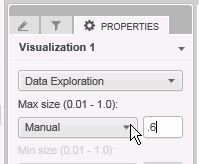
In Strategy Visual Insight 10.4, a user wants to use a Manual option to resize a pie chart. The user types a value in the format .6 as example; however, the value gets changed back to the default value. Resizing works fine if a user types 0.6. The images below demonstrate the issue:
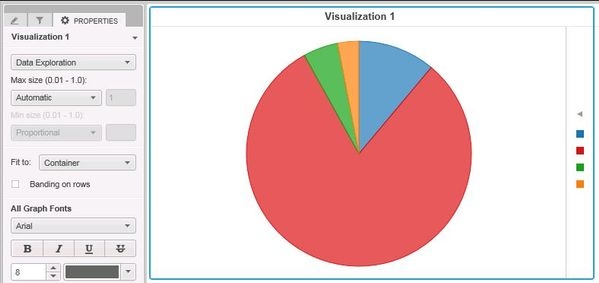
A pie chart and Automatic mode. Default value is 0.9.
ka04W000000Oe9OQAS_0EM4400000025QG.jpeg

 
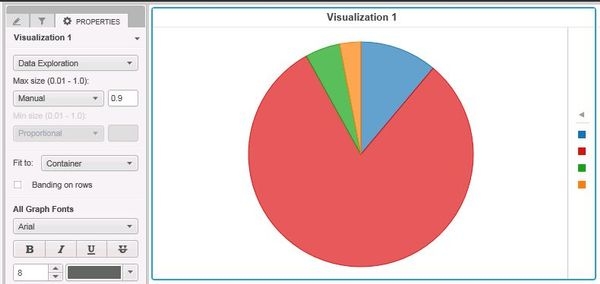
When Manual option is selected, the user types .6, however, value switches to 0.9 again:
ka04W000000Oe9OQAS_0EM4400000025Q5.jpeg

 
STEPS TO REPRODUCE:

  1. In Strategy Tutorial, create a report with Category attribute and Profit metric and create a Visual Insight dashboard using just created report as a dataset.
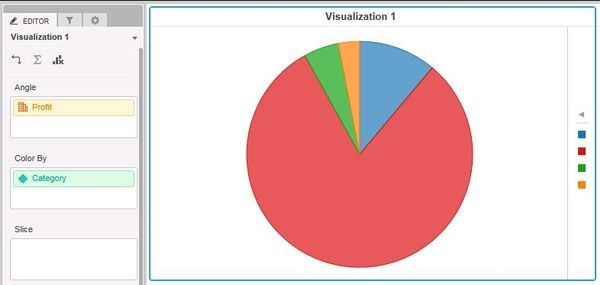
  2. Create a pie chart visualization and place Category to Color By and Profit to Angle sections as shown below:
ka04W000000Oe9OQAS_0EM4400000025Q6.jpeg


  1. Open Properties and select Data Exploration. Size of the pie chart is set to Automatic, 0.9.
  2. Select Manual option and type any other value in a decimal format .X. To demonstrate the issue, .6 was entered:
ka04W000000Oe9OQAS_0EM4400000025QF.jpeg

 
5.  Press 'Enter' on a keyboard, the value gets set back to 0.9.
  
CAUSE:
It appears to specifically affect Strategy Visual Insight 10.4 and a pie chart using Manual option and adecimal format .X in an attempt to resize the chart
  
WORKAROUND:

  • Use 0.X format to avoid the issue

 
ACTION
The issue has been fixed in 10.6 (Feature Release) and 10.4 Hotfix 2 (Platform Release).


Comment

0 comments

Details

Knowledge Article

Published:

April 17, 2017

Last Updated:

April 17, 2017