EducationSoftwareStrategy.com
StrategyCommunity

Knowledge Base

Product

Community

Knowledge Base

TopicsBrowse ArticlesDeveloper Zone

Product

Download SoftwareProduct DocumentationSecurity Hub

Education

Tutorial VideosSolution GalleryEducation courses

Community

GuidelinesGrandmastersEvents
x_social-icon_white.svglinkedin_social-icon_white.svg
Strategy logoCommunity

© Strategy Inc. All Rights Reserved.

LegalTerms of UsePrivacy Policy
  1. Home
  2. Topics

KB442023: Option to use thresholds doesn’t appear for custom groups.


Community Admin

• Strategy


In MicroStrategy 10.4 and above, attributes with custom groups aren't allowed to have thresholds defined as the option is missing.

Starting with the release of Strategy ONE (March 2024), dossiers are also known as dashboards.

SYMPTOM


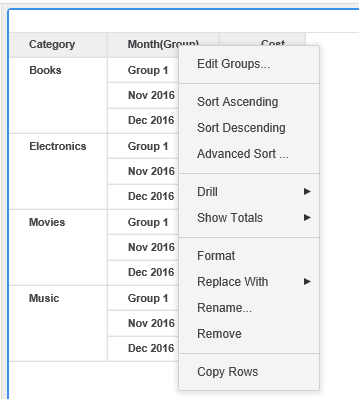
Option to use thresholds doesn’t appear for custom groups in Strategy 10.4 and above.
 

STEPS TO REPRODUCE


1.) Create a Dossier and add an existing dataset.
2.) Drag an attribute into the visualization and right-click on the attribute. Notice that applying thresholds is an option. Right-click one of the attribute elements and choose the “Group” option. Name the group.
3.) Right-click on the attribute and notice that the option to apply thresholds is removed.
 

ka0PW0000001JTSYA2_0EM44000000QxWf.png


CAUSE


The functionality is working as designed. The ability to use thresholds for attributes was included in Strategy 10.4 as an enhancement. This enhancement doesn’t include the same functionality with custom groups.
 

ACTION


A separate Enhancement Request has been logged for this functionality.


Comment

0 comments

Details

Knowledge Article

Published:

September 28, 2018

Last Updated:

March 21, 2024