A possible business case that could be solved by this approach:
A large fact table that summary reports are sourcing, from which it is necessary to drill down through a report (or report template) to row level data. In some cases the drill, unrestricted, could return one million plus records which is not ideal so you want to introduce a limit of records returned i.e. 25.
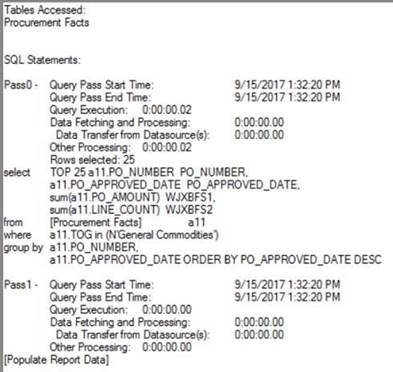
Solution: to do this, and not require a full table pass (like using a rank metric) you can modify two VLDB properties. The first is to enable the SQL Hint VLDB property and include a TOP (or BOTTOM) clause. This will grab the 25 records quickly, but because most databases do not store table data in any particular order, every report execution would get a different set of 25 records. This is where the Select Statement Post String VLDB property comes into play, if you use the SQL Statement Post String VLDB property, you can append an ORDER BY Clause which will ensure a consistent 25 records are returned.
VLDB Editor for Select Statement Post String (ORDER BY PO_APPROVED_DATE_DESC)

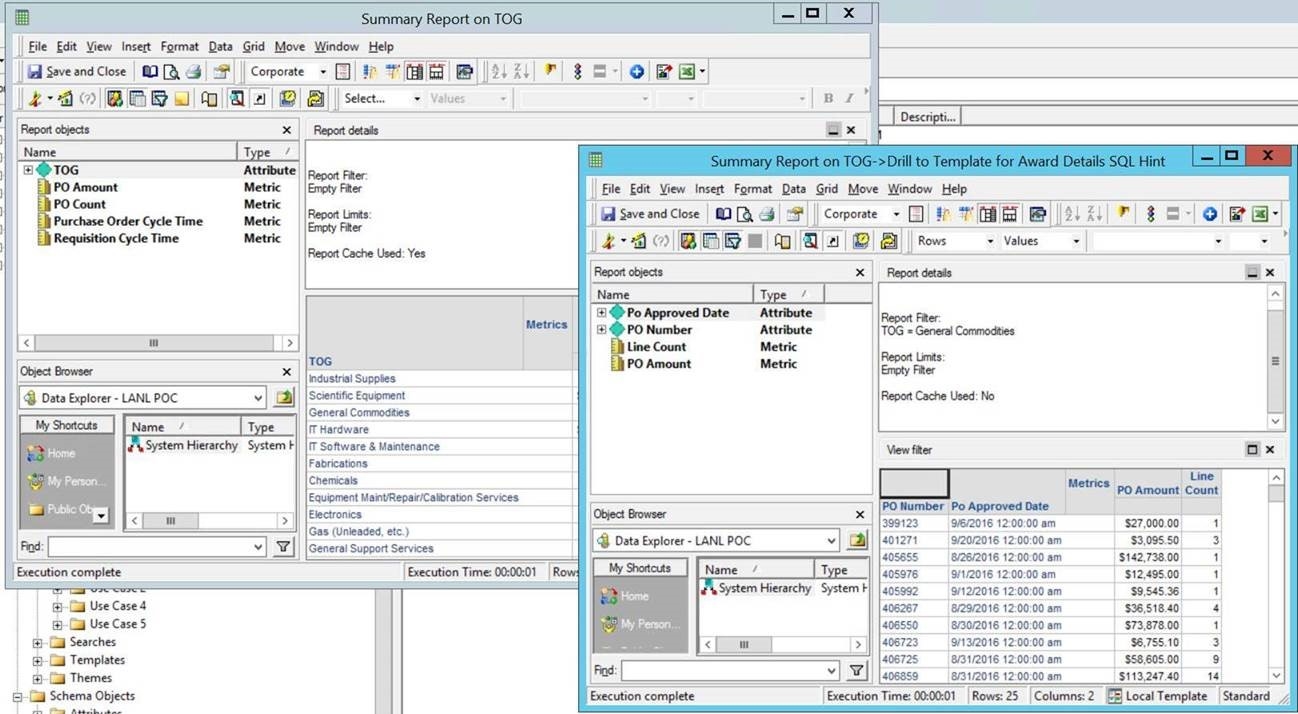
Drill from Summary Report to Report Template which includes SQL Hint (TOP 25) and new Select Statement Post String
SQL that is Generated
Keep in mind that these VLDB properties are introducing custom SQL to filter out the data with out the Strategy Engines knowledge. In general all sorting is done within the analytics engine and this is intended, so this approach is meant to address a corner case as opposed to being a general design approach. KB438837
