EducationSoftwareStrategy.com
StrategyCommunity

Knowledge Base

Product

Community

Knowledge Base

TopicsBrowse ArticlesDeveloper Zone

Product

Download SoftwareProduct DocumentationSecurity Hub

Education

Tutorial VideosSolution GalleryEducation courses

Community

GuidelinesGrandmastersEvents
x_social-icon_white.svglinkedin_social-icon_white.svg
Strategy logoCommunity

© Strategy Inc. All Rights Reserved.

LegalTerms of UsePrivacy Policy
  1. Home
  2. Topics

KB485397: Page cannot be rendered in Safari after users log into MicroStrategy Library using HTTP


Yanqing Liu

Cloud Support Expert I • MicroStrategy


This article outlines an issue with logging in to MicroStrategy Library using HTTP in Safari.

Symptom


After logging into Strategy Library 2021 Update 4 using HTTP, users may get the following error on the page:
Sorry, an error has occurred.
 
Refresh
The following error can be observed in the browser’s Console tab:
The source list for Content Security Policy directive ‘script-src’ contains an invalid source: ‘strict-dynamic’. It will be ignored.
Refused to load … because it does not appear in the script-src directive of the Content Security Policy.
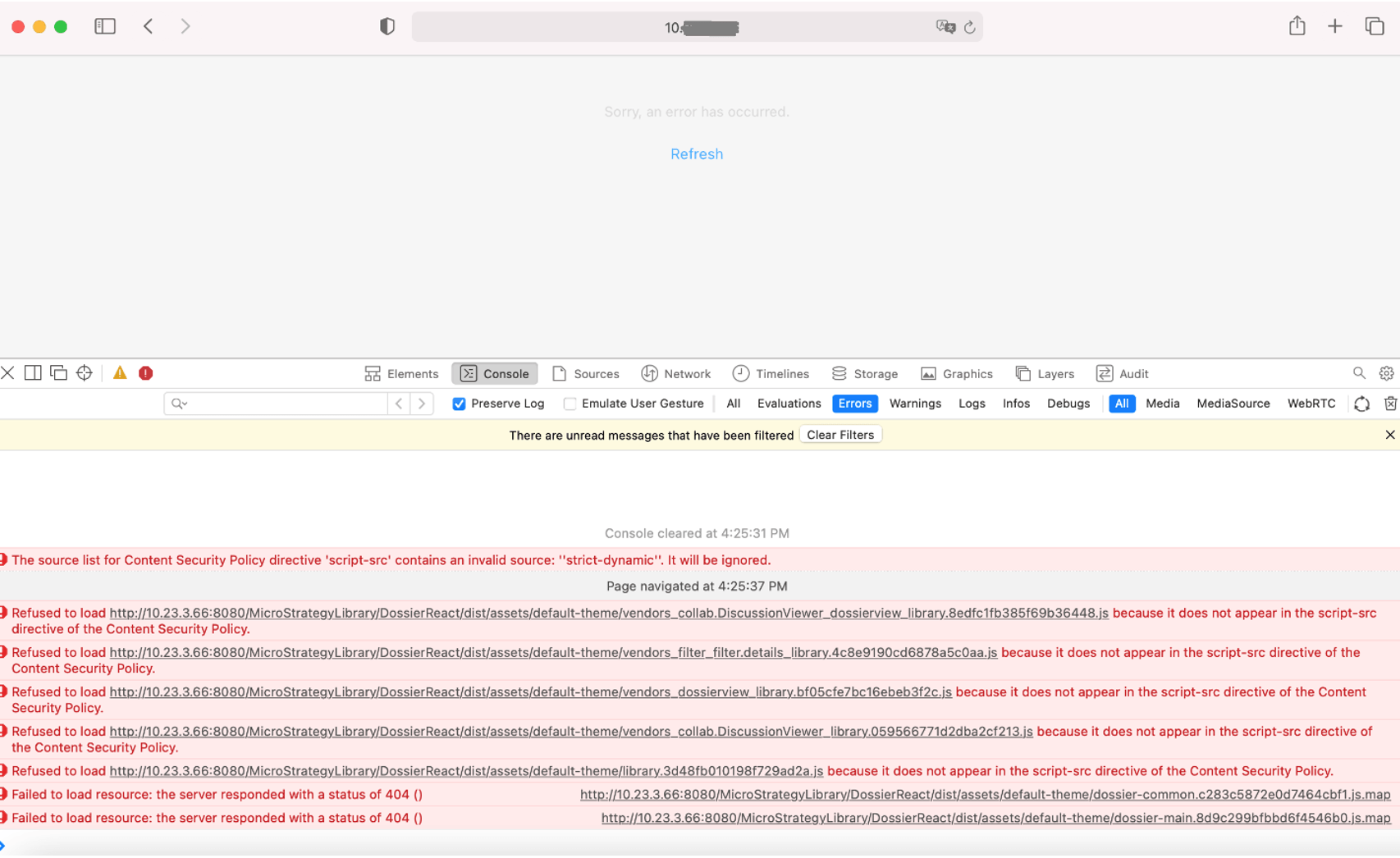
 

ka04W000001IuRRQA0_0EM4W000004YYLX.jpeg

The issue only happens in Safari and the same works in the other web browsers such as Chrome.
 

Cause


The error in the console means ‘strict-dynamic’ is not supported by the web browser.
In Strategy Library 2021 Update 4, Content Security Policy is enabled and configured like this by default:

Content-Security-Policy: base-uri 'self'; object-src 'none'; script-src 'nonce-NONCE_TOKEN' 'unsafe-eval' 'strict-dynamic' https:;

However, as of now, Safari does not support strict-dynamic. It will be ignored, and the browser will just use the remainder of the script-src Content Security Policy Directive without the strict-dynamic in the source list.

Action


Users can use one of the following solutions to fix the issue:

  1. Use HTTPS to access Strategy Library. 
  2. Edit configOverride.properties which can be found at “/StrategyLibrary/WEB-INF/classes/config/” and add the following line to allow HTTP origin:

security.csp.policyDirectives=object-src 'none'; base-uri 'self'; script-src 'nonce-NONCE_TOKEN' 'unsafe-eval' 'strict-dynamic' https: http:;

 
Restart the web application server after making the change.


Comment

0 comments

Details

Knowledge Article

Published:

March 11, 2022

Last Updated:

March 11, 2022