This article contains a sample Python script that uses pandas library and json_normalize() method to prepare datasets for Strategy. It was used to process thousands of JSON files by appending data from each file into one of three main datasets that were exported to CSV at the end. Of course, CSV export can be skipped and data can be pushed directly into MSTR cubes with mstrio library.
The image below shows the JSON file structure.
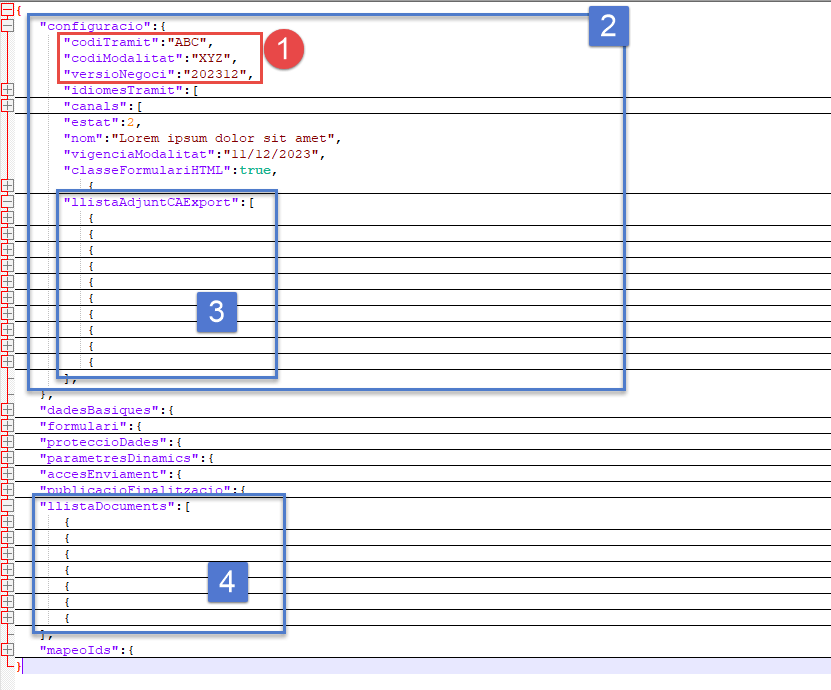
Several issues were addressed while parsing those files:
Useful links:
Please note - I've added color formatting in the code below (http://hilite.me ). Code copied from here might not work due to indentation issues. In that case, use attached file with sample code. Also this CRM is adding ';' after URLs.
import pandas as pd
import json
import time, csv, re
from pathlib import Path
from os import listdir
from os.path import isfile, join

def files_in_folder(files_folder, print_flag, sample):
    data_folder = Path(files_folder)
    files_tbh = [f for f in listdir(data_folder) if isfile(join(data_folder, f))]
    files_tbh.sort()
    if print_flag:
        print(f"\n### Files to be processed: {len(files_tbh)}")
        for f in files_tbh[:sample]:
            print(f)
    print()
    return files_tbh

def create_mainid(df, pref): # this concatenates three columns into one that is unique and common to all
    mainid=df[f"{pref}codiTramit"].astype(str)+df[f"{pref}codiModalitat"].astype(str)+df[f"{pref}versioNegoci"].astype(str)
    return mainid

def export_to_csv(level_id, df):
    df.to_csv(f"{level_id}.csv", index=False, encoding='utf-8', sep=",", quoting=csv.QUOTE_ALL, escapechar="\\", header=True)

def dict_to_string(df, rplcmnt):
    # convert dict to string and then replace ',' with something elses, so data import in MSTR will not go bananas...
    for key in df:
         df[key]=df[key].astype("string").replace({',':rplcmnt}, regex=True)
    return df


# Create tables
def create_df_conf(data, rplcmnt, meta_base):
    df = pd.json_normalize(data['configuracio'], max_level=3)
    df["main_id"]=create_mainid(df, "")
    df=dict_to_string(df, rplcmnt)
    return df

def create_df_llistaD(data, rplcmnt, meta_base):
    df = pd.json_normalize(data, record_path = ["llistaDocuments"], meta=meta_base, errors='ignore')
    df["main_id"]=create_mainid(df, "configuracio.")
    df=dict_to_string(df, rplcmnt)
    return df

def create_df_llistaA(data, rplcmnt, meta_base):
    df = pd.json_normalize(data, record_path = ["configuracio","llistaAdjuntCAExport"], meta=meta_base, errors='ignore')
    df["main_id"]=create_mainid(df, "configuracio.")
    df=dict_to_string(df, rplcmnt)
    return df

input_folder=Path("gencatjson")
rplcmnt = " | "
meta_base = [['configuracio', 'codiTramit'],['configuracio', 'codiModalitat'],['configuracio', 'versioNegoci'],['configuracio', 'modalitatId']]
files_tbh=files_in_folder(input_folder, True, 3)
initial_flag=True # first run will create data frames, subsequential runs will append data

for i,fa in enumerate(files_tbh[:]):
    print(i+1, " - ",fa)
    with open(input_folder / fa) as data_file:
        data = json.load(data_file)

    if initial_flag:
        df_conf_all = create_df_conf(data, rplcmnt, meta_base)
        df_llistaD_all = create_df_llistaD(data, rplcmnt, meta_base)
        df_llistaA_all = create_df_llistaA(data, rplcmnt, meta_base)
        initial_flag=False
    else:
        df_conf_all = pd.concat([df_conf_all, create_df_conf(data, rplcmnt, meta_base)])
        df_llistaD_all = pd.concat([df_llistaD_all, create_df_llistaD(data, rplcmnt, meta_base)])
        df_llistaA_all = pd.concat([df_llistaA_all, create_df_llistaA(data, rplcmnt, meta_base)])


export_to_csv("df_conf_all", df_conf_all)
export_to_csv("df_llistaD_all", df_llistaD_all)
export_to_csv("df_llistaA_all", df_llistaA_all)
