Starting with the release of Strategy ONE (March 2024), dossiers are also known as dashboards.
To improve the execution performance, this client is using the functionality of partitioning the cubes. However, when using metrics from these partitioned cubes, the result displayed on the screen is different from the result using an identical cube without partitioning.
This behavior did not occur in version 10.4
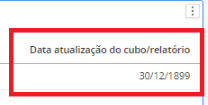
The result using Cube partitioning: 12/30/1899
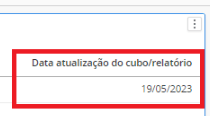
The result using Cube with no Partitioning: 05/19/2023
1. Create the MIN(CurrentDateTime()) metric.
2. Create Cube1 with the Region attribute and the metric created in step 1.
3. Create Cube2 with the Region attribute and the metric created in step 1.
4. Edit the Cube2 , in the Cube editor > Data > Configure Intelligent Cube > Data Partition > Partition Attribute = Region and Number of Partitions = 12
5. Load the two cubes.
6. On the web, create a dossier using Cubo1 as a datasource and add the metric to the grid, the result will be 45071.
7. On the web, create a dossier using Cubo2 as a datasource and add the metric to the grid, the result will be 0.
This is an identified defect in Strategy 11.3.9 where the metric is calculated in different partitions during the map stage, the results in all partitions are then combined in the reduced stage as the final output. Since there is only one row of metric value in the grid, the metric is calculated in only one partition, and null or empty row is returned in other partitions. An empty row of the metric MIN(CurrentDateTime()) was initialized as one row of min(1899-12-31) or 0 if converted to int. During the reduced stage, the output of those partition without data will then treated as 0, and was combined using MIN(). Hence the final result would be MIN(currentDateTime(), 0, 0, 0, ...) = 0.
Contact Strategy Technical Support for an update on the status of the issue. Currently this issue is still being reviewed for feasibility by our Technology team and it is not scoped for any upcoming scheduled Strategy release.
Make the metric MIN(CurrentDateTime()) smart. The smart metric won't be calculated in cube usually so we avoid the map-reduce trap for min().
