EducationSoftwareStrategy.com
StrategyCommunity

Knowledge Base

Product

Community

Knowledge Base

TopicsBrowse ArticlesDeveloper Zone

Product

Download SoftwareProduct DocumentationSecurity Hub

Education

Tutorial VideosSolution GalleryEducation courses

Community

GuidelinesGrandmastersEvents
x_social-icon_white.svglinkedin_social-icon_white.svg
Strategy logoCommunity

© Strategy Inc. All Rights Reserved.

LegalTerms of UsePrivacy Policy
  1. Home
  2. Topics

Getting Started with the Percent Bar Chart (100%)


Community Admin

• Strategy


To compare percentages of various attributes, use percent bar charts to make your data analysis easier. You can even download the dossier to view it in MicroStrategy Desktop.

Starting with the release of Strategy ONE (March 2024), dossiers are also known as dashboards.

Description

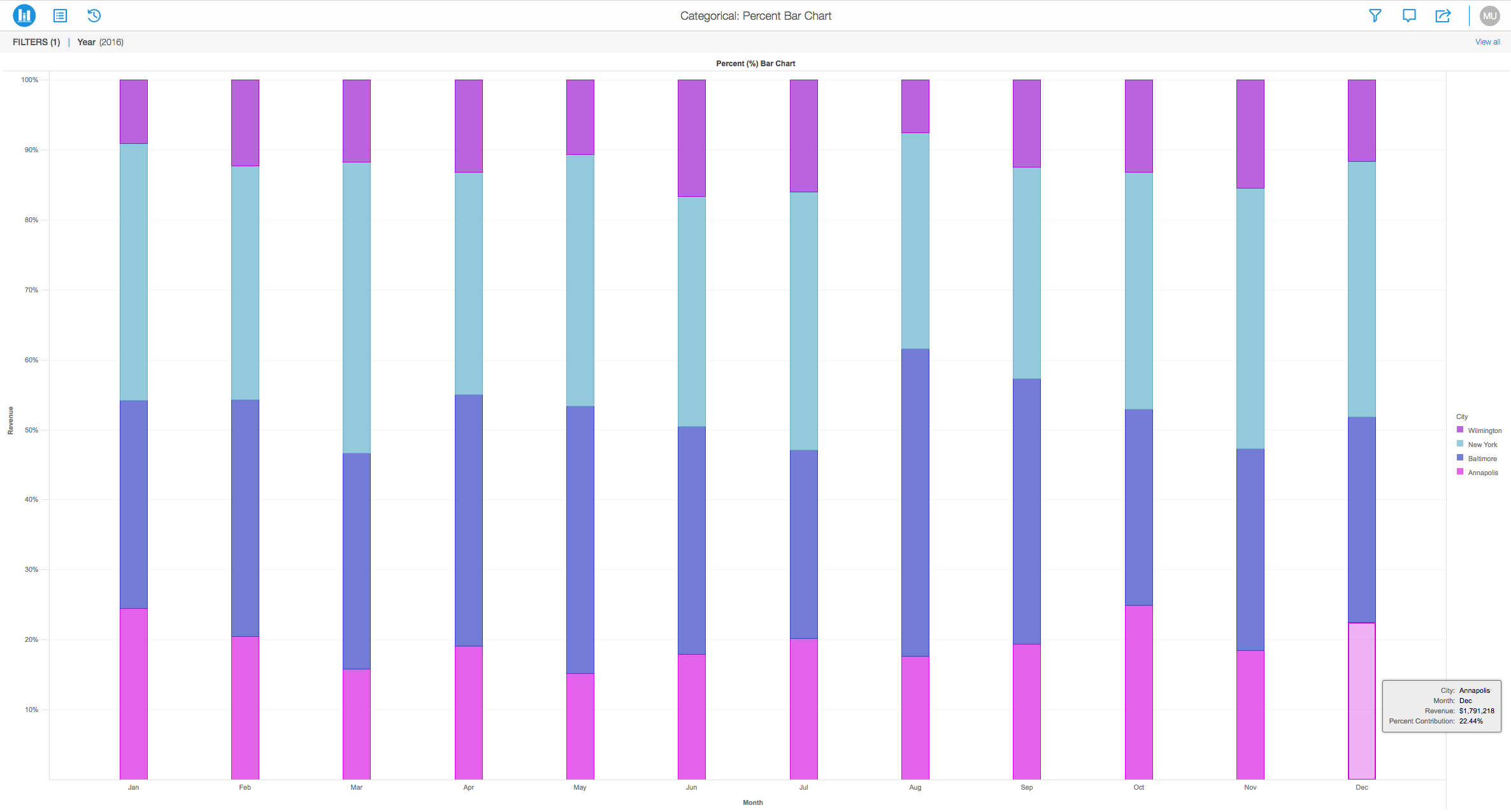
The Percent Bar Chart is another type of a bar graph that represents percentages of various attributes that are compared in a stacked fashion. Below, you can view that the bar chart is a 100% stacked bar chart that shows the relative percentage of multiple data series in stacked columns. It is also known as the "100% Stacked Bar Chart" due to the fact that is shows the percentage values relative to multiple data series stacked on top of each other. In this example, the total of stacked columns will always equal 100%.
View the 100% Stacked Bar Chart:
 

ka0PW0000001JYLYA2_0EM44000000Q9X8.png

Get Started with Percent Bar Charts

Object requirements:

  • Attributes: 1 or more
  • Metrics: 1 or more

Minimum Strategy version: 10.2
Publisher: Strategy 
Installation Instructions:
To view this dossier with the visualization:
 

  1. Download the .zip file below and deploy it in Strategy Desktop or Strategy Web.
  2. You can open a working demo by uploading the .mstr file below and doing the following:
    • To open the demo visualization in Strategy Desktop, double click the .mstr file.
    • To open the demo visualization in Strategy Web, select:
       Create > Upload Strategy File > View Dossier.

Analyze using bar charts by downloading MicroStrategy Desktop!
 
View References:
1. A project in beta by ferdio, (2017, December 4th). Retrieved from http://datavizproject.com/
2. Bar Chart, Wikipedia, (2017, February). Retrieved from https://en.wikipedia.org/wiki/Bar_chart#Grouped_or_stacked

Learning Resources

Interested in learning more about Dossier authoring? Visit the Learning Center on Community!


Comment

0 comments

Details

Knowledge Article

Published:

December 4, 2017

Last Updated:

March 21, 2024