SAP recommends exposing calculation views (CVs) instead of regular tables for BI applications, such as Strategy. This raises two fundamental questions:
This article provides recommendations on how to proceed with modeling on SAP HANA and Strategy for best performance. The results discussed in this article were achieved using Strategy 2020 Update 1 with live connection (no Strategy caching), using the latest ODBC (May 2020) driver and SAP HANA version 2.0 SPS04.
Explore the contents of this article:
1:1 Calculation Views vs table performance
How to model Calculation Views
Moving MicroStrategy Query to Calculation View - Example
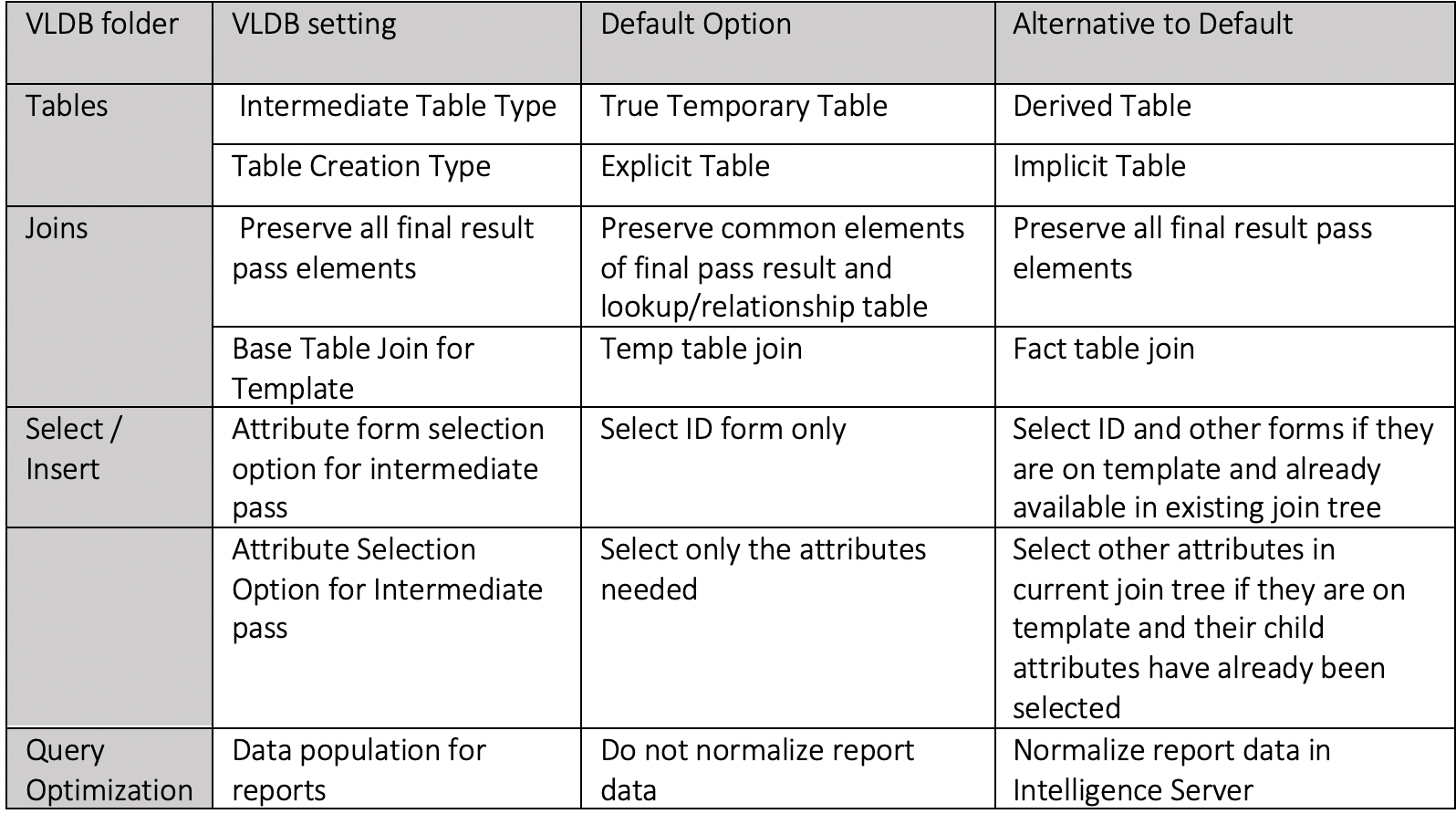
MicroStrategy VLDB settings optimization
Due to the complex nature of modeling in HANA, one might ask if replacing tables with CVs in a “1:1” method is beneficial in terms of performance. For a typical Strategy project, this does not hold – no significant change in performance has been observed for an ODBC Live Connect setup. “1:1” method is a scenario where a calculation view consists of a projection node containing a table with no additional modeling content that is available in calculation views. This results in a calculation view which contains the same data and behaves exactly like a table. SQL queries on such placeholder “1:1” CVs generate the same SQL plan as queries on regular tables. Note however, that even the simplest CV models consisting, for example, of a single join node and projection on top of it, may generate a different SQL plan and produce the same results as a JOIN statement, but with better performance.
The Strategy project used for the testing purposes of “1:1” modeling approach consisted of 5 dashboards using 15 reports in total as their data sources, adding up to around a total of 3000 lines of SQL. Tests were conducted for several concurrent users for two data size sets “1x” and “20x” having 3.9 and 79 million rows in the main fact table respectively.
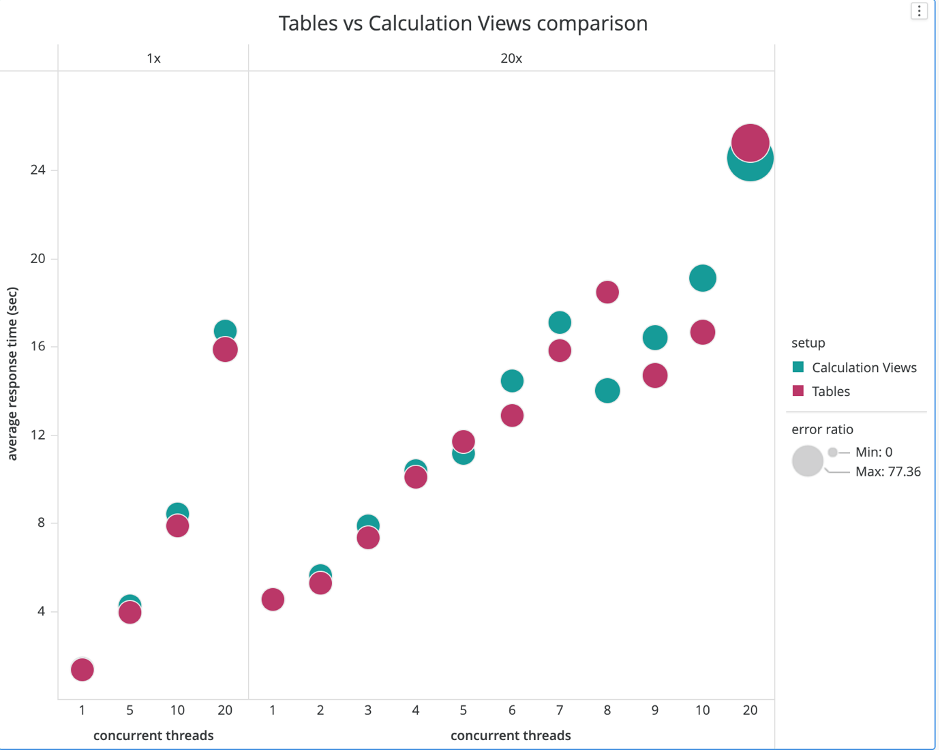
Note that the differences in results are attributed to the noisy response of the system.
Calculation views are meant to be objects that contain a considerable amount of business logic and leverage HANA’s capabilities, rather than simple placeholders SQL tables (“1:1” model). They offer several features that should be used to enhance performance, which are not available in SQL. The following list provides good practices and features that should be considered when developing calculation views models in SAP HANA to achieve best performance:
Note however, that modeling calculation views when done incorrectly can severely affect performance of the database. Therefore, caution and comprehensive testing are recommended when attempting to develop such model.
As stated above – moving the modeling logic to HANA objects like calculation views is a good idea from a performance perspective, because CVs offer additional optimization unavailable for SQL. Moving the modeling logic from Strategy to SAP HANA is not the only approach you can take – you can look at Strategy VLDB settings or at HANA system level administration. MicroStrategy VLDB settings for HANA subject is briefly discussed at the end of the article. Here is an example of a workflow for moving the modeling logic from Strategy to HANA:
A typical SQL statement from Strategy report may look like this:
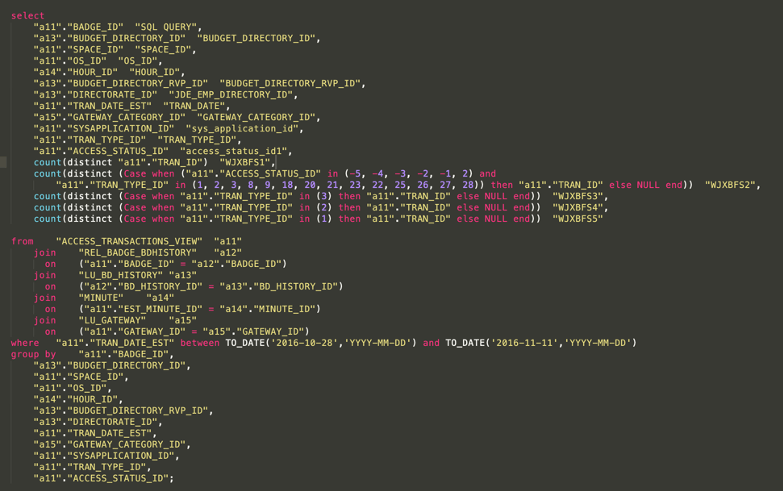
When one attempts to move it to HANA, the first thing to do may be to move SELECT and JOIN statements, and check the results and performance.
Simplified SQL statement:
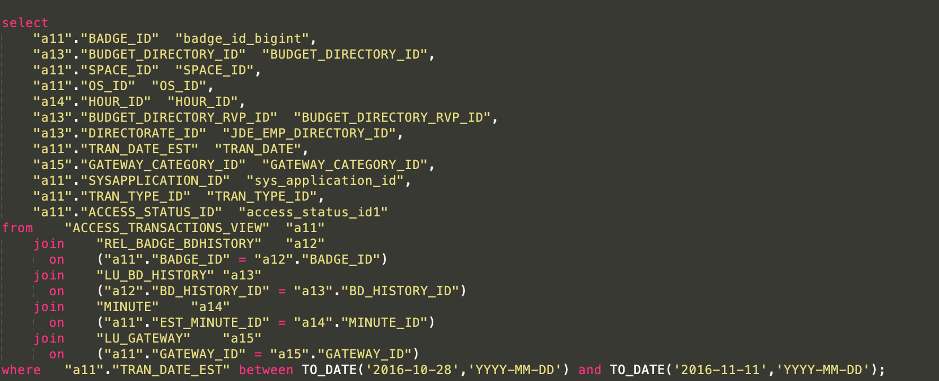
The above SQL statement can be easily modeled in SAP HANA (HANA Studio):
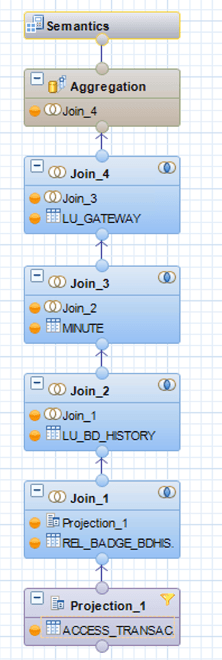
Features of a HANA model:
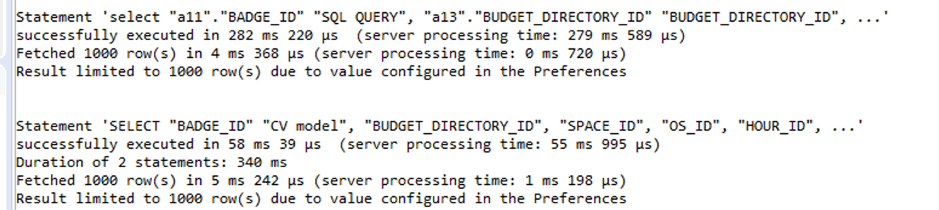
A HANA model gives the same result as the simplified SQL query, but its performance is much better – an average of about 4 times faster server processing time:
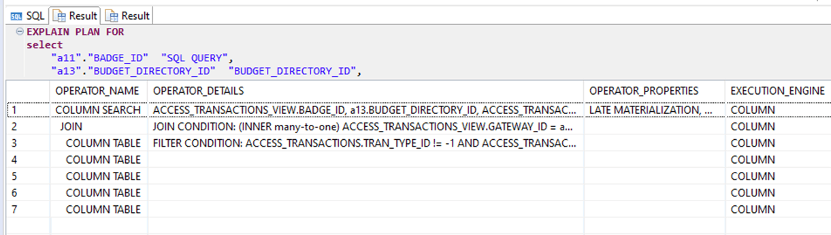
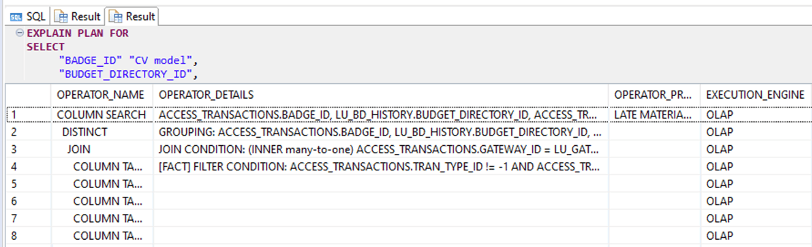
The reason for the better performance of Calculation View model is better optimization plan and OLAP engine being used for CV query. We can investigate that with the Explain Plan option:
Moving forward, we can add to our CV model a count distinct clause that is present in the original SQL, which will transform our CV model into an equivalent of the below SQL query:
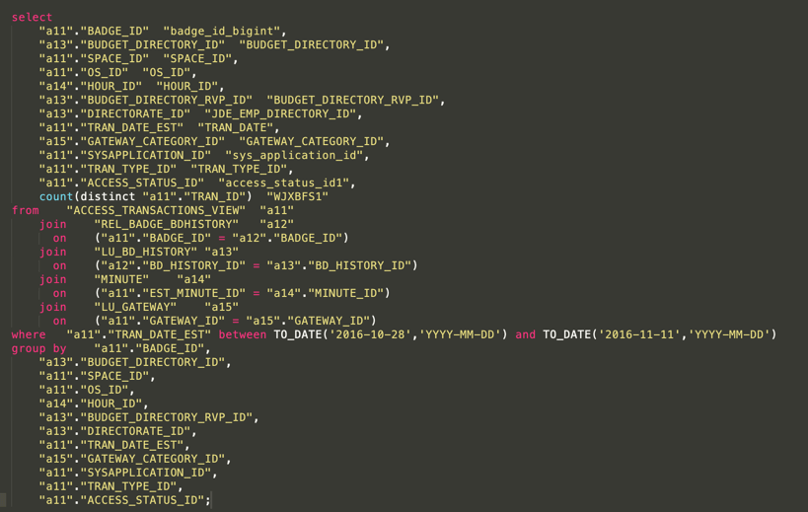
The change with respect to the previous one is the count distinct clause and group by statement, this is modeled in HANA with a counter object:
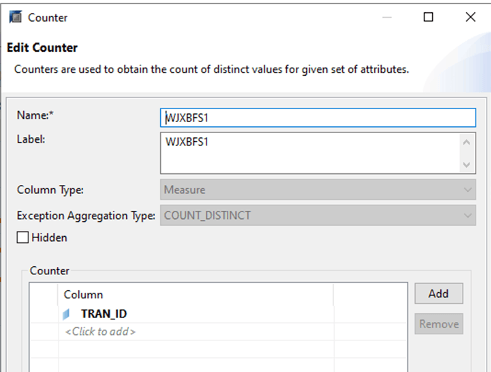
Introducing those changes results in a different plan for SQL statement – which this time uses OLAP engine. Nevertheless, calculation views run 4 times faster on average like in the previous example. Another step is to represent second count distinct statement with embedded case clause:

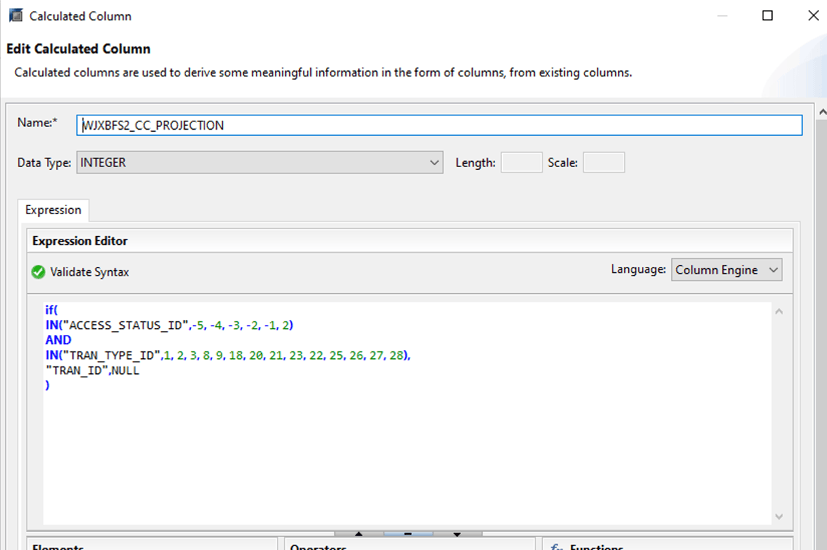
This can be achieved by adding a new projection node and creating calculated column in it, and later creating a counter on top of the calculated column in the aggregation node. Note that SAP recommends using SQL in the Expression Editor, since it allows for “better” optimization than column Engine.
Column engine syntax:
SQL syntax:

Note that HANA studio is misleading with respect to syntax errors in Expression Editor – the above SQL runs fine even though parts of it are highlighted in red.
The next step is to model the rest of the count distinct clauses the same way to result with CV that represents below SQL query:
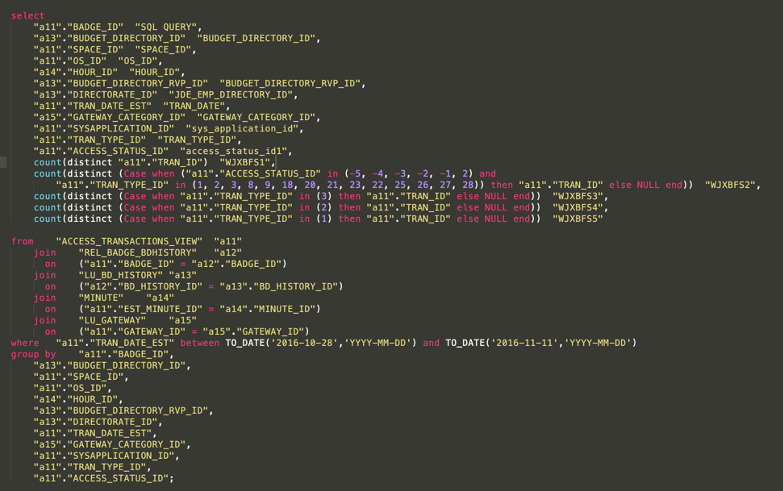
Adding count distinct clauses with embedded CASE statements caused CV to perform exactly the same as SQL query – SQL plan for both queries are the same. The engine used for calculation switched from OLAP to COLUMN for a CV model.
Above concludes an example of moving the calculation logic from Strategy to SAP HANA – it was shown that this approach may result in much better performance (CV was 4 times faster than SQL query at some point) but does not guarantee it.
The conclusion from this experiment is to move the calculation to SAP HANA whenever there is confidence that modeling with calculation view will be superior to SQL queries. It has not been shown, but It is extremely important to remember that poor Calculation View model will perform worse than a SQL query generated by Strategy.
In case of unsatisfactory performance, the following VLDB settings should be considered on Strategy for ODBC Live Connect setup.