EducationSoftwareStrategy.com
StrategyCommunity

Knowledge Base

Product

Community

Knowledge Base

TopicsBrowse ArticlesDeveloper Zone

Product

Download SoftwareProduct DocumentationSecurity Hub

Education

Tutorial VideosSolution GalleryEducation courses

Community

GuidelinesGrandmastersEvents
x_social-icon_white.svglinkedin_social-icon_white.svg
Strategy logoCommunity

© Strategy Inc. All Rights Reserved.

LegalTerms of UsePrivacy Policy
  1. Home
  2. Topics

KB485801: Performance issues are experienced when running a dossier with one Live Connect dataset and a dynamic filter is defined


Stefano Antonellis

Principal Product Specialist • Strategy


This article outlines performance issues are experienced when running a dossier with one Live Connect dataset and a dynamic filter is defined.

Starting with the release of Strategy ONE (March 2024), dossiers are also known as dashboards.

Symptom


Performance issues are experienced when running a dossier that uses a Live Connect dataset with the dynamic filter set up.
 

Steps to reproduce

  1. Create a Dossier with one chapter and two pages, each containing a similar grid:
    -    Page 1 should run quick - add to grid visualization the Call Center attribute and the Revenue metric.
    -    Page 2 should run slower – add, additionally from Page 1 to grid visualization the Day attribute.
  2. Create a chapter filter with Day attribute and set the time range: 1/1/2014 - 9/26/2016 (100 days).
  3. In File menu, go to Dossier Properties and set the Execution Mode to Load pages on demand.
  4. Select the Page 1 and save the dossier with the name ‘Static’. 
  5. Create a copy of the ‘Static’ dossier from Step 4 and call it ‘Dynamic’.
  6. In Filter tab, change the chapter filter to be dynamic; set it to ‘first 100 elements’, so that the data returned are the same as for ‘Static’ dossier.  Save it and close.
  7. Run the ‘Static’ Dossier; it opens on Page 1, check the Query Details. Wait about 30s and go to Page 2.
  8. Run the ‘Dynamic’ Dossier; it opens on Page 1, check the Query Details. Wait about 30s and go to Page 2.

RESULTS:
Queries and visualizations in Step 7 are calculated/rendered only when user opens a page; in the ‘Static’ dossier Loading pages on demand works as it is expected, as shown below:
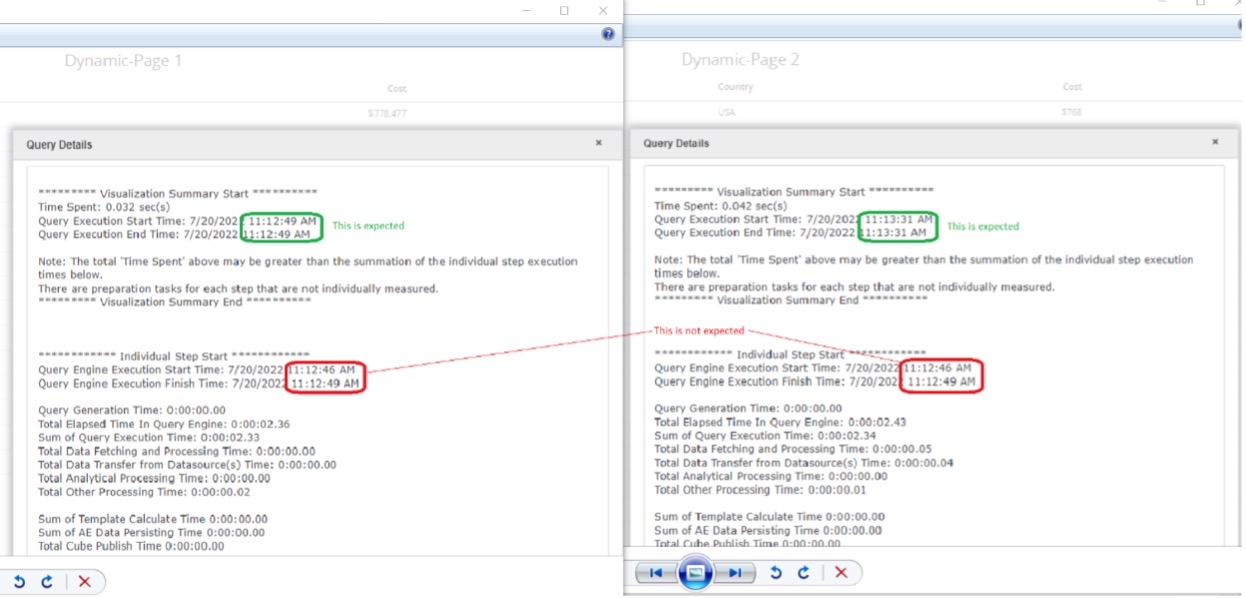
ka0PW0000001JjwYAE_0EM4W000006HIw0.jpeg

All page Queries in Step 8 are calculated when the user opens the ‘Dynamic’ dossier. Only visualizations on a page are rendered when user opens a specific Dossier - loading pages on demand is not working here, as shown below:
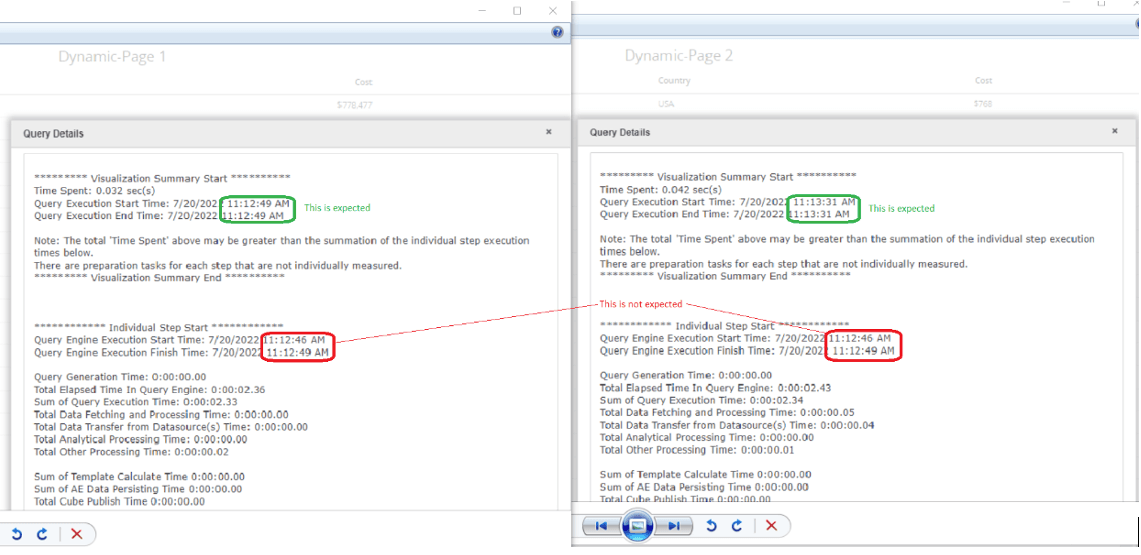
ka0PW0000001JjwYAE_0EM4W000006HIvl.jpeg


Cause


This is a known limitation on the current dynamic default selector + Direct Data Access (DDA) workflow. To support dynamic default selection in DDA, the dossier is executed twice: the first time to populate the dynamic default selections, the second time to apply the dynamic default selection to the targeted grid. 


Comment

0 comments

Details

Knowledge Article

Published:

November 29, 2022

Last Updated:

March 21, 2024