EducationSoftwareStrategy.com
StrategyCommunity

Knowledge Base

Product

Community

Knowledge Base

TopicsBrowse ArticlesDeveloper Zone

Product

Download SoftwareProduct DocumentationSecurity Hub

Education

Tutorial VideosSolution GalleryEducation courses

Community

GuidelinesGrandmastersEvents
x_social-icon_white.svglinkedin_social-icon_white.svg
Strategy logoCommunity

© Strategy Inc. All Rights Reserved.

LegalTerms of UsePrivacy Policy
  1. Home
  2. Topics

Pinning Spark Tables: Capacity Planning in Ambari


David Harsh

Software Engineer in Test II • Strategy


Before pinning tables to memory, it is necessary to run through a simple capacity planing exercise. In this article, we will first understand how much memory Spark cluster has available for pinning tables and then we will find out how much memory tables use.
Before pinning tables to memory, it is necessary to run through a simple capacity planing exercise. In this article, we will first understand how much memory Spark cluster has available for pinning tables and then we will find out how much memory tables use.

  • How much memory Spark has available for pinning tables?
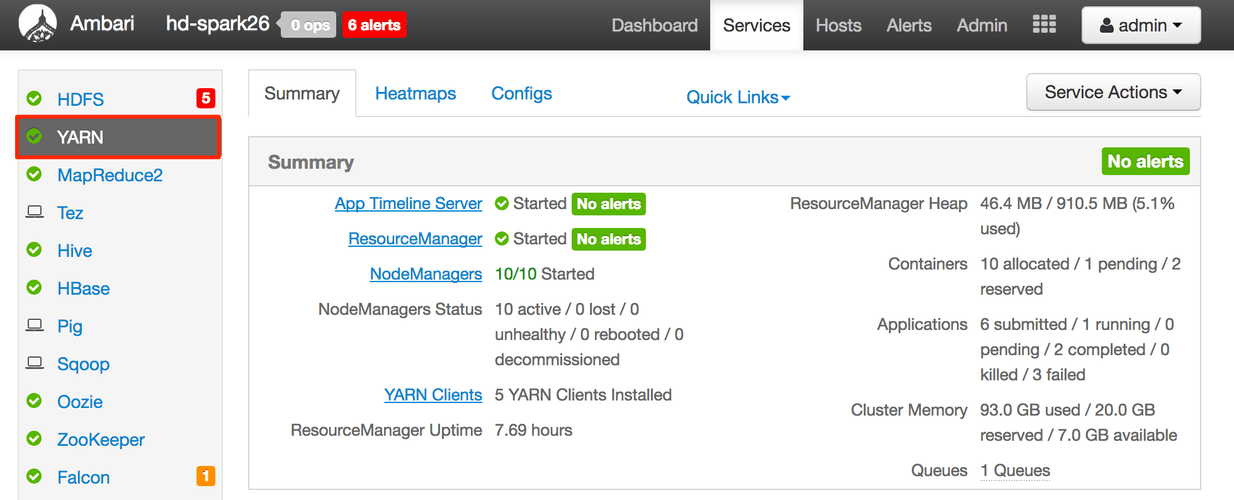
    • In ambari, go to the YARN service section:
ka044000000kPCAAA2_0EM440000002MTt.png
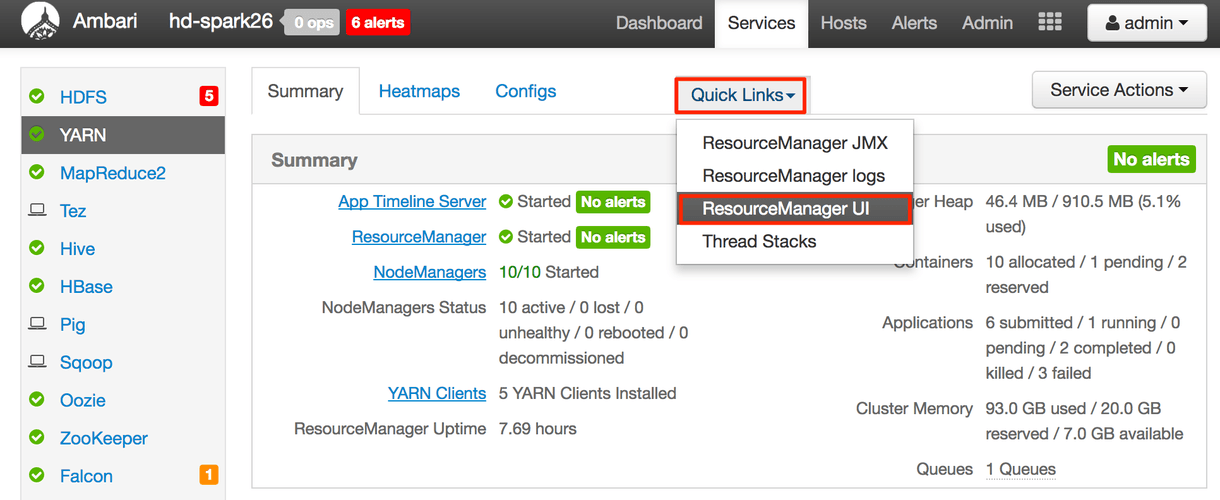
    • In the "quick links" section select "Resource Manager UI" 
ka044000000kPCAAA2_0EM440000002MTy.png
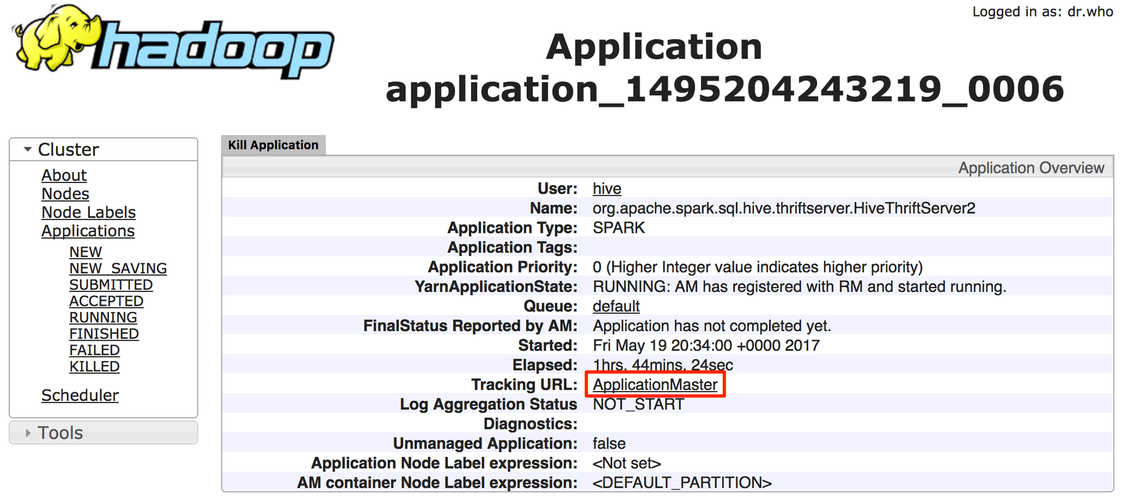
    • Select "Scheduler", then select the Spark thrift server application (the one with the name "org.apache.spark.sql.hive.thriftserver.HiveThriftServer2")
ka044000000kPCAAA2_0EM440000002MU3.png
ka044000000kPCAAA2_0EM440000002MU8.png
    • Go to the Spark UI interface.
ka044000000kPCAAA2_0EM440000002MUD.png
    • In the Spark UI, go to the environment settings page. We will read the properties settings to find out how much memory the cluster has for pinning tables.
ka044000000kPCAAA2_0EM440000002MUI.png
    • How many executors the cluster has:
      • Is dynamic allocation enabled? Find the property spark.dynamicAllocation.enabled if it is set to true, then dynamic allocation is enabled. If it is set to false or property is not in the environment page, dynamic allocation is disabled.
    • What is the executor memory?
      • Find the property spark.executor.memory, what is its value? If it cannot be found, the default is 1g (ref: https://spark.apache.org/docs/latest/configuration.html#application-properties)
    • What is the memory fraction and storage fraction?
      • Find the property spark.memory.fraction, what is its value? If it cannot be found, the default value is 0.6 (ref: https://spark.apache.org/docs/latest/configuration.html#memory-management)
      • Find the property spark.memory.storageFraction, what is its value? If it cannot be found, the default value is 0.5 (ref: https://spark.apache.org/docs/latest/configuration.html#memory-management)
    • Cluster's total memory available for pin tables approximation calculation:
      • Number of executors = spark.dynamicAllocation.maxExecutors OR spark.executor.instances
      • Executor memory = spark.executor.memory
      • Execution and storage memory fraction = spark.memory.fraction
      • Storage memory fraction = spark.memory.storageFraction
      • Pinning table total memory is: ( executor memory - 300m - 400m) * execution and storage memory fraction * storage memory fraction * number of executors.
        • The 300 megabytes is a hard coded value in Spark's code to serve non-execution, non-storage purposes (ref: https://github.com/apache/spark/blob/branch-2.1/core/src/main/scala/org/apache/spark/memory/UnifiedMemoryManager.scala#L194)
        • The 400 megabytes is an approximate of how much memory will the JVM garbage collector survivor space take. When Spark executor's JVM starts, it uses the value in spark.executor.memory as the JVM memory allocation pool (-Xmx argument). But when Spark calculates maximum memory, it uses the java API Runtime.getRuntime().getMaxMemory() and this API does not include the space used by JVM garbage collector survivor space. (ref: http://stackoverflow.com/questions/23701207/why-do-xmx-and-runtime-maxmemory-not-agree ; https://github.com/apache/spark/blob/branch-2.1/core/src/main/scala/org/apache/spark/memory/UnifiedMemoryManager.scala#L211; http://blog.csdn.net/oufuji/article/details/50387104)
        • Note I: this calculation does not take into account spark driver's memory. Given there is one driver and many executors and that this is an approximation, previous calculation is still relevant. If we want add driver's memory, add to the previous calculation the following: ( spark.driver.memory - 300m - 400m) * execution and storage memory fraction * storage memory fraction.
        • Note II: Execution memory is excluded from the calculations above. Pinned tables can occupy more than the storage-only memory space and enter the execution memory space. Once a query requests for execution memory, the least frequently used tables will be evicted up to the storage-only memory space. The value calculated above is for storage-only memory, that is, execution memory is excluded from the calculations above. (ref: https://spark.apache.org/docs/latest/tuning.html#memory-management-overview)
  • How much memory my tables use?
    • Go to beeline
    • Log into the Spark SQL thrift server
      [cloudbreak@ip-10-0-0-52 ~]$ beeline Beeline version 1.2.1000.2.6.0.3-8 by Apache Hive
      beeline> !connect jdbc:hive2://ip-10-0-0-187.ec2.internal:10015/;principal=hive/ip-10-0-0 187.ec2.internal@POCAR.Strategy.COM;kerberosAuthType=kerberos Connecting to jdbc:hive2://ip-10-0-0-187.ec2.internal:10015/;principal=hive/ip-10-0-0-187.ec2.internal@POCAR.Strategy.COM;kerberosAuthType=kerberos Enter username for jdbc:hive2://ip-10-0-0-187.ec2.internal:10015/;principal=hive/ip-10-0-0-187.ec2.internal@POCAR.Strategy.COM;kerberosAuthType=kerberos: user1 Enter password for jdbc:hive2://ip-10-0-0-187.ec2.internal:10015/;principal=hive/ip-10-0-0-187.ec2.internal@POCAR.Strategy.COM;kerberosAuthType=kerberos: Connected to: Spark SQL (version 1.6.3) Driver: Hive JDBC (version 1.2.1000.2.6.0.3-8) Transaction isolation: TRANSACTION_REPEATABLE_READ 0: jdbc:hive2://ip-10-0-0-187.ec2.internal:10>
       
    • Pin one table into memory.
      0: jdbc:hive2://ip-10-0-0-187.ec2.internal:10> cache table demo_fact_waypoint; +---------+--+ | Result | +---------+--+ +---------+--+ No rows selected (236.461 seconds) 0: jdbc:hive2://ip-10-0-0-187.ec2.internal:10>
    • Go to Spark UI and find out how much memory it occupies.
    • Go to the storage section and find the memory size:
          • Find the property spark.dynamicAllocation.maxExecutors, what is its value? If it cannot be found, the default is infinity. (ref: https://spark.apache.org/docs/latest/configuration.html#dynamic-allocation). In case the value is infinity, then assume the maximum number of executors is the number of YARN NodeManagers in the cluster.
          • Find the property spark.executor.instances, what is its value? If it cannot be found, the default is 2. (ref: https://spark.apache.org/docs/latest/running-on-yarn.html)
    • Unpin the table from memory:
    • 0: jdbc:hive2://ip-10-0-0-187.ec2.internal:10> uncache table demo_fact_waypoint; +---------+--+ | Result | +---------+--+ +---------+--+ No rows selected (0.06 seconds) 0: jdbc:hive2://ip-10-0-0-187.ec2.internal:10>
    • Repeat steps 3 - 7 for all tables and record the sum of the table's sizes.
    • ​If spark cluster memory is not enough to store all the tables, then consider increasing the spark executors, executor's memory or prioritizing most frequently used tables over the least frequently used. 
  • How to increase the number of executors?
    • The following are steps to increase number of executors in Ambari (Hortonworks 2.6)
    • Go to the "Spark" section in ambari, select the "Configs" tab
    • In case the dynamic allocation is enabled, go to the "Advanced spark-thrift-sparkconfig" section , change the spark.dynamicAllocation.initialExecutors, spark.dynamicAllocation.maxExecutors and spark.dynamicAllocation.minExecutors according to the needs.
    • In case dynamic allocation is disabled, change the spark.executor.instances in the "Custom spark-thrift-sparkconf" section.
    • Click the Save Button:
    • Restart the spark cluster by going to the top of the page and selecting "Service Actions" and "Restart Spark Thrift Servers".
  • How to increase executor's memory?

The following are steps to increase number of executors in Ambari (Hortonworks 2.6)

  • Go to the "Spark" section in ambari, select the "Configs" tab
  • To change the executor's memory allocation pool: go to the "Advanced Spark-thrift-sparkconfig" and change spark.executor.memory accordingly:
  • To change the execution and storage memory fraction or storage memory fraction: go to "Custom Spark-thrift-sparkconfig" and change property spark.memory.fraction or spark.memory.storageFraction.
  • If the properties are not there, add them using the "Add property" button at the bottom.
  • Save the changes
  • Restart the spark cluster by going to the top of the page and selecting "Service Actions" and "Restart Spark Thrift Servers"

Comment

0 comments

Details

Knowledge Article

Published:

May 22, 2017

Last Updated:

May 22, 2017