Starting with the release of Strategy ONE (March 2024), dossiers are also known as dashboards.
SYMPTOM:
This issue is specific to manipulating the Data Source option in the top right of the Visualization and setting this value to 'None'. When adding a metric from Dataset 2 to the grid with a related attribute and/or metric from Dataset 1, the Visualization will return null for the metric from Dataset 2 as a result of the Data Source option chosen.
The issue can also be seen when there is a metric filter on ambiguous metric. In such case, the metric filter is ignored.
STEPS TO REPRODUCE:
This scenario was created using the Strategy Tutorial Project.
1. Create a report with Year and Profit and name this 'DS1'.
2. Copy this report and name it 'DS2'.
3. Add both of these reports to a VI Dashboard/Dossier.
4. Add the 'Year' Attribute from DS1 and add the 'Profit' metric from DS2.
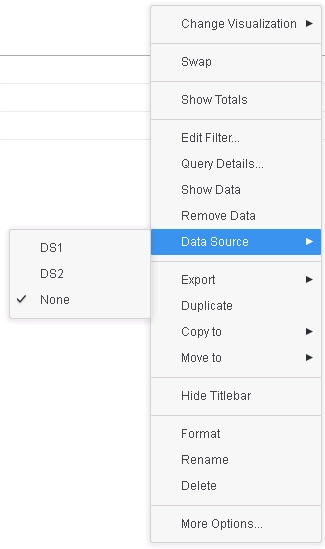
5. Go to the top right of the VIsualization, click the ellipsis button, scroll down to 'Data Source' and set this option to 'None'.
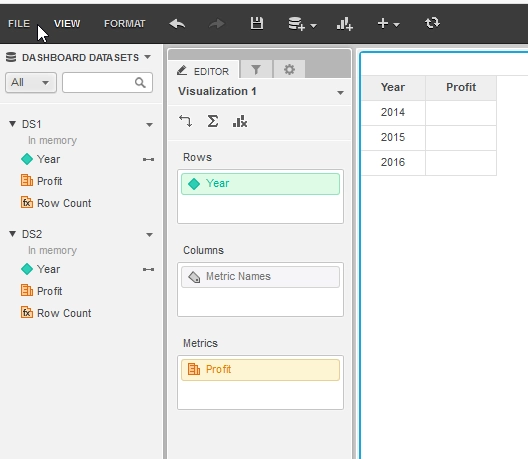
Profit metric is ambiguous, therefore returns null instead of calculating it from the appropriate dataset.
CAUSE:
This is a limitation of Data Blending Engine in Strategy 10.4.5 and Strategy 10.10 and lower where the Data Blending Engine could not find an appropriate dataset for the ambiguous metric if the Data Source for the visualization is set to None.
ACTION/RESOLUTION:
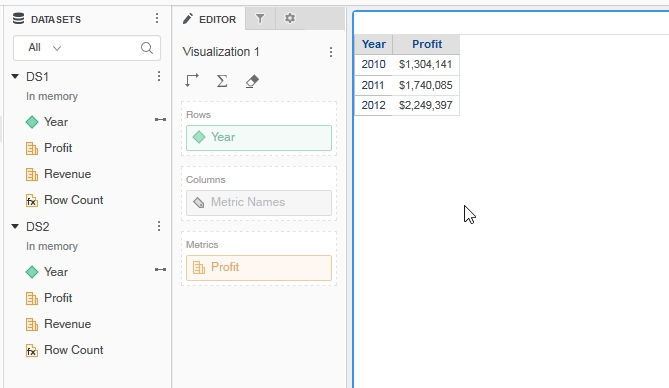
This is enhancement in Strategy 10.4.6 and Strategy 10.11 and higher where the Data Blending Engine will detect the appropriate dataset to calculate the metric.
For filters containing ambiguous metrics, metric source can now be automatically determined to pick the right dataset to apply the filter and the metric filter is applied.
Strategy reference numbers for this technical note are KB440794 and US84468.
