EducationSoftwareStrategy.com
StrategyCommunity

Knowledge Base

Product

Community

Knowledge Base

TopicsBrowse ArticlesDeveloper Zone

Product

Download SoftwareProduct DocumentationSecurity Hub

Education

Tutorial VideosSolution GalleryEducation courses

Community

GuidelinesGrandmastersEvents
x_social-icon_white.svglinkedin_social-icon_white.svg
Strategy logoCommunity

© Strategy Inc. All Rights Reserved.

LegalTerms of UsePrivacy Policy
  1. Home
  2. Topics

Platform Analytics warehouse database is not update to date and Kafka topic folders are empty in MicroStrategy 2021 Update 2


Danfeng Zhan

Principal Product Specialist • Strategy


This issue articulate Platform Analytics warehouse database is not update to date and Kafka topic folders are empty in MicroStrategy 2021 Update 2 due to statistics feature flag not enabled at project level. A solution for this issue is available in current releases.

SYMPTOM:
In Strategy 2021 Update 2, Platform Analytics warehouse database is not update to date. It is noticed most of the topic folders are empty such as Mstr.PlatformAnalytics.IsSessionStats-0, Mstr.PlatformAnalytics.IsReportStats-0.
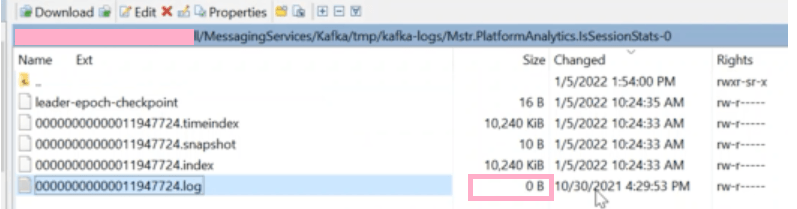
ka04W000001Iu2bQAC_0EM4W000004XVG0.png


NOTE: Mstr.AnalyticsServer.Diag.xxxxxxxxxx.CastorServer-0 has updated telemetry and new xml trace is being written into it.
Below items have been verified:
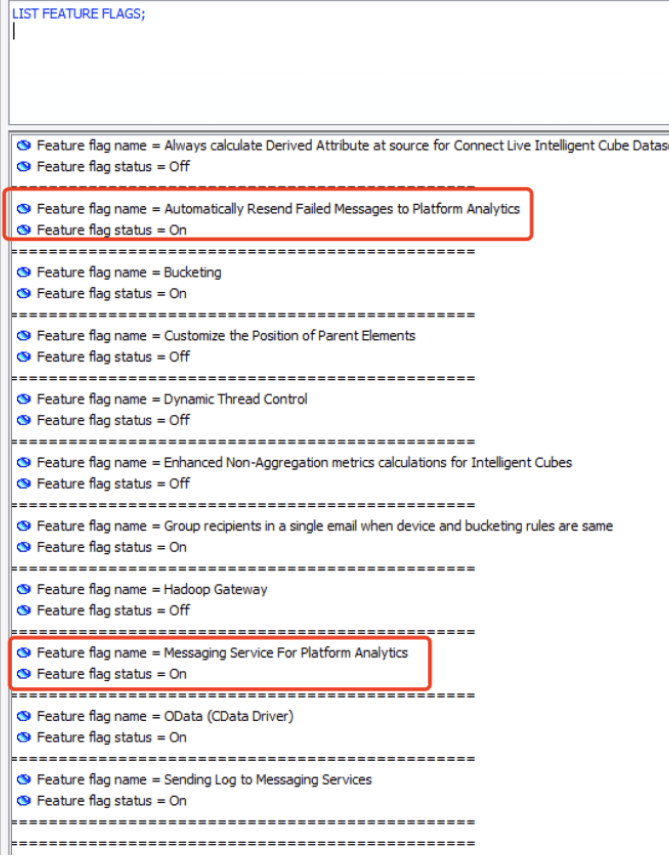
  • All related services Kafka, zookeeper, Redis, PA consumer are up and running
    Refer to Knowledge Base Article below for steps to check the services:
    Troubleshooting: How to Check Platform Analytics Services
  • Messaging service feature flag is enabled as shown below
ka04W000001Iu2bQAC_0EM4W000004XVG1.png
  • Folder FailedSentOutMessages is empty on Intelligence Server machine
  • Kernel>StatisticsTrace and StatsConfigTrace doesn’t provide additional insight
  • Error of 'Message size too large' is captured in KFKProducerError.log, issue persists after enlarge the message size by below steps:
  1. Add message.max.bytes in command manager command such as below:

ALTER SERVER CONFIGURATION ENABLEMESSAGINGSERVICES TRUE CONFIGUREMESSAGINGSERVICES "bootstrap.servers:10.23.102.101:9092/batch.num.messages:5000/queue.buffering.max.ms:2000/message.max.bytes:100000000";

  1. Add message.max.bytes=100000000 in file server.properties.

Further Readings:
Topic folder:

  • For Windows: C:\Program Files (x86)\MicroStrategy\Messaging Services\tmp\kafka-logs
  • For Linux: /opt/MicroStrategy/MessagingServices/Kafka/tmp/kafka-logs

 
To check if each topic has updated data, open the topic file in notepad.
For example, Mstr.PlatformAnalytics.IsSessionStats-0, the one with type of "Text" is the topic content as shown below:
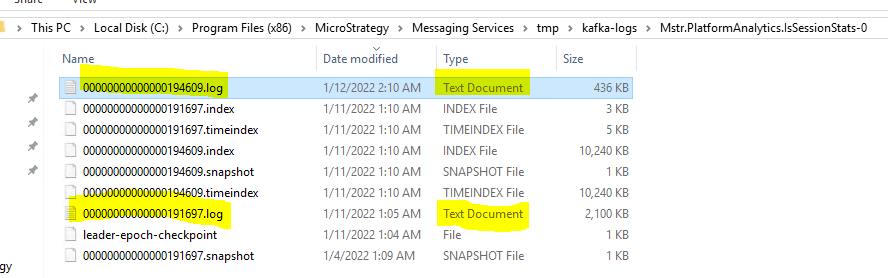
ka04W000001Iu2bQAC_0EM4W000004XVG2.png


Refer to Knowledge Base Article below to check topic with kafka-console-consumer.sh
KB442629: How to check topic data in Linux for Strategy Platform Analytics 11.0 and above
CAUSE:
 
PASTATISTICS BASICSTATS feature flag is disabled for all the projects.
ACTION:
 

  1. Verify the statistics flag by executing below command:
    LIST ALL PROPERTIES FOR PASTATISTICS IN PROJECT "Strategy TUTORIAL";
  2. Open the basic stats by executing below command:
    ALTER PASTATISTICS BASICSTATS ENABLED DETAILEDREPJOBS TRUE DETAILEDDOCJOBS TRUE JOBSQL TRUE COLUMNSTABLES TRUE IN PROJECT "Strategy TUTORIAL";

Comment

0 comments

Details

Knowledge Article

Published:

January 18, 2022

Last Updated:

January 18, 2022