EducationSoftwareStrategy.com
StrategyCommunity

Knowledge Base

Product

Community

Knowledge Base

TopicsBrowse ArticlesDeveloper Zone

Product

Download SoftwareProduct DocumentationSecurity Hub

Education

Tutorial VideosSolution GalleryEducation courses

Community

GuidelinesGrandmastersEvents
x_social-icon_white.svglinkedin_social-icon_white.svg
Strategy logoCommunity

© Strategy Inc. All Rights Reserved.

LegalTerms of UsePrivacy Policy
  1. Home
  2. Topics

KB482889: Project cannot be unloaded via Command Manager or Developer when there is user session or job execution in MicroStrategy 2019


Danfeng Zhan

Principal Product Specialist • Strategy


This issue has been classified as a working by design behavior by MicroStrategy. The impact is limited to MicroStrategy 11.x product. A solution for this issue is available in current release.

SYMPTOM:
 
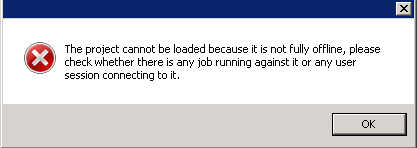
in Strategy 2019, “The project can’t be loaded because it is not fully offline, please check whether there is any job running against it or any user session connecting to it. “occurs during unloading a project via Command Manager or Developer when there is user session or job execution.  
 

ka044000000kRrSAAU_0EM44000000gOeJ.jpeg

REPRODUCTION:

  1. Login to MSTR web and access a project
  2. Try unloading same project using command manger

    ex: UNLOAD PROJECT "Strategy Tutorial" FROM CLUSTER ALL SERVERS;
  3. Try loading project using command manager

    ex: LOAD PROJECT "Strategy Tutorial" TO CLUSTER ALL SERVERS;
  4. Following error pops up:“The project can’t be loaded because it is not fully offline, please check whether there is any job running against it or any user session connecting to it.“


CAUSE:
 
This is working as designed with Strategy Intelligence Server 11.0 and above.
 
Strategy Intelligence Server 11.0, the project unloading progress is enhanced by enforcing the project to be complete offline before loading the project to avoid scheme inconsistency issues in cluster. If there is still a job running in that project, project will not be unloaded completely and stay in "unload pending" status.
 
ACTION:
 
Cancel all the jobs and disconnect all the user sessions which are connecting to the project before unload the project.
To cancel a job from job monitor: 

ka044000000kRrSAAU_0EM44000000gOed.jpeg

To end a user session from user session monitor: 

ka044000000kRrSAAU_0EM44000000gOei.jpeg

If the project stays in "unload pending" status for a long time, this action can also be done in job monitor and user connection monitor to let the project unload successfully. 
 
Article Reference Number: KB482889


Comment

0 comments

Details

Knowledge Article

Published:

February 20, 2019

Last Updated:

February 20, 2019