EducationSoftwareStrategy.com
StrategyCommunity

Knowledge Base

Product

Community

Knowledge Base

TopicsBrowse ArticlesDeveloper Zone

Product

Download SoftwareProduct DocumentationSecurity Hub

Education

Tutorial VideosSolution GalleryEducation courses

Community

GuidelinesGrandmastersEvents
x_social-icon_white.svglinkedin_social-icon_white.svg
Strategy logoCommunity

© Strategy Inc. All Rights Reserved.

LegalTerms of UsePrivacy Policy
  1. Home
  2. Topics

Publish MicroStrategy Cubes from External Workflow Schedulers


Kenneth Osmond

Principal Consultant • MicroStrategy


ka04W00000147zsQAA_0EM4W000005aIsL.png


OVERVIEW 

 
A common issue faced by many organizations is the synchronization of data lake updates with Strategy cube refresh. The most common scenario is that the data pipeline to update the data lake is managed by an enterprise scheduler, oozie, streamer or other kind of data ingestion manager. These updates usually occur and are expected to complete within a certain time window, often several times a day or hour. To keep Strategy cubes as current as possible, the usual method is to create Strategy cube publishing subscriptions that are triggered by a time-based schedule. These subscriptions are configured to run shortly after the data lake update is complete.  
 
The synchronization strategy described above is most effective in environments where relevant data lake updates occur less frequently (e.g. daily) and can reliably complete before the Strategy cube refresh occurs. 
 
With the Big Data trend, the factors of Velocity, Volume and Big Data Platform Architecture have an impact on the synchronization strategy in the following ways: 
 

  1. Velocity affects cube refresh in this scenario because data lake updates occur very frequently and require execution of frequent Strategy subscriptions to refresh the cubes, often several times per hour. This can result in multiple overlapping workloads in the Strategy environment and increased job queuing, reducing Strategy performance and increasing latency. 


  1. Volume also affects cube refresh because longer times to ingest data into the data lake increases completion duration, leaving a shorter interval between data lake update and Strategy cube refresh. In response to this is cube schedules are delayed and may still be in progress when the next data lake update begins and may still be in progress after it completes. Side effects of the increased volume and attempts to compensate have been observed that include: scheduled cube refresh starting when a prior cube refresh is in progress that causes job cancellation; multiple data lake updates before cube refresh; long running cube refresh jobs when schedules are missed; and capacity waste when multiple cube refreshes done on a single data lake update. Synchronization timing shifts can have different impacts according to the nature of the shift. 


  1. Big Data Platform Architecture can also play a role. For example, if the platform is based on Hadoop file system or similar, the tables being updated become unavailable during data lake ingestion. When a Strategy cube refresh occurs and the data lake table is unavailable, or becomes unavailable while the cube query is executing, the cube refresh will fail with a database error, possibly after wasting many processing cycles. 


SOLUTION APPLICATION 

 
The solution discussed in this article is a python application that leverages the Strategy API suite to provide an external scheduler, i.e. the scheduler that manages the data lake updates, the ability to initiate an on-demand cube refresh immediately after the data lake update is complete. The application is named Strategy Cube Trigger, abbreviated as “MCT”.  
 
MCT can be used asynchronously where the external scheduler initiates cube refresh but does not receive or interpret any status result, or it can be used synchronously in either a blocking or non-blocking mode where status results can be returned to the external scheduler.  
 
When used synchronously in the non-blocking mode, MCT first checks whether the cube is available to be published and if so, initiates publishing, otherwise it does not attempt to publish and exits. A status result is returned to the external scheduler.   
 
When used synchronously in the blocking mode, MCT first checks whether the cube is available and waits a specified duration for it to become available. If the cube becomes available within the waiting time window, publishing is initiated. A further option is available that causes MCT to wait until publishing is complete before exiting. A status result is returned to the external scheduler.   
 

BENEFITS 


  • Reduces data latency to a minimum between data lake and cubes by initiating publishing immediately after data lake ingestion is complete and data lake tables are available 
  • Eliminates Strategy failed cube publishing attempts when cubes are busy 
  • Eliminates multiple cube publish job queuing on the same timed subscription 
  • Eliminates longer-running cube updates when a refresh cycle is missed 
  • Eliminates redundant cube refreshes 
  • Eliminates job failures due to data lake table unavailability 
  • Reduces Strategy workloads and increases performance 


APPLICATION STRUCTURE 

 
The following pseudo-code shows the application flow: 


# Pseudo Code for MSTR Cube Trigger 

mstr_cube_trigger(optional_request_list) 

    # Read config from properties file 

    get_properties(properties_file)      

    # Get request list from command line if not passed to function 

    if not optional_request_list: 

        get_json_request_from_argv()     

    # Login to Strategy 

    rest_api_login()  

    # Process request list                    

    for request in request_list: 

        if update_type = "event": 

            # Re-publish by event-triggered subscription 

            trigger_event(request::event_spec) 

        if update_type = "api publish":  

            # Republish by cube api, irr api or subscription 

            if not skip_if_busy(): 

                # Block until cube is available 

                wait_for_cube_ready(request::cube_spec)      

            if cube_ready(): 

                # Publish by API 

                publish(request::cube_spec)                  

                if synchronous = True: 

                    # Block until the cube finishes publishing 

                    wait_for_cube_ready(request::cube_spec)  

    rest_api_logout() 

    exit 


APPLICATION FEATURES 


  • Callable from external scheduler via command line interface 
  • Callable from another python script 
  • Requests submitted as json message on command line, argument to python function or from a text file  
  • Multiple cube refresh requests can be packaged into a single request message 
  • Optionally scheduled from cron job to check for requests sent as file by sftp 
  • Logs requests and results 
  • Connections configured in properties file 
  • Connects with standard, ldap or Kerberos authentication 
  • Runs on a server or in a container 
  • Initiate cube refresh subscriptions via Strategy event 
  • Initiate cube refresh directly via Strategy REST APIs 
  • Optionally block until cube is ready when using REST APIs 
  • Optionally block until cube has finished publishing when using REST APIs 
  • Optionally skip refresh if cube is busy when using REST APIs 
  • Synchronous refresh modes can include direct cube refresh for OLAP and MTDI cubes, incremental refresh report (IRR) for OLAP cubes, subscription based refresh for MTDI cubes 
  • Cube refresh options include Add, Update, Replace and Upsert 


APPLICATION OVERVIEW – SYNCHRONOUS MODE 


ka04W00000147zsQAA_0EM4W000005aIfR.jpeg


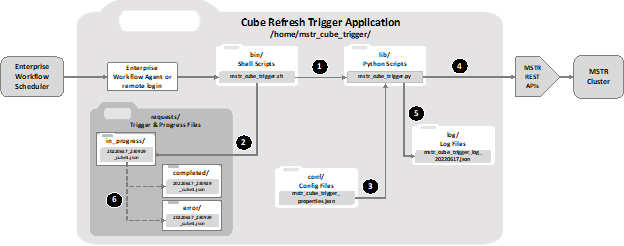
  1. Enterprise Workflow launches mstr_cube_trigger.sh script with json string containing cube refresh instructions as parameter. 
  1. mstr_cube_trigger.sh writes the json string passed in from the Enterprise Workflow to a file in the requests/in_progress folder. 
  1. mstr_cube_trigger.py loads configuration mstr_cube_trigger_properties.json to obtain information such as url for MSTR library, credentials, etc. 
  1. mstr_cube_trigger.py dispatches MSTR REST API calls to trigger cube refresh. 
  1. mstr_cube_trigger.py writes completion status to mstr_cube_trigger_log_<yyyymmdd>.json. 
  1. mstr_cube_trigger.sh moves the file from requests/in_progress folder to either of requests/completed or requests/error folder depending on outcome.  


APPLICATION OVERVIEW – ASYNCHRONOUS MODE 


ka04W00000147zsQAA_0EM4W000005aIpv.jpeg


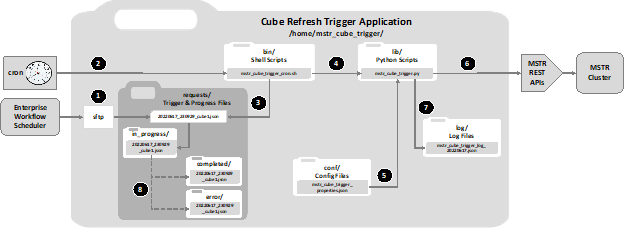
  1. Enterprise Workflow transfers trigger request json file to requests folder. 
  1. mstr_cube_trigger_cron.sh script is periodically run via cron to check for request files every minute. 
  1. mstr_cube_trigger.sh detects new trigger request json file in requests folder and moves it to requests/in_progress folder. 
  1. The mstr_cube_trigger_cron.sh launches python script mstr_cube_trigger.py. 
  1. mstr_cube_trigger.py loads configuration mstr_cube_trigger_properties.json to obtain information such as url for MSTR library, credentials, etc. 
  1. mstr_cube_trigger.py dispatches MSTR REST API calls to trigger cube refresh. 
  1. mstr_cube_trigger.py writes completion status to mstr_cube_trigger_log_<yyyymmdd>.json. 
  1. mstr_cube_trigger.sh moves the file from requests/in_progress folder to either of requests/completed or requests/error folder depending on outcome.  


USE CASES 

 
Here are some examples of use case scenarios for the MCT: 
 

Use Case 

Trigger API 

Cube Type 

Method 

Mode 

Wait for Cube Ready 

Skip Publish If Cube Not Ready 

Wait for Publish To Complete 

Outcome 

U01 

Event 

MTDI 

Event Driven Subscription 

Async 

n/a 

n/a 

n/a 

Trigger cube refresh 

U02 

Event 

OLAP 

Event Driven Subscription 

Async 

n/a 

n/a 

n/a 

Trigger cube refresh 

U03 

Event 

OLAP 

Event Driven IRR Subscription  

Async 

n/a 

n/a 

n/a 

Trigger cube refresh 

U04 

Cube 

MTDI 

API 

Async 

N 

Y 

N 

Execute refresh if cube ready else skip. Continue without wait. 

U05 

Cube 

OLAP 

API 

Async 

N 

Y 

N 

Execute refresh if cube ready else skip. Continue without wait. 

U06 

IRR 

OLAP 

IRR API 

Async 

N 

Y 

N 

Skip if cube is not ready.  
Continue without wait. 

U07 

Subscr 

MTDI 

Immediate Subscription 

Async 

n/a 

n/a 

n/a 

Directly execute cube refresh subscription. 

U08 

Cube 

MTDI 

API 

Sync 


Y 

N 

Y 

Wait for cube ready before publish. Wait for cube to finish. 


U09 

Cube 

OLAP 

API 

Sync 

Y 

N 

Y 

Wait for cube ready before publish. Wait for cube to finish. 

U10 

IRR 

OLAP 

IRR API 

Sync 

Y 

N 

Y 

Wait for cube ready before publish. Wait for cube to finish. 


EXAMPLES - Trigger by Remote Login or Workflow Agent 

 
File Name: <path>/mstr_cube_trigger/bin/cube_trigger.sh 
Usage: cube_trigger.sh <json_trigger_request_string> 
 

Command 

Result 

 cube_trigger.sh ' 

    {"mstr_cube_trigger":[ 

        { 

            "event":{"name":"RefreshCubeDemo"} 

        } 

     ]}' 

trigger event by supplying event name 

cube_trigger.sh ' 

    {"mstr_cube_trigger":[ 

        { 

            "event":{"id": "EB11845F9BEA70D22019AC39B4195BBD"} 

        } 

    ]}' 

trigger event by supplying event id 

cube_trigger.sh ' 

    {"mstr_cube_trigger":[ 

        { 

            "project":{ "id":"B016BFB5D096F11FDF107BAA42E836A1"}, 

            "cube":{ "id":"B09B090080EFA512A8FE1FAD1D11EC4C", 

                           "skip if busy":"Y", 

                           "block until published":"N", 

                           "max block minutes":60 

                         } 

         } 

    ]}' 

publish cube by supplying project and cube id 

cube_trigger.sh ' 

    {"mstr_cube_trigger": [ 

        { 

            "project":{"name":"Network Big Data"}, 

            "folder":{"name":"Finance/Public Objects/Reports/Sales"},       

            "cube":{ "name":"MTDI Test Cube", 

                            "skip if busy":"Y",  

                            "block until published":"N", 

                            "max block minutes":60 

                         } 

        } 

    ]}' 

publish cube by supplying project, folder and cube names 

cube_trigger.sh ' 

    {"mstr_cube_trigger":[ 

        { 

            "project":{"id":"B016BFB5D096F11FDF107BAA42E836A1"}, 

             "folder":{"id":"1A725C3268C2D25D608FDFF087F4AD28"}, 

             "cube":{"name": "MTDI Test Cube"} 

        } 

    ]}' 

publish cube by supplying project, folder and cube id and name mix 


REQUIREMENTS 


  • Strategy environment, with Library running and user account having permission to run REST APIs, triggers and subscriptions 
  • Linux, VM or Mac OSX environment to host MCT 
  • Python 3.10 or higher installed on host 
  • cron and sftp on host if using sftp to deliver requests in text files 
  • enterprise scheduler agent or rsh on host to launch MCT 
  • existing python application workflow orchestrator that can call MCT natively 


WHAT’S NEXT? 

 
Another article will be published shortly to show code examples and how install the application. 


Comment

0 comments

Details

Knowledge Article

Published:

June 30, 2023

Last Updated:

June 30, 2023