Starting with the release of Strategy ONE (March 2024), dossiers are also known as dashboards.
New Features & Functionality
Publish multiple dossiers or documents to the Strategy Library
With version 10.11, administrators can select multiple dossiers or documents at a time from Strategy Workstation and publish them to users’ libraries. Via the Strategy Library, end users can access personalized dossiers and documents on a browser or on a mobile device. Administrators can select either individual users or user groups as recipients for the dossiers or documents. Additionally, it offers the option to send an email notification to the user when the dossiers are published.
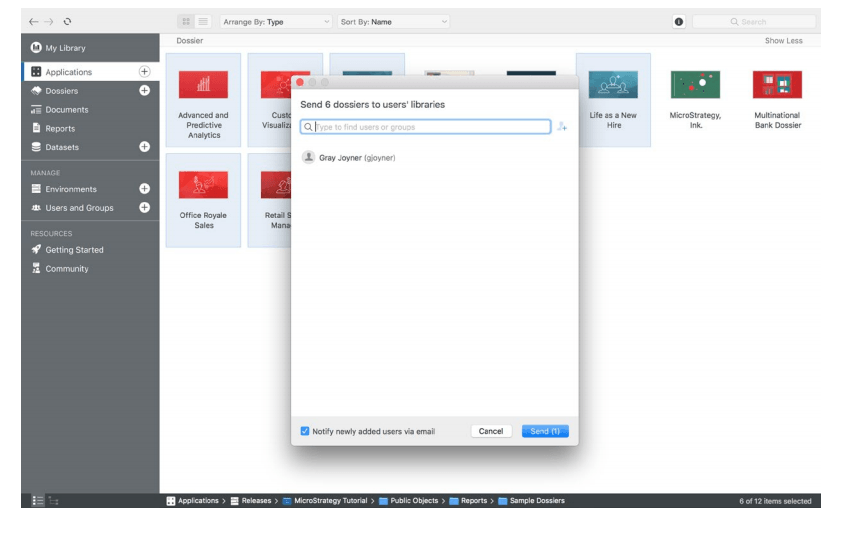
Get started with these next few steps
1. Open Workstation
2. Navigate to the dossier(s) or document(s) you want to push to people's libraries
3. Multi-select the dossiers (press and hold the Ctrl key for Windows and Command key for Mac)
4. Right click and choose Send to Libraries
5. Type in the names of the specific users or groups you want to push the dossier(s) to
6. Then click Send
Other options:
1. Choose Get Link and generate a link for sharing your dossiers
2. Choose Manage Security Access to manage the security access for your dossier
Note: You can share up to 100 dossiers at the same time.
Follow along with this video tutorial to learn how to publish and share in Strategy Library.
