Starting with the release of Strategy ONE (March 2024), dossiers are also known as dashboards.
The Python script below was created and tested in Jupyter Notebook with Strategy 2021 u.5.1 and mstrio library 11.3.6.101. Main steps in this script:
- establish connection to MSTR environment (in Jupyter Notebook or Workstation) without specifying project
- Get all dossiers across all projects
- For each dossier get info about datasets
- Export dossiers info to a CSV file
- For each dataset get info about type and path
- Export datasets info to a CSV file
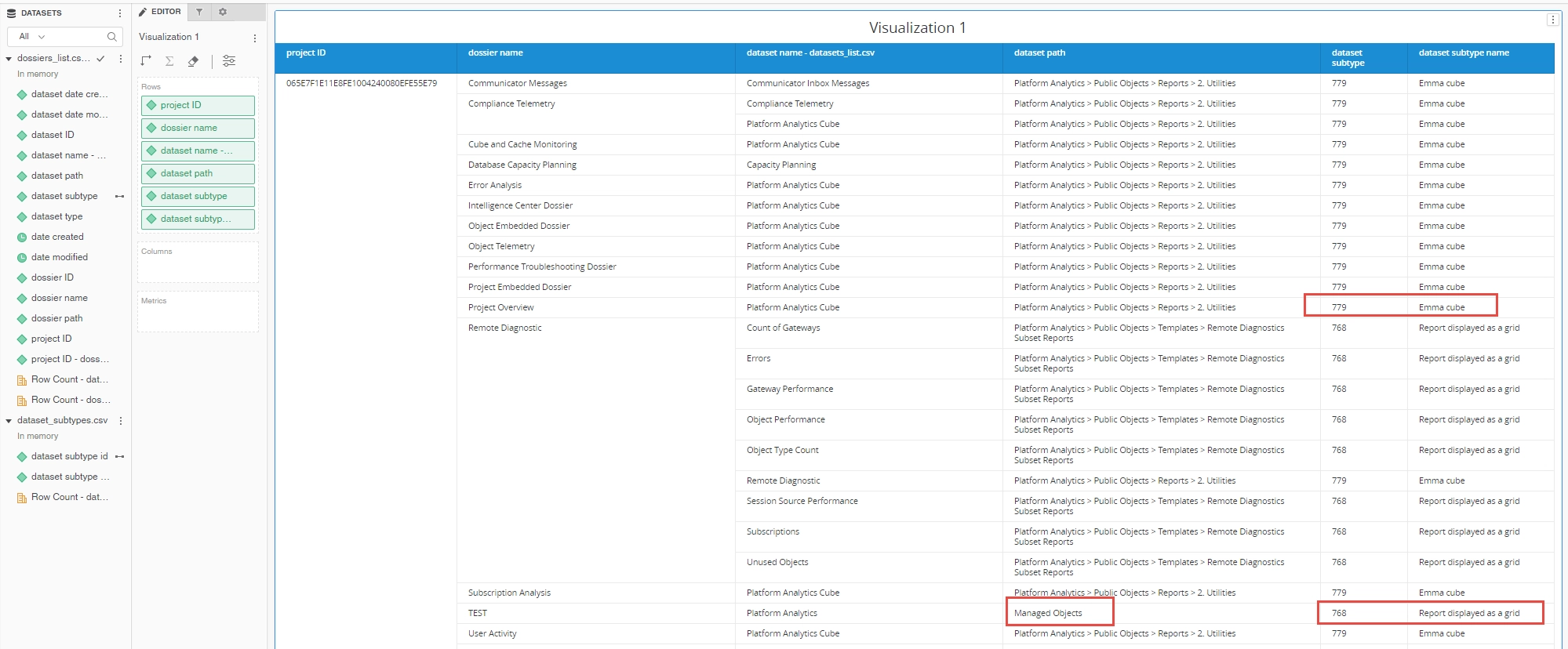
Information from columns "dataset_path" and "dataset_subtype" will help you understand what kind of datasets have been added to each dossier. You can use combine exported CSV file in a new dossier for filtering and further analysis. Example visualizations of the results:
Attached to this article are:
- Jupyter Notebook file with the Python code used
- the same code as a regular .py file
- examples of output files "datasets_list.csv" and "dossiers_list.csv"
- "dataset_subtypes.csv" file that contains dataset subtypes names
It is recommended to run the script with administrator user that can bypass security checks. The script will brake if you don't have API access to a project or read access to some reports or documents. You can add exceptions handling and replace function list_dossiers_across_projects() with list_dossiers() that reads a single project only.
Please note - I've added color formatting in the code below (http://hilite.me/ ). Code copied from here might not work due to indentation issues. In that case, use attached file with sample code. Also this CRM is adding ';' after URLs.
import csv
import pandas as pd
from datetime import datetime
from mstrio.types import ObjectSubTypes, ObjectTypes
from mstrio.project_objects import Dossier
from mstrio.project_objects.dossier import list_dossiers_across_projects
from mstrio.object_management import Object


# Jupyter Notebook login
import getpass
from mstrio.connection import Connection

mstr_username = "mstr"
mstr_password = getpass.getpass(prompt='Password ')
mstr_base_url = "https://env-XXXXXX.customer.cloud.Strategy.com"
mstr_url_api  = mstr_base_url+"/MicroStrategyLibrary/api"

conn = Connection(mstr_url_api, mstr_username, mstr_password)


# Workstation login
from mstrio.connection import get_connection
conn = get_connection(workstationData)

# FUNCTIONS

def search_ancestors(ancestors):
    path=''
    if ancestors: # necessary if you set get_ancestors parameter to false
        for i in range(len(ancestors)):
            path= path+' > '+(ancestors[i]['name'])
    else:
        path="___NO PATH"
    return path[3:]

def get_datasets(connection, project_ID, dossier_ID):
    res = connection.get(url=f"{connection.base_url}/api/v2/dossiers/{dossier_ID}/definition",
                                headers={'X-MSTR-ProjectID': project_ID})
    return res

def get_object(connection, project_ID, object_ID):
    res = connection.get(url=f"{connection.base_url}/api/objects/{object_ID}?type=3",
                                headers={'X-MSTR-ProjectID': project_ID})
    return res


# ### Get all dossiers accross all projects
ldap=list_dossiers_across_projects(connection=conn)
print(f"Length of dossiers list: {len(ldap)}")


# ### For each dossier get info about datasets
count_dos=0  # this counter will give you hints how long the whole process will take
dt1=datetime.now()
dossiers_list,datasets_list=[],[]

for a in ldap[:]:
    datasets_json=get_datasets(conn, a._project_id, a.id).json()
    datasets_local=[["missing","missing"]]

    if djd:=datasets_json.get('datasets'): # walrus operator; works for Python 3.8 or higher
        datasets_local=[]
        for d in djd:
            datasets_local.append([d['name'], d['id']]) #this is just for this dossier
            datasets_list.append((d['name'], d['id'], a._project_id)) #this gathers all datasets
    for dt in datasets_local:
        dossiers_list.append([a._project_id, a.id, a.name, search_ancestors(a._ancestors),
                              a._date_created.strftime("%Y-%m-%d %H:%M:%S"),
                              a._date_modified.strftime("%Y-%m-%d %H:%M:%S"),
                              dt[0], dt[1]])

    count_dos+=1
    if (count_dos % 50) == 0 or count_dos == (len(ldap)):
        eta = (len(ldap[:])/count_dos)*(datetime.now()-dt1)
        print(count_dos, "dossiers processed / ETA: ", eta)
    #print(a.__dict__)

print("\nFinito...\n")
print(f"Datasets entries generated: {len(dossiers_list)} (some are empty, some are used multiple times)")
datasets_list=list(set(datasets_list))
print(f"Unique datasets: {len(datasets_list)}")


# Export dossiers to CSV
headers_dossiers=["project_ID", "dossier_ID","dossier_name", "dossier_path", "date_created", "date_modified",
                  "dataset_name", "dataset_ID"]
df = pd.DataFrame(dossiers_list, columns = headers_dossiers)
df.to_csv(f"dossiers_list.csv", index=False, encoding='utf-8', sep=",",
          quoting=csv.QUOTE_ALL, escapechar="\\", header=True)


# ### For each dataset get info about type and path
count_dos=0  # this counter will give you hints how long the whole process will take
dt1=datetime.now()
datasets_list_new=[]

for b in datasets_list[:]:
    dj=get_object(conn, b[2], b[1]).json()
    datasets_list_new.append([b[2], dj["id"], dj["name"], dj["type"], dj["subtype"],
                              dj["dateCreated"], dj["dateModified"], search_ancestors(dj["ancestors"])])

    count_dos+=1
    if (count_dos % 50) == 0 or count_dos == (len(datasets_list)):
        eta = (len(datasets_list[:])/count_dos)*(datetime.now()-dt1)
        print(count_dos, "datasets processed / ETA: ", eta)

print("\nFinito...\n")


# Export datasets to CSV
headers_datasets=["project_id","dataset_id", "dataset_name", "dataset_type","dataset_subtype",
                  "dataset_date_created","dataset_date_modified","dataset_path"]
df = pd.DataFrame(datasets_list_new, columns = headers_datasets)
df.to_csv(f"datasets_list.csv", index=False, encoding='utf-8', sep=",",
          quoting=csv.QUOTE_ALL, escapechar="\\", header=True)
