Ever wondered how to calculate the distance or travel duration from point A to point B with Strategy ?
It's possible with our R integration ! Here is a quick tutorial to implement this in a Cloud environment.
HowTo
Connect remotely to your server (in this example, Linux, would work for Windows aswell)
Open a SSH console via Putty
Start the R console by typing : sudo R
Install Google Map package : install.packages("ggmap")
Select your mirror by entering the ID
Wait for the ggmap installation (dozens of seconds, up to a few minutes)
Load Google Map package in R : library(ggmap)
Run a test in R Console : mapdist("75015, France", "92400, France", mode="driving")

This retrieves the the distance and real-time driving time
Now, move the attached Rscripts (from "ggmaps.zip") into /opt/mstr/R_Integration_Pack/Rscripts
Or create them from this code, here "MapMinute.R" file
#Strategy_BEGIN
#
#RVAR from -input -string -scalar
#RVAR to -input -string -scalar
#
#RVAR res -output -numeric -scalar  #Metric Expression: RScriptSimple<_RScriptFile="D:\Management\02 Knowledge Sharing\2015_0520 R Integration\Sample R Script\01 Simple\MapDist.R", _InputNames="from, to">(from, to)
if(exists("mstr.WorkingDir")) setwd(mstr.WorkingDir)  #Working Directory if executed by Strategy
#
#Strategy_END

if(!require("ggmap")){
  install.packages("ggmap",repos="http://cran.rstudio.com")
  library(ggmap)
}
list <- mapdist(from, to,mode="driving")
res <- list$minutes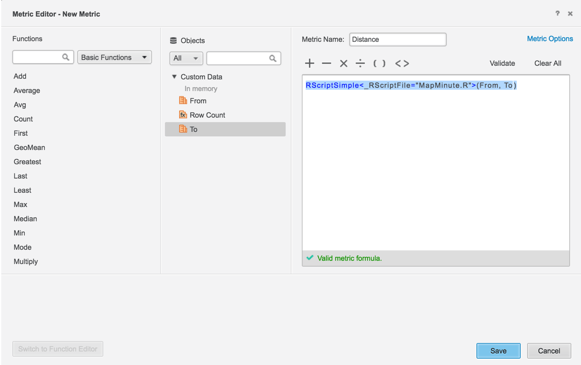
From & To must be valid metrics, with Text format.
Next Steps & Thoughts
You can also calculate such metric in a iCube, or in a Datamart Report if you want to store this in the WH.
Also, I think there is a limit of 2500 requests a day, to be considered for large scale demos or POCs
ps: Thanks to Madrid, Carlos & Hani Soewandi for the idea & assistance setting this up
Additional script samples
MapKm.R
#Strategy_BEGIN
#
#RVAR from -input -string -scalar
#RVAR to -input -string -scalar
#
#RVAR res -output -numeric -scalar  #Metric Expression: RScriptSimple<_RScriptFile="D:\Management\02 Knowledge Sharing\2015_0520 R Integration\Sample R Script\01 Simple\MapDist.R", _InputNames="from, to">(from, to)
if(exists("mstr.WorkingDir")) setwd(mstr.WorkingDir)  #Working Directory if executed by Strategy
#
#Strategy_END

if(!require("ggmap")){
  install.packages("ggmap",repos="http://cran.rstudio.com")
  library(ggmap)
}
list <- mapdist(from, to,mode="driving")
res <- list$km
#Strategy_BEGIN
#
#RVAR from -input -string -scalar
#RVAR to -input -string -scalar
#
#RVAR res -output -numeric -scalar  #Metric Expression: RScriptSimple<_RScriptFile="D:\Management\02 Knowledge Sharing\2015_0520 R Integration\Sample R Script\01 Simple\MapDist.R", _InputNames="from, to">(from, to)
if(exists("mstr.WorkingDir")) setwd(mstr.WorkingDir)  #Working Directory if executed by Strategy
#
#Strategy_END

if(!require("ggmap")){
  install.packages("ggmap",repos="http://cran.rstudio.com")
  library(ggmap)
}
list <- mapdist(from, to,mode="driving")
res <- list$miles
#Strategy_BEGIN
#
#RVAR from -input -string -scalar
#RVAR to -input -string -scalar
#
#RVAR res -output -numeric -scalar  #Metric Expression: RScriptSimple<_RScriptFile="D:\Management\02 Knowledge Sharing\2015_0520 R Integration\Sample R Script\01 Simple\MapDist.R", _InputNames="from, to">(from, to)
if(exists("mstr.WorkingDir")) setwd(mstr.WorkingDir)  #Working Directory if executed by Strategy
#
#Strategy_END

if(!require("ggmap")){
  install.packages("ggmap",repos="http://cran.rstudio.com")
  library(ggmap)
}
list <- mapdist(from, to,mode="driving")
res <- list$hour