Starting with the release of Strategy ONE (March 2024), dossiers are also known as dashboards.
R Integration Pack is missing. If chosen that way, the R Integration Pack should be installed along with MSTR installation following the manual for it. When opening a report with using R, an error such as “R install not found” will appear and the R Integration Pack folder will not be visible in the installation folder. The installer will point to a successful installation, but the corresponding files are not existent.
The principal cause of this issue is a defect that was solved in the Strategy 2021 Update 6, available since June 2022. Some considerably rare cases have been seen on newer releases (above 2021 Update 6) but those case are more related to OS inconsistencies or side processes that don’t allow the correct installation of R Integration Pack.
For versions older than Strategy 2021 Update 6, it is recommended to upgrade to it or superior releases.
If this is not possible, there is a workaround for sorting the problem until the user upgrades the software version:
Computer\HKEY_LOCAL_MACHINE\SOFTWARE\WOW6432Node\Strategy\R Integration Pack
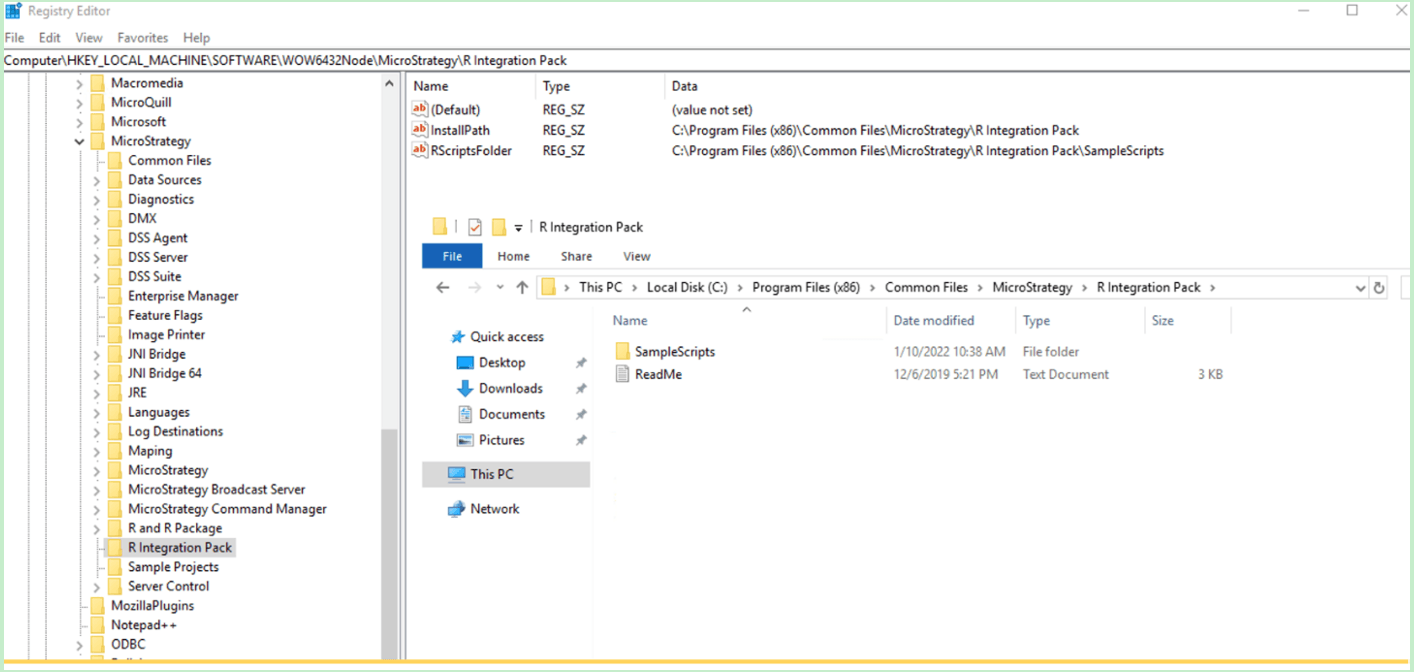
The issue is related to R & R Package Installer and not handled through platform install. In this case, upgrading platform to Strategy 2021 Update 6 will not resolve issue.
This issue is fixed on R / R Packages Installer which is released along with Strategy 2021 Update 6 release. And updated installer can be found on https://community.Strategy.com/s/products under Gateways & Add-Ons > R / R Packages Installer.
To fix issue on the machine, please run the updated installer which will overwrite the existing key so the user will not have to manually apply the workaround.
This scenario has been tested on Strategy side and it fixes the registry key issue, keep in mind at the end of the installation error message may pop up regarding string, it’s a minor issue and will be fixed in upcoming release. Just hit “OK” button and reboot the machine once installation is completed.
