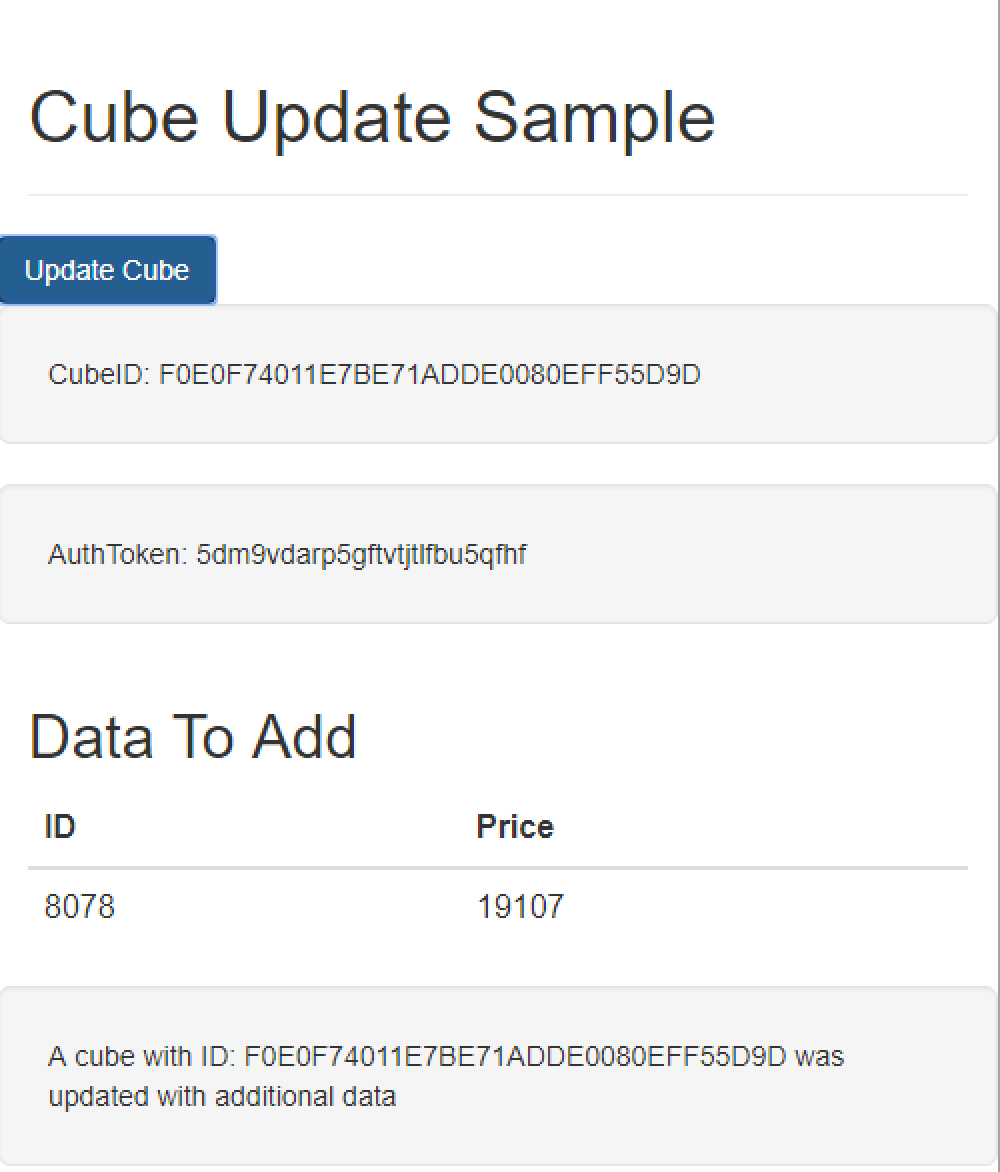
The fully executable HTML file can be downloaded from this article.
General documentation on the REST API can be found here.
The REST APIs are a new set of APIs that allow 3rd party applications to tap into many powerful features of the Strategy Analytics platform.
This example shows how to invoke the REST API call to update an In-Memory Cube with external data. This powerful feature allows applications to programmatically create or update datasets that their end users can immediately consume either inside Strategy or from external applications. The REST API can be leveraged by any application or language capable of making an HTTP Request. This example is to help those looking to leverage these various APIs within a Javascript application.
Note - The Dataset API can only update data in cubes that were created with the REST API
To invoke this code against your own environment, change the CONFIG PARAMETERS within the begin() function. This sample assumes standard authentication. Also, the HTML file should exist within the same web server as the StrategyLibrary application to avoid Cross Origin Resource Sharing (CORS) issues.
<html>
<!-- Latest compiled and minified CSS -->
<link rel="stylesheet" href="https://maxcdn.bootstrapcdn.com/bootstrap/3.3.7/css/bootstrap.min.css ">

<body>
	<div class="container"><div class="page-header"><h1>Cube Update Sample</h1></div></div>
	<button type="button" class="btn btn-primary" onclick="begin()">Update Cube</button>
	<div class="well well-lg" id="existingCubeID"></div>
	<div class="well well-lg" id="textArea"></div>


<div class="container">
  <h2>Data To Add</h2>
  <table class="table">
    <thead>
      <tr>
        <th id="title1"></th>
        <th id="title2"></th>
      </tr>
    </thead>
    <tbody>
      <tr>
        <td id="value1"></td>
        <td id="value2"></td>

      </tr>
    </tbody>
  </table>
</div>
</body>

<div class="well well-lg" id="cubeInfo"></div>


<script>
    function begin() {
	//BEGIN CONFIG PARAMETERS -------------------------------------------------------------------------
        var baseRestURL = "https://env-73627.customer.cloud.Strategy.com/StrategyLibrary";
        var username = "steve";
        var password = "";
	var projectID = "B7CA92F04B9FAE8D941C3E9B7E0CD754";
	var existingCubeID = "F0E0F74011E7BE71ADDE0080EFF55D9D"; //This cube must be created by the REST  API. See the CreateCube example for reference
	//END CONFIG PARAMETERS -------------------------------------------------------------------------

	 document.getElementById("existingCubeID").innerHTML = "CubeID: " + existingCubeID;


        createAuthToken(baseRestURL, username, password, function authCallBack(token) {
            document.getElementById("textArea").innerHTML = "AuthToken: " + token;

	//The below sample will generate data that creates an Attribute of ID, and a metric of Price
		//Create row(s) of data for cube:
		var id_val = Math.floor(Math.random() * 20000);
		var price_val = Math.floor(Math.random() * 20000);

		var JSONString = "[{\"ID\":"+id_val+",\"Price\":"+price_val+"}]";
		var dataObject = JSON.parse(JSONString);

		//Print keys and values from defined data string
		document.getElementById("title1").innerHTML = Object.keys(dataObject[0])[0];
		document.getElementById("title2").innerHTML = Object.keys(dataObject[0])[1];
		document.getElementById("value1").innerHTML = dataObject[0][Object.keys(dataObject[0])[0]];
		document.getElementById("value2").innerHTML = dataObject[0][Object.keys(dataObject[0])[1]];
		var base64EncodedData = btoa(JSONString);

		//The table will define 2 columns called ID and Price of type 'double'. We will then map the ID column to an attribute and the price column to a metric in the table structure JSON.

		//define table structure
		var tableStructure = "{\"name\":\"Table\",\"columnHeaders\":[{\"name\":\"ID\",\"dataType\":\"DOUBLE\"},{\"name\":\"Price\",\"dataType\":\"DOUBLE\"}],\"data\":\""+base64EncodedData+"\"}";

		updateCube(baseRestURL, token, projectID , tableStructure, existingCubeID, function callback(request){
			console.log("Update Response: " + request.response);
			console.log("Update Status: " + request.status);
			if(request.status == 200){
 				document.getElementById("cubeInfo").innerHTML = "A cube with ID: " + existingCubeID+ " was updated with additional data";
			}
			else{
				document.getElementById("cubeInfo").innerHTML = "something went wrong, please check yout configuration variables";

			}
		});


        });
    }


 function updateCube(baseRestURL, authToken, projectID, tableStructure, datasetID, callback) {

	var APIPath = "/api/datasets/"+datasetID+"/tables/Table";
        var completeRestURL = baseRestURL + APIPath;
        console.log("REST API URL: " + completeRestURL);

        var method = "PATCH";
        var postData = tableStructure;
 	var url = completeRestURL;
        var async = true;
        var request = new XMLHttpRequest();
        request.onload = function() {
            console.log("ONLOAD");
            var status = request.status; // HTTP response status, e.g., 200 for "200 OK"
            console.log(status);
            console.log(request.getAllResponseHeaders());

            return callback(request);
        }

        request.open(method, url, async);
        request.setRequestHeader("Content-Type", "application/json");
        request.setRequestHeader("Accept", "application/json");
	request.setRequestHeader("UpdatePolicy", "Add");
	request.setRequestHeader("X-MSTR-AuthToken", authToken);
	request.setRequestHeader("X-MSTR-ProjectID", projectID);
        request.send(postData);
    }


    function createAuthToken(baseRestURL, username, password, callback) {
        var APIPath = "/api/auth/login";
        var completeRestURL = baseRestURL + APIPath;
        console.log("REST API URL: " + completeRestURL);

        var method = "POST";
        var postData = "{\"username\": \"" + username + "\",\"password\": \"" + password + "\",\"loginMode\": 1,\"applicationType\": 35}";
        var url = completeRestURL;
        var async = true;
        var request = new XMLHttpRequest();
        request.onload = function() {
            console.log("ONLOAD");
            var status = request.status; // HTTP response status, e.g., 200 for "200 OK"
            console.log(status);
            var token = request.getResponseHeader("x-mstr-authtoken");
	    console.log("Token: " + token);
            return callback(token);
        }

        request.open(method, url, async);
        request.setRequestHeader("Content-Type", "application/json");
        request.setRequestHeader("Accept", "application/json");
        request.send(postData);
    }
</script>


</html>