EducationSoftwareStrategy.com
StrategyCommunity

Knowledge Base

Product

Community

Knowledge Base

TopicsBrowse ArticlesDeveloper Zone

Product

Download SoftwareProduct DocumentationSecurity Hub

Education

Tutorial VideosSolution GalleryEducation courses

Community

GuidelinesGrandmastersEvents
x_social-icon_white.svglinkedin_social-icon_white.svg
Strategy logoCommunity

© Strategy Inc. All Rights Reserved.

LegalTerms of UsePrivacy Policy
  1. Home
  2. Topics

Re-engineering a Telecom Market Share Analytical Application


Nahiyan Khan

Technical Support Intern • Strategy


We helped a leading data analytics provider for the telecom industry in the US to re-engineer their market measurement product. The effort included re-engineering of data integration processes, workflow automation, developing new custom user interfaces and building a set of IBM Cognos reports. The result was a new product that delivered high quality deliverables to our customer’s clients while simultaneously reducing the volume of support needed by 55%.

Content
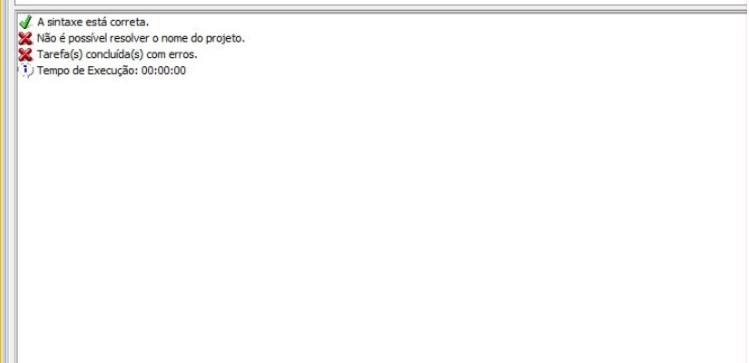
When trying to create a new data load in Strategy 10.11, the error message "Unable to resolve project name" appears.
SYMPTOM
When you try to create a new data load, the error message "Unable to resolve project name" as seen in the image below:
ka02R000000kVDhQAM_0EM44000000RBHN.jpeg

CAUSE
The cause of the issue is that Enterprise Manager is not able to resolve the host name.
ACTION
When creating the new data load, use your server IP address instead of it's host name, the syntax should look like this:
START MONITORING SERVER "IP_ADDRESS" IN PORT 34952 USING USERNAME "administrator" PASSWORD "XXXX" FOR ENTERPRISE MANAGER "IP_ADDRESS" IN PORT 9999


Comment

0 comments

Details

Knowledge Article

Published:

June 5, 2017

Last Updated:

June 5, 2017