EducationSoftwareStrategy.com
StrategyCommunity

Knowledge Base

Product

Community

Knowledge Base

TopicsBrowse ArticlesDeveloper Zone

Product

Download SoftwareProduct DocumentationSecurity Hub

Education

Tutorial VideosSolution GalleryEducation courses

Community

GuidelinesGrandmastersEvents
x_social-icon_white.svglinkedin_social-icon_white.svg
Strategy logoCommunity

© Strategy Inc. All Rights Reserved.

LegalTerms of UsePrivacy Policy
  1. Home
  2. Topics

KB484695: Replacing a dataset results in the error, "Cannot check out X into context because it has already been imported into a child context"


Ling Jing

Product Owner, Principal • MicroStrategy


This article addresses the error returned when replacing a dataset in a dossier. This article also provides a solution to work around this error.

Starting with the release of Strategy ONE (March 2024), dossiers are also known as dashboards.

Description 


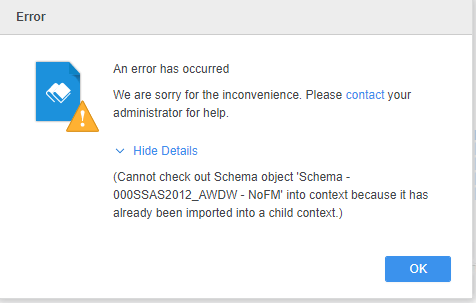
When replacing a dataset in a dossier, the following error is returned. 
Cannot check out %1 object '%2' into context because it has already been imported into a child context. 
Error code: 0x80041FC2
 

ka0PW0000001JejYAE_0EM4W000001JZUT.jpeg

Steps to reproduce

  1. Create a dossier and add a new data. 
  2. Select OLAP. 
  3. From the MDX connections, import a new MDX cube. 
    Note: Do not select the Import hierarchy as hierarchical attribute option.
  4. Right-click on the new MDX cube > Replace dataset.
    The error is returned.


Solution 

Please save the dossier first, then replace the dataset. An error should not be returned.  


Comment

0 comments

Details

Knowledge Article

Published:

November 9, 2020

Last Updated:

March 21, 2024