A financial institution is obliged to deliver personalized and highly formatted PDF reports to its private clients every 6 months. The data is being sourced from a legacy system that creates a separate XML file per each client (1 million files). A pixel-perfect PDF report must be generated for each file (client). Generating this amount of PDF files is not a trivial task to do, but Strategy can fulfil it with Report Services, Distribution Services, multi-table in-memory cubes and REST APIs.
A Python script has been written to read data from XML files and push it to Strategy cubes. This article explains what steps has been undertaken, contains several tips and best practices. It also contains some performance benchmarks, since this amount of data can put your hardware to a test. All relevant files and examples are attached to this article.
- Python scripts reads XML files - each one contains data about client's investments: securities owned, daily and monthly performance, geographical regions of operations.
- A new multi-table cube is created in Strategy. There is a separate table defined for each topic (securities, performance)
- Every 10.000 files (customizable) a batch of data is being converted into JSON format and being pushed to the Strategy cube.
- There are 100 batches and after the last one a cube is being published.
- Report Services document is built on top of the cube. It contains grids, graphs, text, images, map.
- Subscription to PDF file is defined; bursting option is used to generate a separate PDF file for each client.

Each XML file contains the same type of data in the same structure. A Python script has been written to read through all those files, collect relevant information and push batches of data to Strategy in-memory cubes in Strategy Intelligence Server. Strategy REST APIs are used for pushing data to Strategy. Performance of the whole process depends on several factors and those factors were tested and described below.
The tests were executed on AWS cloud machines with Red Hat OS. Different machine sizes were tested: 8 CPU with 61 GB of RAM, 16 CPU + 122 RAM; 32 CPU + 244 RAM, 64 CPU with 488 RAM. With this amount of data the smallest machine with 8 CPU and 64 GB of RAM struggled a lot and completed the task successfully only once. In almost all the cases, it appears, 61 GB RAM was not sufficient - the Python script usually crashed at the very end of processing during cube publishing phase. It is possible that tweaking Tomcat or Intelligence Server settings regarding RAM usage would prevent crashing. With machines with more than 61 GB of RAM all the tests run smoothly without any issues, However, there were no clear differences in the speed of processing. 16 CPU machine was enough and there was no advantage of using even bigger machines.
For each machine, it took around 13-14 seconds to process 10.000 XML files and upload the data to Strategy Server (with multi-table cubes). It took around 2200 seconds (36 minutes) total time for each machine to complete the process of uploading data from 1 million files.

First version of Push API ( PATCH /datasets/{datasetId}/tables/{tableId} ) allowed pushing data only to single-table Intelligent Cubes. If your task is to push a large amount of data you would probably want to divide it into smaller chunks (to avoid issues with throughput and network latency). In this case, every time you push a chunk of data you need to republish the Cube. With each push the cube gets bigger and each republish task takes longer. It's ineffective and leads to wasting of time. See below how each bar is taller than the previous one.

The latest version of push API ( PUT /datasets/{datasetId}/uploadSessions/{uploadSessionId} ), introduced with Strategy 11, works smarter. Dividing data into chunks is embedded into API logic and uploading data is separated from publishing cubes. First you upload all your chunks of data (10, 1000 or million batches) and at the end there is one big process of publishing the cube. It is smarter and saves a lot of computer processing time.

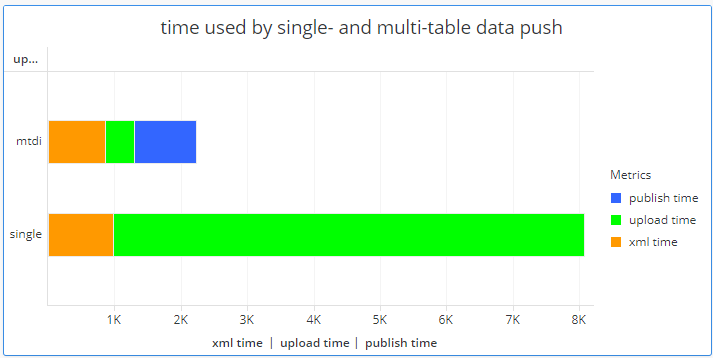
The difference in time elapsed is clear when you show both multi-table and single-table data push on one chart: 37 minutes versus 2 hours 14 minutes. In case of the lower bar (single table cube) the green bar represents a sum of upload and publish time.
When you push data coming from 1 million XML files you can split this amount into 100 batches of 10.000 files, 34 batches of 30.000 files or 17 batches of 60.000 files or use any other split ratio. If your batch is too big this can negatively affect stability of the process, so it is advised to do some tests before the final job. I run tests for 3k, 10k, 30k and 60k batches. The trend is visible for both single- and multi-table cubes. The bigger the batches uploaded to the cubes, the faster it takes to finish the whole process.
For single-table cube the reason is clear - less batches, less time wasted on unnecessary publishing jobs. For multi-table cubes it is not that obvious since there is always just one publishing job at the end of the process. The reason in this case has something to do with the work Intelligence Server must perform to merge all batches into one coherent in-memory cube.

There are quite a few Governing Rules that might stop your upload process before completing. An error message might tell you the reason or, in some cases, it might be incomprehensible. Here is the list of governing rules that you should review when you plan to push big amounts of data into Intelligent Cubes.
# Project settings
- Intelligence Cubes > General > Maximum RAM usage
- Governing Rules > Default > Import Data > Maximum file size
- Governing Rules > Default > Import Data > Maximum quota per user
- Governing Rules > Default > Result sets > Memory consumption settings
- Governing Rules > Default > Result sets > Intelligence Server elapsed time > Interactive reports
- Governing Rules > Default > Result sets > Warehouse execution time
# Intelligence Server settings
- Governing Rules > Default > Memory Settings > Maximum RAM for Working Set cache
You might be testing different scenarios (different batch sizes, different Python script versions) before executing your final job. It is important to remember about some things related to RAM usage:
- Log out after each job in you Python script or delete unnecessary user connections from User Monitor in Developer. Each open connection might block big amounts of RAM and this can hamper your job.
- Control Tomcat memory usage and flush it when needed
When I run my first test I did it with one big cube containing data from 1 million XML files. The cube size was about 6 GB. I've built a Report Services document on top of the cube and started the subscription job (saving output PDFs to a folder on hard drive). It took 36 hours to finish this job, so obviously I was not impressed by this performance. First, I've upgraded the server from 8 CPU to 32 CPU. It made no difference. With 32 CPU and 488 GB of RAM the process was running equally slow, so I've killed it.
Before stopping the job I've checked that the server was running at 2% of CPU power and 9% of RAM power, so clearly there was a room for improvement. Apparently, 1 subscription can use only one PU (Processing Unit) and one processor core - the other 31 cores were idle.
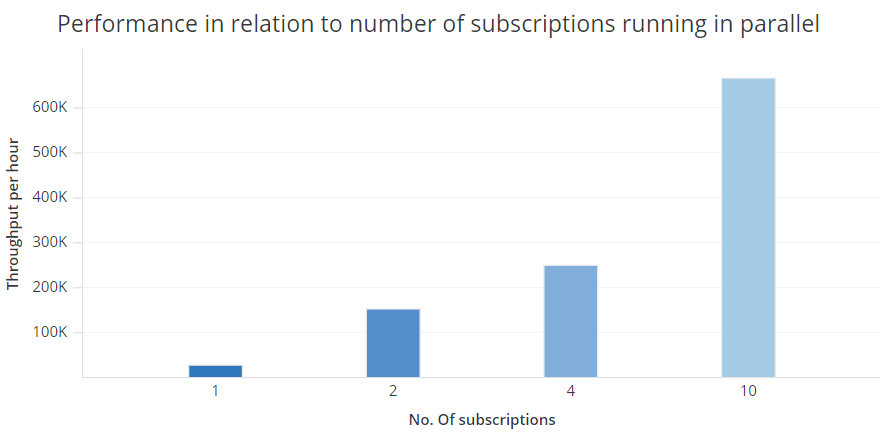
As a next test, I've generated two cubes containing 500.000 XML files and run two subscriptions on them in parallel. That was it! Instead of 36 hours the process took 6,5 hours

Next test was with 4 cubes (250.000 XML files each) and 4 subscriptions - total time was 4 hours. With 10 cubes and 10 subscription the job took 1,5 hour. In this last case the average speed of generating PDF files was 667.000 PDFs per hour (!) which is quite impressive in my opinion.
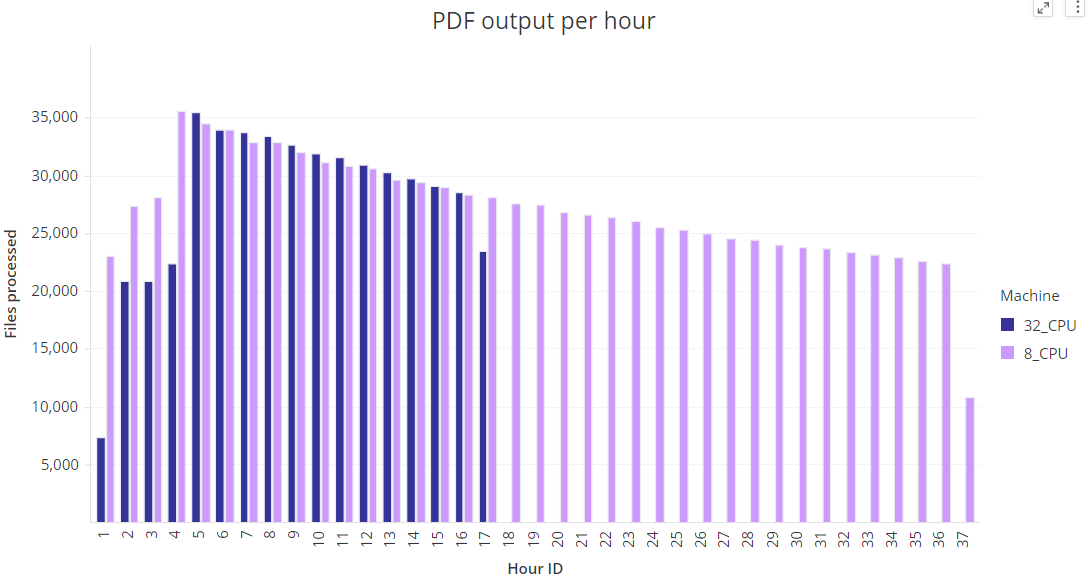
One interesting thing is that in each case the average performance was deteriorating with each passing minute and hour. You can see it on the graph below for 4 subscriptions - the bars get lower with each passing hour. I am not quite sure how to explain that. Maybe the speed of writing to disc was slowing down due to some caching mechanism?

- Disable document caching. The whole process will slow down when you reach a governing limit regarding the number of allowed cache files. It will also be eating up your disc space fast.
- Extend time-out governing limits if you think your process will run for many hours.
- Don't build your Report Services document on a giant cube with millions of rows. This will be slow. Instead prepare a small cube with, let's say 1000 sample rows, and build your document on it. When you are done just replace dataset and connect your final big cube.
- Maybe you've notice an interesting fact. One subscription achieved throughput of 35k files per hour when only one subscription was running. When I executed multiple subscription at the same time, one subscription could reach levels of 65k files per hour. Two subscriptions running in parallel can give you 130k files per hour. Until now I haven't found a good explanation of that phenomena.
Mass generation of PDF files in most cases requires CPU based License Model. One must carefully choose number of CPU licenses in order to find the optimal value.
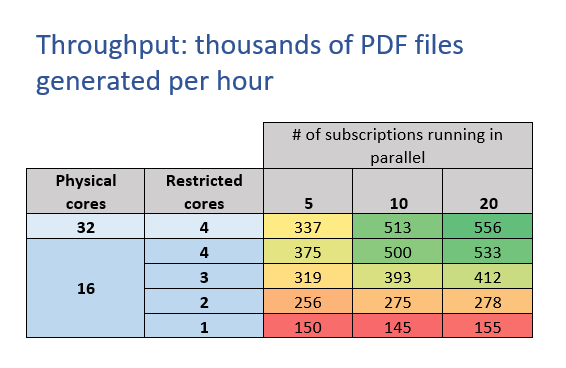
I run several tests in this matter and I put the results in the table below. Three factors were taken into account:
You cannot consider those results as 100% reliable, since each case was run only once and several other factors are not taken into consideration. However, this table can give you a bit of understanding about the configuration you might need to use in your use case.