EducationSoftwareStrategy.com
StrategyCommunity

Knowledge Base

Product

Community

Knowledge Base

TopicsBrowse ArticlesDeveloper Zone

Product

Download SoftwareProduct DocumentationSecurity Hub

Education

Tutorial VideosSolution GalleryEducation courses

Community

GuidelinesGrandmastersEvents
x_social-icon_white.svglinkedin_social-icon_white.svg
Strategy logoCommunity

© Strategy Inc. All Rights Reserved.

LegalTerms of UsePrivacy Policy
  1. Home
  2. Topics

Reports containing a text filter may fail when used with parameterized query against older SQL Server versions resulting in a potential drop table error


Qinyi Chen

Quality Engineer, Principal • Strategy


This article explains why a report containing a text filter may fail when using parameterized query in an older versions of the SQL Server database. This article also provides a solution to avoid this error.

Description 


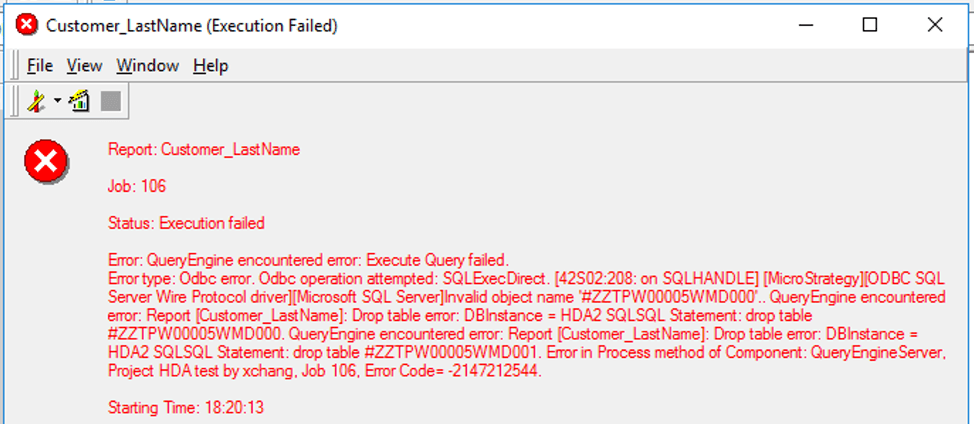
When parameterized query is used against older SQL Server versions, like SQL Server 2008 and earlier, reports containing a text filer may fail. You may receive a report execution error, such as a "drop table error," as shown below: 
ka04W000001EtHLQA0_0EM2R000000farV.jpeg

Steps to reproduce 


Pre-condtions: 

  • The report uses an older version of the SQL Server Warehouse, e.g., SQL Server 2008 or an earlier version.
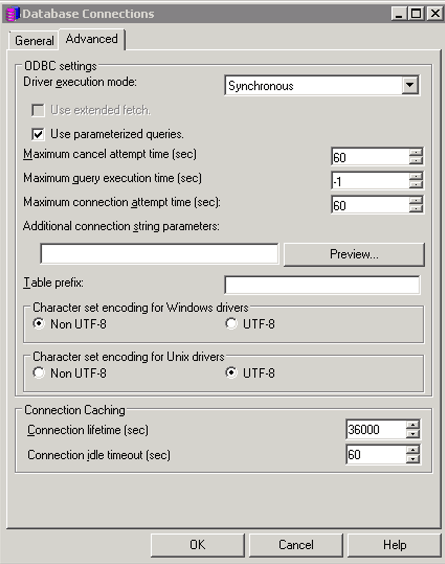
  • The Use parameterized queries option is enabled in the Database Connections dialog. 
ka04W000001EtHLQA0_0EM2R000000fara.jpeg
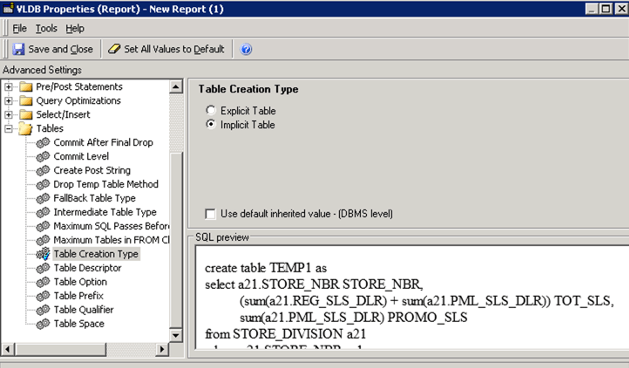
  • The report uses the Implicit Table option under Table Create Type in the VLDB Properties dialog. 
ka04W000001EtHLQA0_0EM2R000000farf.jpeg


The issue can be reproduced with the Strategy Tutorial project and the following steps:
  • Create a metric M1 with Cost fact, or use the Cost metric.
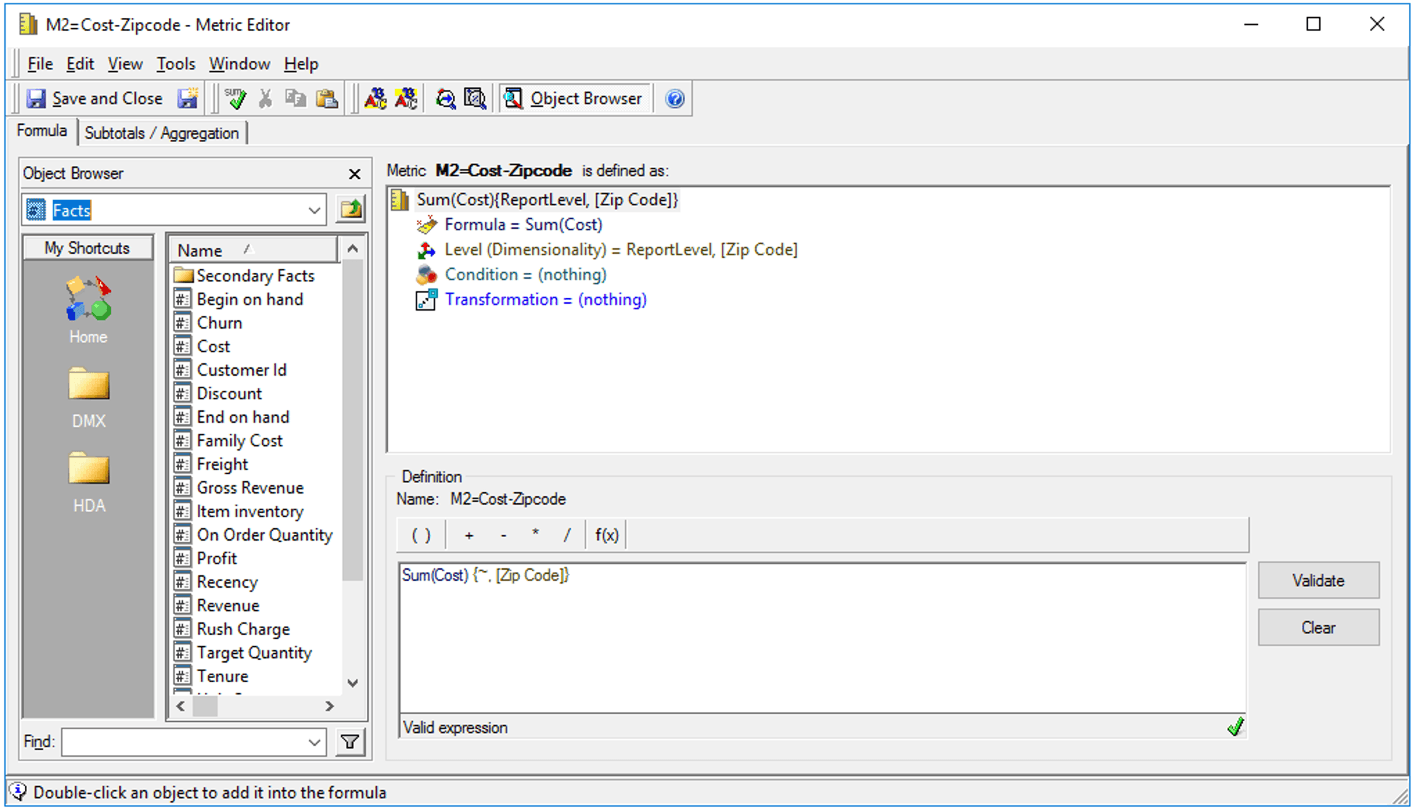
  • Create a metric M2 with Cost fact and set the level to Zip Code.
ka04W000001EtHLQA0_0EM2R000000fark.jpeg
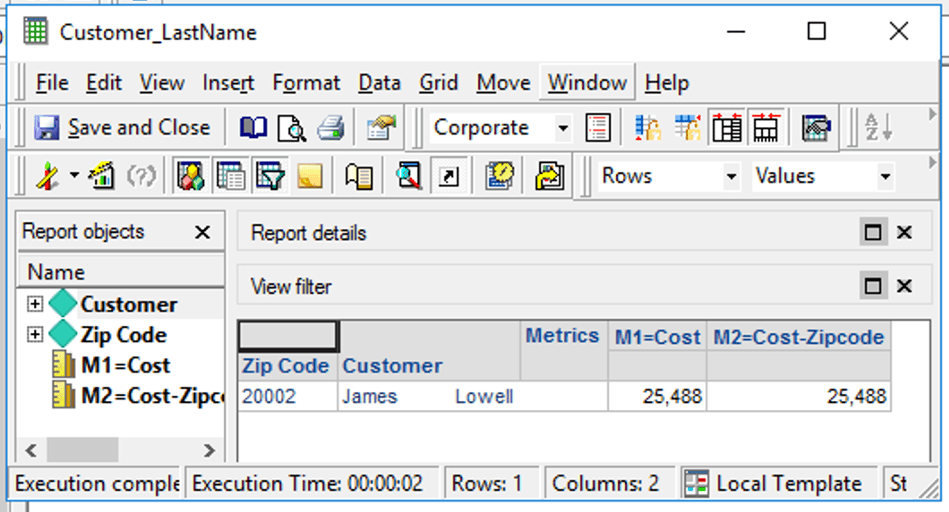
  • Create a report with Zip Code, Customer, M1, and M2.
  • Add a filter on Customer Last Name. For example, Last Name is Exactly James.
  • Execute the report. It runs as expected.
ka04W000001EtHLQA0_0EM2R000000faru.jpeg
  • Partial SQL View:
    
    Pass0 - 
    select	a11.CUSTOMER_ID  CUSTOMER_ID,
    	sum(a11.TOT_COST)  WJXBFS1
    into #ZZTPW00005YMD000
    from	CUSTOMER_SLS	a11
    	join	LU_CUSTOMER	a12
    	  on 	(a11.CUSTOMER_ID = a12.CUSTOMER_ID)
    where	a12.CUST_LAST_NAME = 'James'
    group by	a11.CUSTOMER_ID 
    
    Pass1 - 	
    select	a12.ZIPCODE  ZIPCODE,
    	sum(a11.TOT_COST)  WJXBFS1
    into #ZZTPW00005YMD001
    from	CUSTOMER_SLS	a11
    	join	LU_CUSTOMER	a12
    	  on 	(a11.CUSTOMER_ID = a12.CUSTOMER_ID)
    where	a12.CUST_LAST_NAME = 'James'
    group by	a12.ZIPCODE 
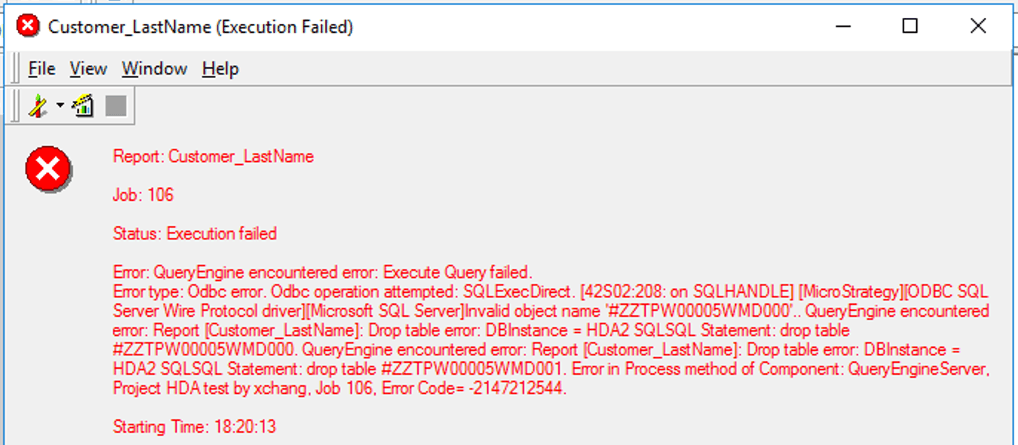


    When parameterize query is turned on, the report fails, and you can notice the SQL is different.
ka04W000001EtHLQA0_0EM2R000000fas4.jpeg
  •  
    Partial SQL View:
    
    Pass0 - 
    select	a11.CUSTOMER_ID  CUSTOMER_ID,
    	sum(a11.TOT_COST)  WJXBFS1
    into #ZZTPW00005WMD000
    from	CUSTOMER_SLS	a11
    	join	LU_CUSTOMER	a12
    	  on 	(a11.CUSTOMER_ID = a12.CUSTOMER_ID)
    where	a12.CUST_LAST_NAME = ?
    group by	a11.CUSTOMER_ID 
    with parameters:
    	James
    
    Pass1 - 
    select	a12.ZIPCODE  ZIPCODE,
    	sum(a11.TOT_COST)  WJXBFS1
    into #ZZTPW00005WMD001
    from	CUSTOMER_SLS	a11
    	join	LU_CUSTOMER	a12
    	  on 	(a11.CUSTOMER_ID = a12.CUSTOMER_ID)
    where	a12.CUST_LAST_NAME = ?
    group by	a12.ZIPCODE 
    with parameters:
    	James


Why is this happening?


In some older versions of the SQL Server database, you are not allowed to create tables using parameterized queries.
With the SQL Server Warehouse default setting, whenever the Engine needs to create a temp table, it will use the implicit table creation, meaning it uses a syntax like

SELECT … INTO #TEMP_TABLE
. If there is a filter applied in the report, the syntax will contain a
WHERE
clause.
Before the parameterized query is turned on, such queries will not cause any issues. However, with parameterized query on, some older version of the database will not support the syntax.
 

Solution


You should edit the Table Creation Type VLDB setting to use explicit table. 
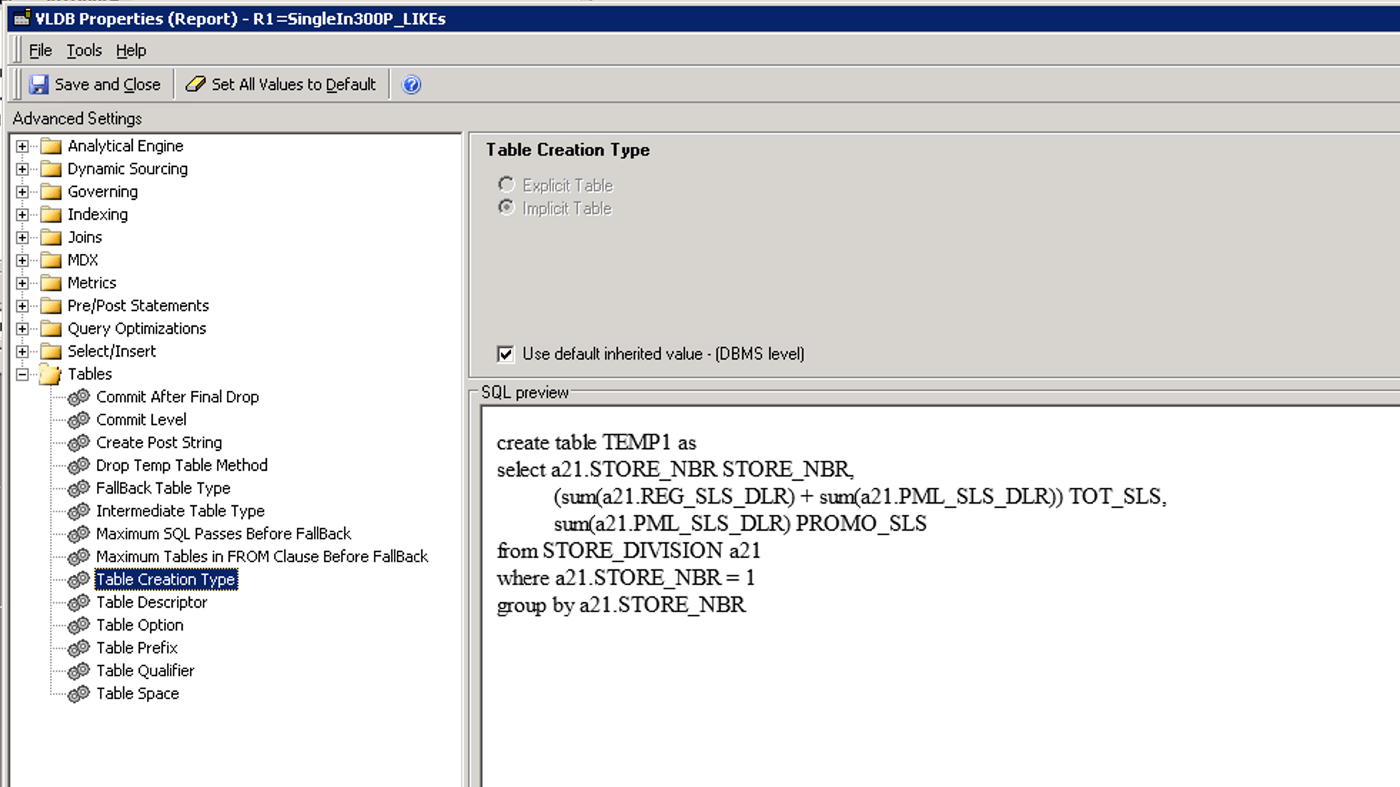
  • At the report level, click Data > VLDB Properties.
  • In the VLDB Properties dialog, expand Tables > Table Creation Type.
ka04W000001EtHLQA0_0EM2R000000fasJ.jpeg
  • Deselect the Use default inherited value - (DBMS level) option.
  • Select the Explicit Table option.
  • Save and close.


After the VLDB setting is changed to explicit and the

CREATE
table statement no longer contains parameters, the following SQL is generated:

create table #ZZTPW00007UMD000(
	CUSTOMER_ID	SMALLINT, 
	WJXBFS1	FLOAT)

Pass1 - 	
insert into #ZZTPW00007UMD000 
select	a11.CUSTOMER_ID  CUSTOMER_ID,
	sum(a11.TOT_COST)  WJXBFS1
from	CUSTOMER_SLS	a11
	join	LU_CUSTOMER	a12
	  on 	(a11.CUSTOMER_ID = a12.CUSTOMER_ID)
where	a12.CUST_LAST_NAME = ?
group by	a11.CUSTOMER_ID
with parameters:
	James
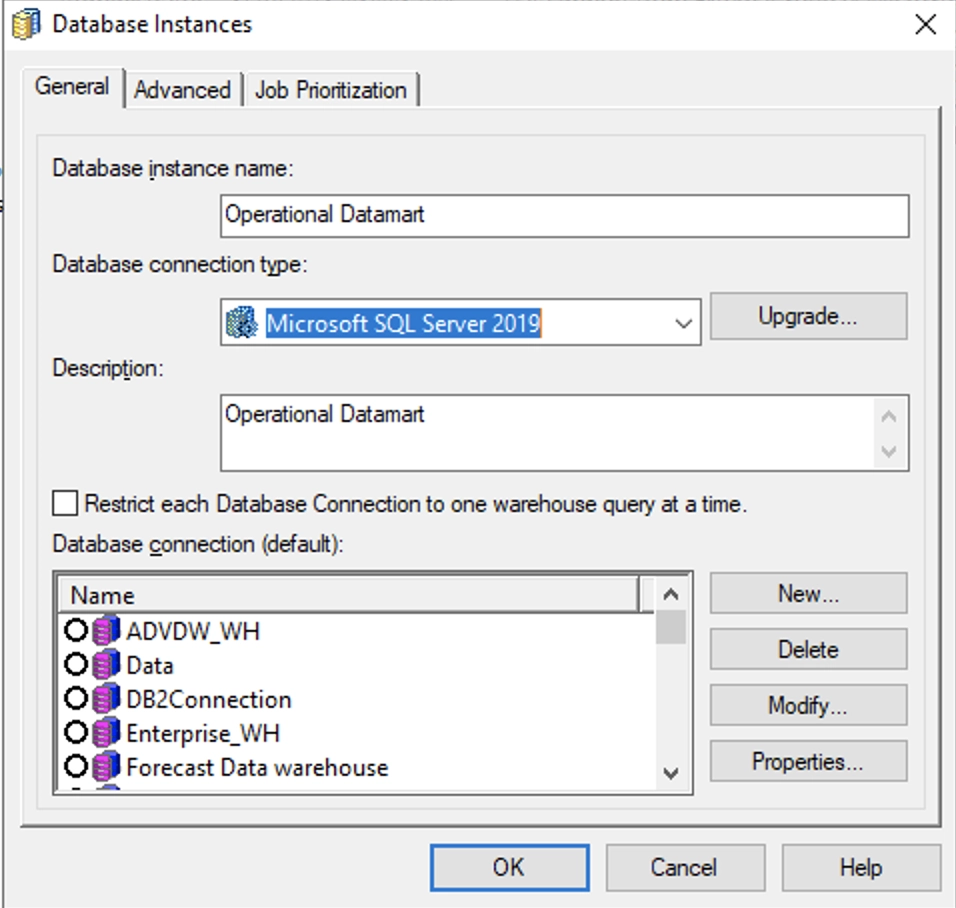
If too many reports fail because of this reason, you can choose to change the Database Instance default setting. Go to Project Configuration > Database instances > SQL Data warehouses.
Important Note:  If you have moved away from older SQL server versions and are still observing this issue, please be sure to update the "Database connection type" to reflect the updated SQL server version. 

ka04W000001EtHLQA0_0EM4W0000026z8n.jpeg


Comment

0 comments

Details

Knowledge Article

Published:

May 15, 2020

Last Updated:

December 18, 2020