Starting with the release of Strategy ONE (March 2024), dossiers are also known as dashboards.
SYMPTOM:
In Strategy Library 10.10 for iOS, performing manipulation such as link drill before the reset button is rendered, it won't show anymore after turning to the original Dossier.
STEPS TO REPRODUCE:
Follow the steps below to reproduce the issue:
1. Create a report services document with any dataset, add a text box and configure the link to run a document or report:
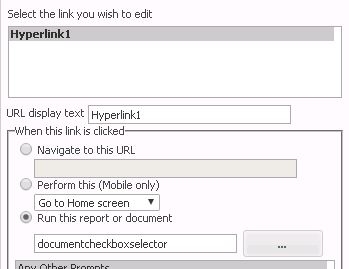
2. Run the document in Strategy Library 10.10 for iOS, click the link defined in step1 before the Reset button appears.
3. Go back to the original document, note that the reset button could not show:

CAUSE:
This is a known issue in Strategy Library 10.10 for iOS
ACTION:
Currently this issue is still being reviewed for feasibility by our Technology team and it is not scoped for any upcoming scheduled Strategy release.
Article Reference Number: KB440356
